

- Name C Design Space for SVG Projects
- Category Social
- Available on PC
- OS Windows 10 version 14316.0 or higher
- languages English (United States)
A Deep Dive into C Design Space for SVG Projects for Windows: Your Creative Companion
If you're a designer or hobbyist yearning to bring your SVG projects to life with a touch of sophistication and ease, C Design Space might just be the tool to keep your creative sparks flying. This Windows app offers a streamlined environment tailored for crafting, editing, and managing SVG files—all in a user-friendly package.
Basic Information and Core Highlights
Positioned as a dedicated SVG design workspace, C Design Space for SVG Projects is developed by Hilarious, a team committed to simplifying creative workflows. Its standout features include intuitive vector editing, seamless project management, and compatibility with a variety of SVG workflows—making it ideal for both beginners and seasoned designers. The app primarily targets hobbyists, small business owners, and educational users who need reliable SVG design tools without the clutter of overly complex interfaces.
Creative Sparks: An Engaging Introduction
Imagine walking into a bright, well-organized design studio—every tool within arm's reach, ready to transform your raw ideas into visual masterpieces. That's the vibe C Design Space offers: an accessible yet powerful environment that invites users to dive into SVG design without feeling overwhelmed. Whether you're fine-tuning intricate illustrations or organizing multiple project files, this app makes the process feel natural and surprisingly fun, like sketching on a digital canvas that responds instantly to your inputs.
Core Functionalities in Detail
1. Intuitive Vector Editing and Crafting
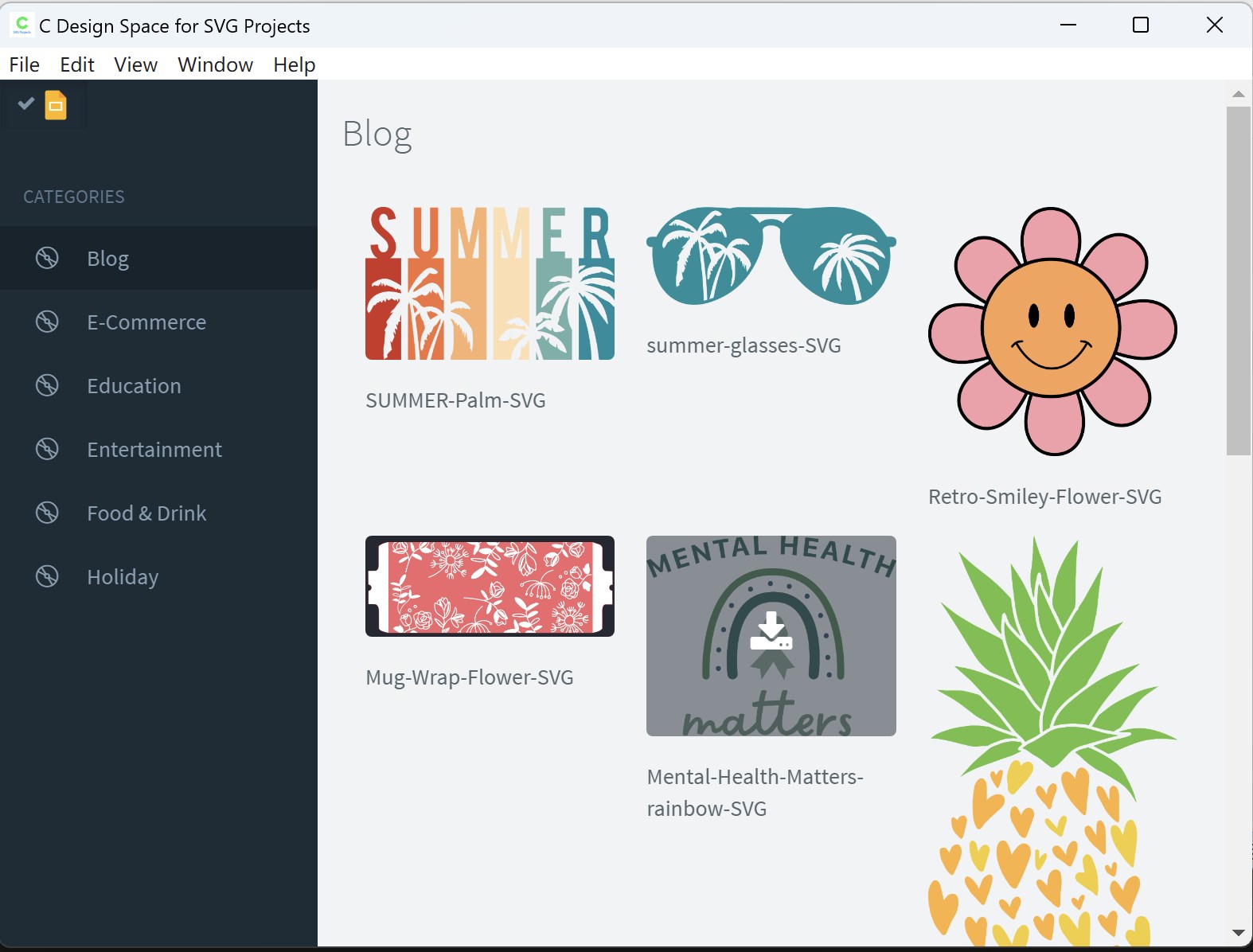
At the heart of C Design Space is its robust vector editing engine. Users can easily create, modify, and fine-tune SVG elements using straightforward tools that resemble familiar drawing applications. From resizing and reshaping to adjusting curves and nodes, the process is smooth and responsive. The app's precision ensures that even the most detailed designs stay crisp, while its layer management system allows for organized, complex projects—just like managing a digital scrapbook of your ideas.
2. Seamless Project Management & Export Options
Beyond creation, managing multiple designs becomes effortless. The app supports categorized project storage, enabling users to switch between projects without stress. When your masterpiece is ready, exporting options are flexible—choose from various SVG formats, ensuring compatibility across cutting-edge craft machines or online platforms. This efficient workflow saves time and keeps your creative momentum flowing, whether for personal endeavors or professional output.
3. User Experience: Interface, Flow, and Learning Curve
The interface of C Design Space exudes clarity—clean icons, well-organized menus, and unobtrusive tools make navigation almost intuitive. Transitioning from basic sketches to detailed edits is fluid, with minimal lag or confusion. For beginners, initial tutorials and tooltips ease the learning curve—think of it as learning to ride a bicycle with training wheels before zooming off on your own. Experienced users will appreciate how the app's design minimizes clutter, allowing focus on the creative task at hand.
Unique Advantages: What Sets It Apart?
Many SVG editors clutter the market, but C Design Space's standout feature lies in its focus on user profile customization and authenticity verification. This means that users can personalize their workspace—setting preferences, saving custom toolsets, and even verifying their account authenticity to access premium features. Additionally, its connection discovery functionality enables seamless linking to other design apps or communities, fostering a collaborative environment. Compared to other tools that often feel cookie-cutter, this app centers on a tailored, connected, and secure design experience.
Final Verdict and Recommendations
All in all, C Design Space for SVG Projects for Windows is a solid choice for anyone seeking a straightforward yet capable SVG design environment. Its user-friendly interface, coupled with its focus on customization and connection features, makes it particularly appealing for semi-professional and hobbyist users. While it might not replace high-end professional vector graphic software, it strikes a commendable balance between simplicity and functionality.
For casual creators, DIY enthusiasts, and educators, I highly recommend giving this app a try—especially if you value an organized workspace and seamless community integration. For those venturing into more complex vector design, it could serve as a supplementary tool or stepping stone before moving on to more advanced programs. Overall, C Design Space is a nifty, reliable partner for your SVG journey—worthy of a spot in your creative toolkit.
Pros
- Intuitive SVG Design Tools
- Seamless Integration with Microsoft Store
- Wide Range of Design Templates
- Export and Compatibility Options
- Regular Updates and Improvements
Cons
- Limited Advanced Features
- Occasional Performance Delays
- Learning Curve for New Users
- Limited Collaboration Features
- Occasional Compatibility Issues










