

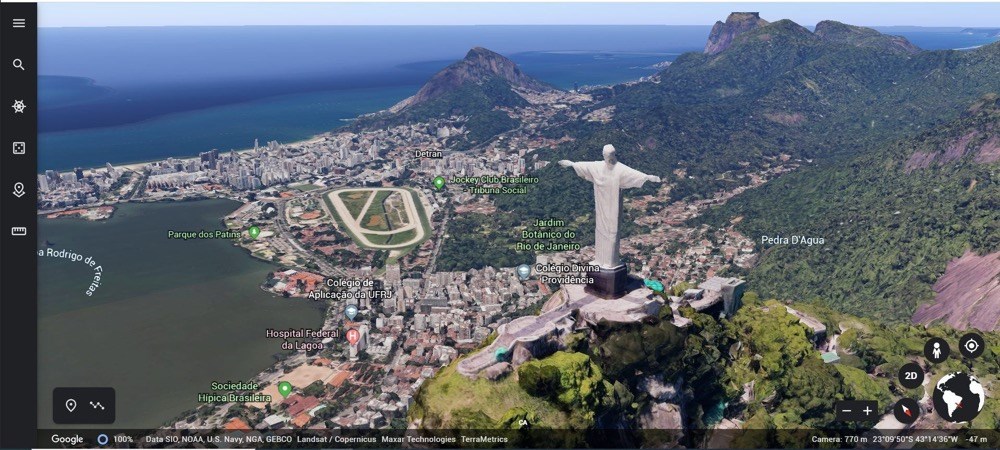
- Name Earth 3D Maps & Street View
- Category Business
- Available on PC
- OS Windows 10 version 17763.0 or higher
- languages English (United States)
Discover the World in Your Windows Desktop: Earth 3D Maps & Street View
For those who have ever dreamt of exploring Earth's vast landscapes from the comfort of their home or office, Earth 3D Maps & Street View for Windows offers an intriguing window into our planet. Combining detailed 3D visualization with immersive street-level views, it transforms your desktop into a mini universe waiting to be explored.
About the App: A Brief Overview
Developed by Hung APP, Earth 3D Maps & Street View is a versatile geographic visualization tool designed to bring the world closer to you. Its primary appeal lies in its ability to provide interactive 3D maps alongside real-world street views, making geography more engaging and accessible. The app targets geography enthusiasts, travelers planning their adventures, educators, and anyone curious about our planet's diverse landscapes. Key features include high-fidelity 3D Earth models, seamless street view navigation, and user-friendly exploration tools—perfect for turning your screen into a mini globe-trotting adventure.
Immersive Globe-Trotting and Map Exploration
Launching the app is like unfolding a detailed miniature Earth right on your desktop. The interface immediately immerses you into a realistic 3D globe, where you can spin, zoom, and explore continents with ease. Thanks to intuitive controls, navigating across the map is smooth—think of it as handling a real globe but with the added bonus of detailed terrain and labels popping up at your fingertips. Whether zooming into busy city centers or scrolling across oceanic expanses, the visuals are crisp and responsive, providing a satisfying exploration experience.
Street View Mode: A Virtual Walk Around the World
One of the app's standout features is its ability to switch seamlessly from a global view to street level. Imagine standing on a virtual sidewalk in Paris, Tokyo, or New York—just a few clicks away. The street view isn't just a static snapshot; it offers a dynamic, interactive experience, allowing users to look around and even move along streets as if they're taking a guided tour. This feature is especially useful for planning visits, getting a feel for different neighborhoods, or simply satisfying a curious wanderlust—all from your Windows desktop.
User Interface: Friendly, Clean, and Accessible
The app's design adopts a clean and straightforward layout, making it approachable for users of all levels. The controls are intuitive—zoom with your mouse wheel, rotate the globe with click-and-drag, and switch between views with clear icons. The learning curve is gentle; even first-time users can start exploring without much fuss. The overall experience is smooth, with minimal lag, thanks to optimized performance, which makes long exploration sessions comfortably enjoyable. Visual cues and straightforward menus ensure that users always know what to do next, turning what could be a complex 3D navigation into a delightful game of discovery.
What Sets It Apart from Similar Apps?
Compared to other geographic or mapping applications, Earth 3D Maps & Street View shines in its dedicated focus on detailed 3D visualization combined with immersive street-level exploration. Unlike many standard map apps that focus solely on navigation or data presentation, this app emphasizes an engaging visual experience. Additionally, its seamless integration of 3D globe touring with real-world street imagery offers a unique perspective—like having a mini planet Earth at your command. While collaborative or task management features aren't its core strengths, the app's ability to facilitate group learning or shared exploration sessions could be a subtle yet valuable advantage for educational or team-based activities.
Final Thoughts and Recommendations
Earth 3D Maps & Street View for Windows is well-suited for geography buffs, educators, students, or anyone intrigued by our planet's surface. Its main appeal lies in delivering a realistic, interactive 3D global experience coupled with detailed street views—without the need for an internet connection at all times. I would recommend this app for casual exploration, educational purposes, or even as a conversation starter at work or school.
While it may not replace dedicated GIS or mapping tools for professional use, its ease of use and compelling visuals make it a notable addition to any explorer's digital toolkit. For the most immersive experience, I suggest pairing it with some basic geographic knowledge to unlock the full potential of this mini world. All in all, I find it a charming, informative, and visually satisfying app that turns your Windows device into a window to the world.
Pros
- Comprehensive 3D Earth Visualization
- Intuitive Street View Navigation
- Regular Map Updates
- Offline Map Support
- Integrated Search and Directions
Cons
- Limited Customization Options
- Occasional Loading Delays
- Inconsistent Detail Levels in Remote Areas
- Limited Augmented Reality Features
- Minor User Interface Glitches










