
- Name Snipaste
- Category Productivity
- Developer Le Liu
- Available on PC
- OS Windows 10 version 15063.0 or higher
- Keyboard Not specified
- Mouse Not specified
- languages Arabic (Jordan), Chinese (Simplified), Chinese (Traditional), Czech, Dutch, English (United States), French, German, Greek, Italian, Japanese, Korean, Lithuanian, Polish , Portuguese (Brazil), Portuguese (Portugal), Russian, Spanish (Mexico), Swedish, Turkish, Vietnamese
Snipaste for Windows: A Powerful and Intuitive Screenshot Tool
Snipaste for Windows, developed and published by Le Liu, stands out as a versatile screenshot application designed to streamline the way users capture, annotate, and manage their screen images. Unlike typical snipping tools, it combines simplicity with advanced features, making it a valuable asset for professionals, students, and anyone needing quick visual communication.
Who Is It For? A Clear Purpose for Everyone
Snipaste is targeted at users seeking an efficient way to take, edit, and organize screenshots without unnecessary complexity. Whether you're a developer documenting bugs, a designer gathering inspirations, or a casual user capturing memorable moments, Snipaste aims to enhance your workflow with minimal fuss. Its focus on productivity and user-centered design makes it suitable for a broad audience—ranging from tech-savvy power users to everyday users looking for a reliable snipping solution.
A Fresh Take on Screen Capture: An Engaging Glimpse
Imagine being able to capture a tricky screenshot in a flash, instantly annotate it, and have it ready to share — all without breaking your flow. Snipaste approaches this with a sense of finesse, blending the pragmatic with the delightful. Its clean interface and responsive behavior mirror the ease of a well-organized toolkit, turning what could be a monotonous chore into a seamless part of your routine.
Core Features Unveiled: Precision, Annotation, and Integration
Smart Snipping and Customization
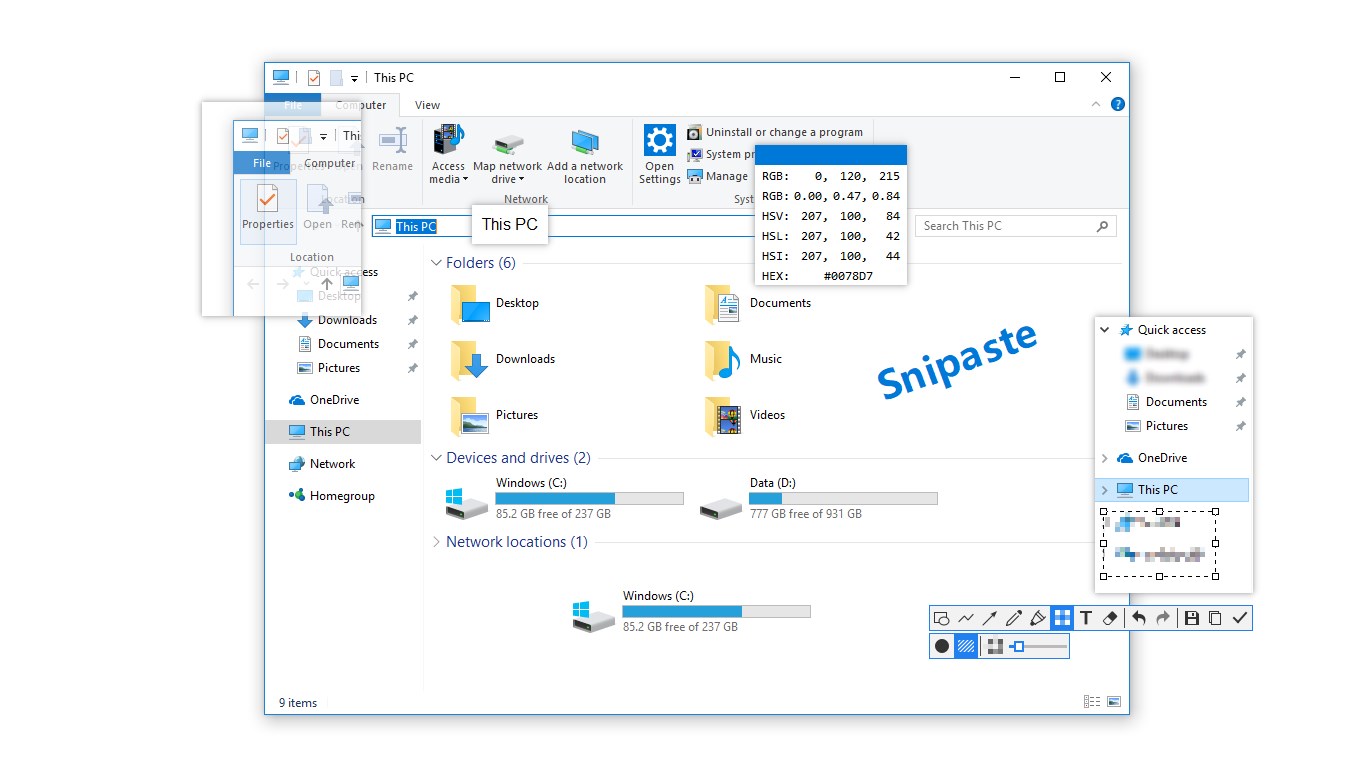
Snipaste offers a straightforward yet powerful snipping mechanism. Users can quickly select rectangular, freehand, or window snips, with options for delayed captures or ongoing screenshot modes. The app's precision ensures that every pixel counts, making it especially useful for detailed technical work. Plus, customization options allow you to adjust hotkeys, default save paths, and auto-copy settings, tailoring the tool to fit your personal workflow perfectly.
Inbuilt Annotation and Pinning
Once a screenshot is captured, the real magic begins. Snipaste excels with its intuitive annotation features—highlighting, adding text, arrows, or shapes to clarify your message. Unique to Snipaste is its "pinning" ability, which lets you overlay floating images or notes directly onto your desktop. This feature transforms simple screenshots into persistent visual cues, greatly enhancing multitasking and visual communication—think of it as having a sticky note on your digital workspace, but smarter.
Workflow Enhancements and Efficiency
What truly sets Snipaste apart is its seamless integration into your workflow. With robust hotkey support and the ability to keep pinned images active, it reduces the cognitive load typically associated with switching between tools. Its minimal interface alerts and auto-save options keep distractions low, enabling you to focus on what matters. Unlike more cluttered image editors, Snipaste's straightforward approach means fewer layers of complexity, which helps prevent workflow stagnation.
Design, Usability, and Unique Advantages
The interface is akin to a neat drawer—everything in its place, inviting users to dive in without hesitation. The layout is minimal but comprehensive, with all essential functions accessible within a single window. Operation feels fluid—from capturing a snip to annotating and sharing—thanks to the responsive design and fast processing. The learning curve is gentle; most users can master its core features within minutes, freeing up time for actual task execution rather than fiddling with settings.
Compared to other productivity apps, Snipaste's cutting-edge features—particularly its persistent pinning and smooth integration—strike a delicate balance. While some tools overload users with options, Snipaste emphasizes reducing cognitive load, making it easier for users to stay focused and productive. Its ability to overlay images persistently on the desktop redefines screenshot utility, offering a level of interaction that other simple snipping tools lack.
Final Thoughts and Recommendations
All in all, Snipaste for Windows is a well-crafted, user-friendly screenshot tool that goes beyond the basics. Its standout features—namely persistent pinning and seamless workflow integration—make it a high-value addition to any digital toolbox. For those who often need to communicate ideas visually or manage multiple snippets efficiently, Snipaste offers a compelling, straightforward solution.
I recommend giving Snipaste a try if you value an intuitive interface combined with powerful, workflow-enhancing features. It's particularly suited for users seeking minimal complexity coupled with high functionality. Whether you're capturing technical details or highlighting key information during meetings, Snipaste can elevate your productivity without overwhelming you.
Pros
- Intuitive User Interface
- Rich Annotation Tools
- Pinning Pasteboard
- Customizable Shortcuts
- Lightweight and Fast
Cons
- Limited Cloud Integration
- Basic Editing Features
- No Mobile Version
- Limited Export Formats
- Occasional Lag with Large Screenshots











