

- Name MadKey - (Key Presser/Auto Clicker)
- Category Productivity
- Developer StableCode
- Available on PC, Surface Hub
- OS Windows 10 version 17763.0 or higher
- languages English (United States)
MadKey - (Key Presser/Auto Clicker) for Windows: Streamlining Repetitive Tasks with Precision
MadKey by StableCode is a straightforward yet powerful automation tool designed to help users automate repetitive keystrokes and mouse clicks on Windows, making tedious tasks more manageable and efficient. Whether you're gaming, data entry, or software testing, MadKey aims to simplify your workflow through reliable automation.
Who Developed MadKey and What Does It Do?
Developed and published by StableCode, MadKey is a lightweight application tailored for users seeking an easy-to-use auto clicker and key presser. Its core strengths lie in automating routine interactions on your PC, freeing you from monotonous manual input. Key functionalities include customizable hotkeys for start/stop, adjustable click intervals, and flexible key press sequences—features that enhance productivity without overcomplicating the interface.
Setting the Scene: Why MadKey Stands Out
Imagine spending hours clicking the same spot in a game or repeatedly pressing keys for a macro—sounds familiar? MadKey is like having a friendly robot assistant that takes over these repetitive chores seamlessly. Its minimalistic and intuitive design provides a fresh breath of air compared to more cluttered automation tools, making automation as easy as pressing a button. Let's explore how MadKey elevates the experience through its core features and user interface.
Core Features: Simplicity Meets Functionality
1. Customizable Automation Scripts for Enhanced Workflow
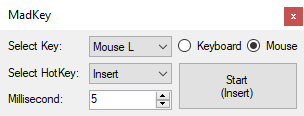
MadKey empowers users to create personalized automation sequences with flexible settings such as click intervals, hotkeys, and key sequences. This adaptability makes it suitable for a range of tasks—from automating simple clicks during gaming sessions to complex testing scripts in software development. The interface is designed to facilitate quick setup, allowing users to define precise behaviors without delving into complicated configurations.
2. Reliable and Precise Control with Hotkeys
The application's hotkey system is like having an on/off switch that you can trigger anytime—no need to navigate menus. This feature is particularly useful when you need quick control during ongoing tasks or when juggling multiple applications. The hotkeys are responsive and customizable, ensuring that users can integrate MadKey into their workflow effortlessly, elevating efficiency without adding cognitive load.
User Experience: Intuitive, Smooth, and Accessible
From the moment you launch MadKey, it feels like stepping into a well-organized toolbox. The user interface boasts a clean layout, with clearly labeled controls that resemble a friendly dashboard rather than a daunting software suite. The setup process is straightforward, meaning even newcomers can get started within minutes. During operation, the program responds swiftly—clicks and key presses are executed with precision, ensuring your automation runs smoothly without lag or jitter. For users concerned about learning curves, MadKey's simple design minimizes the effort needed to master its features, making it accessible for both seasoned techies and casual users alike.
Unique Advantages: How MadKey Differs from Competitors
Compared to traditional productivity tools packed with numerous features, MadKey shines by focusing on core automation functions—delivering exactly what most users need without the clutter. Its standout trait is the combination of high reliability and minimal cognitive load; it simplifies automation tasks without overwhelming the user with options. Unlike some auto clickers that require extensive setup or complex scripting, MadKey's streamlined approach ensures that automation feels almost natural, reducing mental fatigue. This focus on workflow integration—quick setup, instant hotkey activation, and seamless operation—makes MadKey a thoughtful choice for users who want efficiency without sacrificing ease of use.
Final Verdict: A Practical, User-Friendly Automation Companion
Considering its straightforward design, reliable performance, and targeted feature set, I recommend MadKey for anyone seeking an uncomplicated yet capable automation tool. It's especially suitable for gamers, testers, or busy professionals who need quick and dependable automation without the steep learning curve. For those looking to reduce repetitive strain and free up mental bandwidth, MadKey emerges as a solid, unobtrusive helper—making automation feel natural, not intimidating.
Pros
- User-Friendly Interface
- Highly Customizable Settings
- Low Resource Consumption
- Reliable Automation Functionality
- Affordable Pricing
Cons
- Limited Advanced Features
- Basic User Support
- Potential for Misuse
- Compatibility Limitations
- Basic Logging Functionality











