

- Name Cyberduck
- Category Productivity
- Developer iterate GmbH
- Available on PC
- OS Windows 10 version 15063.0 or higher
- Keyboard Integrated Keyboard
- Mouse Integrated Mouse
- languages Arabic, Bulgarian, Catalan, Chinese (Simplified), Chinese (Traditional), Czech, Danish, Dutch, English, English (United States), Finnish, French, Georgian, German, Greek, Hebrew, Italian, Japanese, Korean, Latvian, Norwegian, Polish, Portuguese (Brazil), Portuguese (Portugal), Romanian, Russian, Serbian (Latin), Slovak, Slovenian, Spanish, Swedish, Thai, Turkish, Ukrainian, Welsh
Cyberduck for Windows: Seamless and Intuitive Cloud Storage Management
Cyberduck for Windows is a robust and user-friendly application designed to simplify cloud storage and server management, making data transfers smooth and straightforward for both novice and experienced users alike.
About the Developer and Core Features
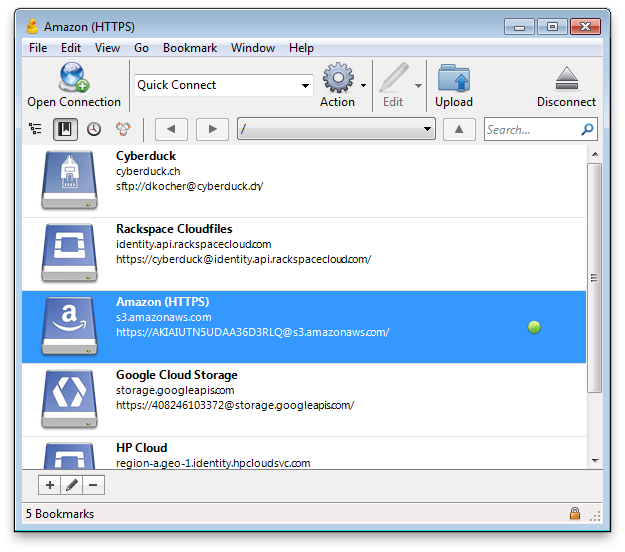
Developed and published by iterate GmbH, Cyberduck extends the company's reputation for creating reliable, cross-platform clients that bridge complexity and usability. Its main features include support for numerous cloud service providers (like Amazon S3, Google Cloud Storage, and Microsoft Azure), a drag-and-drop interface that feels familiar like working with local files, and integration of advanced connection options such as FTP, SFTP, WebDAV, and more. Its focus on versatility ensures it caters to a wide array of storage environments, from small teams to enterprise-level infrastructures.
Engaging Introduction: A Friend in Your Cloud Journey
Imagine trying to juggle multiple packages while navigating an intricate maze — frustrating, right? That's where Cyberduck steps in as your trusted guide. With its straightforward design and powerful features, this app transforms complex cloud and server management into a walk in the park. Whether you're updating website assets, syncing local projects, or managing backups, Cyberduck promises to streamline these workflows with minimal fuss. It's like having a skilled assistant who understands your needs, reducing your mental load while boosting your productivity.
Intuitive File Browsing and Transfer Efficiency
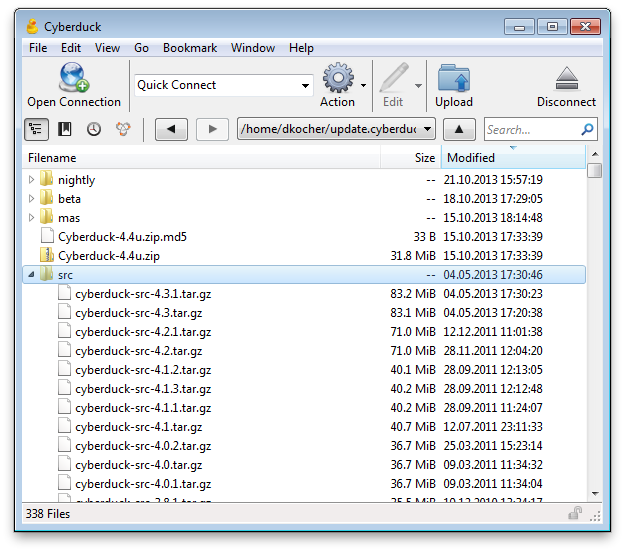
One highlight of Cyberduck is its user-friendly, Explorer-like interface that makes accessing remote storage feel as natural as browsing your local folders. The support for drag-and-drop operations means you can effortlessly transfer large files without fuss — no tangled menus or confusing options, just a straightforward experience. Moreover, it intelligently resumes interrupted transfers and manages batch uploads/downloads seamlessly, saving you time and frustration.
Versatility with Multiple Protocols and Cloud Support
What sets Cyberduck apart from other storage managers is its impressive compatibility. Whether you're connecting via FTP, SFTP, WebDAV, or directly to cloud providers like Amazon S3, Backblaze B2, or Microsoft Azure, Cyberduck handles it gracefully. This versatility acts like a universal remote—eliminating the clutter of multiple apps and letting you switch between services smoothly. For professionals juggling different storage environments, this feature stands out as a major productivity booster.
Design, User Experience, and Learning Curve
The interface resembles a sleek filing cabinet—clean, organized, and familiar, reducing the learning curve for new users. The visual cues and logical layout mean you can start working with minimal onboarding. Transitioning from local to remote management is effortless, and the app's responsiveness feels snappy even during large file operations. Although handling some advanced configurations might require a quick glance at the documentation, overall, Cyberduck offers an accessible experience for all skill levels.
Workflow Integration and Unique Advantages
In the realm of productivity tools, Cyberduck's true strength lies in its ability to integrate into your existing workflows without adding extra cognitive load. Unlike bloated file transfer clients, it strips down unnecessary complexity — focusing on essential functionalities that directly enhance your efficiency. Its support for automations and scripting (via command-line integration) enables users to embed file transfer routines into larger automation pipelines. This focus on reducing mental clutter and streamlining operations offers a significant edge over less intuitive, feature-heavy competitors.
Final Verdict and Recommendations
If you're searching for a reliable, easy-to-navigate client that consolidates multiple cloud storage services and protocols into a single, user-friendly interface, Cyberduck for Windows is highly recommended. It's especially suitable for users who prefer a straightforward, minimalist approach that still packs powerful features. For teams managing diverse storage environments or individual professionals seeking to simplify their data handling routines, this app offers a smart and efficient solution.
In summary, Cyberduck's combination of thoughtful design, versatility, and workflow-focused features makes it a standout choice. While it may not have every bells-and-whistle feature seen elsewhere, its strength lies in delivering core functionalities without overwhelming the user — a true friend for your cloud management needs.
Pros
- User-friendly interface
- Supports multiple protocols
- Open-source and free
- Robust security features
- Cross-platform compatibility
Cons
- Limited advanced file management tools
- Occasional slow connection times
- Limited built-in editing capabilities
- Less frequent updates for certain protocols
- Interface customization options are minimal











