

- Name BLE-MIDI Connect
- Category Multimedia design
- Available on PC, Mobile, Surface Hub, HoloLens
- OS Windows 10 version 17763.0 or higher
- languages English (United States)
An Introduction to BLE-MIDI Connect for Windows
If you're delving into the world of digital music production or live performance, seamless connectivity between your MIDI devices and Windows-based applications is essential. BLE-MIDI Connect for Windows, developed by Locomorange, offers a straightforward yet powerful solution to establish Bluetooth Low Energy MIDI connections, turning your Windows PC into a versatile hub for musical creativity.
Core Features That Set It Apart
Effortless Bluetooth MIDI Pairing
One of BLE-MIDI Connect's standout features is its streamlined pairing process. Unlike traditional MIDI over Bluetooth solutions that can be clunky or require complex configurations, this app guides users intuitively through discovering and connecting BLE MIDI devices. It's akin to having a friendly assistant helping you to quickly bridge your keyboard, controller, or sensor to your digital workspace without fuss.
Robust Multi-Device Management
Another highlight is its capacity to handle multiple Bluetooth MIDI devices simultaneously. Imagine conducting an orchestra of wireless controllers—be it drum pads, wind controllers, or synth modules—without losing sync or experiencing lag. The app maintains stable connections, ensuring your musical setup remains responsive and reliable even during live performances or recording sessions.
Native Windows Integration & Customization
Unlike some third-party apps that act merely as intermediaries, BLE-MIDI Connect integrates smoothly into the Windows environment, making it compatible with your DAWs and virtual instruments seamlessly. It also offers customizable settings, allowing users to prioritize device connections or adjust buffering for optimal latency—crucial for performers and producers seeking a tailored experience.
Design, Usability, and User Experience
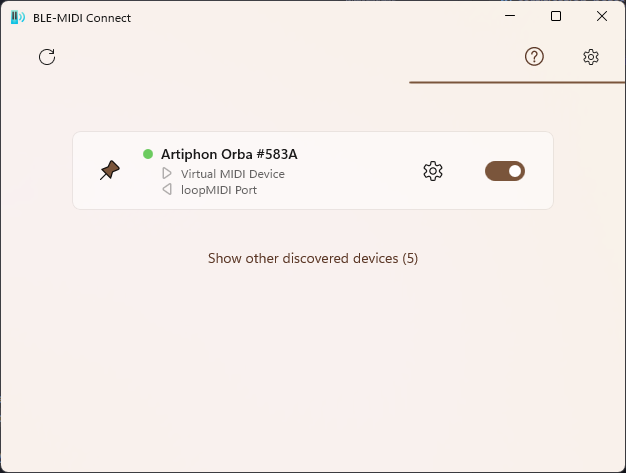
The interface exhibits a clean, minimalistic design—think of it as the cockpit of a well-maintained aircraft. Everything from device scan to connection status is displayed clearly, making navigation straightforward. For newcomers, the learning curve is gentle; the app's guided prompts and logical layout prevent any overwhelming complexity. For seasoned users, the efficient workflow saves time, letting you focus on making music rather than troubleshooting connections.
What Makes It Unique: The Differentiators
In a competitive landscape populated with wireless MIDI solutions, BLE-MIDI Connect shines particularly due to its native Windows support coupled with high stability across multiple devices. Many similar applications rely on third-party bridging mechanisms or are limited in multi-device scenarios; this app's direct Bluetooth Low Energy integration provides a more consistent, low-latency experience. Its emphasis on real-time responsiveness and multi-device management feel akin to having a conductor's baton—precise, synchronized, and under your control.
Final Thoughts and Recommendations
Overall, BLE-MIDI Connect for Windows is recommended for musicians, producers, and tech enthusiasts looking for a reliable and easy-to-use Bluetooth MIDI solution. Its intuitive design and robust multi-device support distinguish it from many competitors, making it especially suitable for those who need flexibility in complex setups or live environments. While it might not replace more comprehensive MIDI management solutions for large setups, it excels as a lightweight, dependable Bluetooth MIDI connector. For anyone exploring wireless MIDI options on Windows, this app is worth giving a try—think of it as your new wireless musical handshake partner.
Pros
- Seamless Bluetooth Low Energy (BLE) connectivity
- Intuitive user interface
- Wide compatibility
- Low latency performance
- Frequent updates and bug fixes
Cons
- Limited device support for some hardware
- Occasional connection drops under high interference
- Learning curve for advanced features
- Battery consumption can be high during continuous use
- Limited customization options for MIDI routing











