- Name XRemote - Remote Play for S/X Series
- Category Lifestyle
- Developer PSToolset
- Available on PC
- OS Windows 10 version 14316.0 or higher
- languages English (United States)
Introducing XRemote: Seamless Remote Play for S/X Series on Windows
If you've ever dreamed of turning your gaming console into a cloud-like extension of your PC, XRemote makes that vision possible with a straightforward, reliable solution. Designed by PSToolset, this app aims to bridge your Xbox Series X/S experience with your Windows device, delivering the convenience of remote gaming without the need for cumbersome setups. It's particularly appealing to gamers who want to start a session on their console but finish it on their PC's larger screen or when away from the console itself.
Core Features That Make XRemote Stand Out
1. Hassle-Free Remote Play Connection
The standout feature of XRemote is its ability to effortlessly connect your Xbox Series X/S to your Windows device, leveraging a stable wireless or wired network. With minimal configuration, gamers can launch and control their console games directly from their PC, transforming their workflow into a fluid, on-the-fly experience. Imagine starting your game on the couch and picking up right where you left off on your desk—no more fussing with complex setups.
2. Intuitive Interface with Seamless Navigation
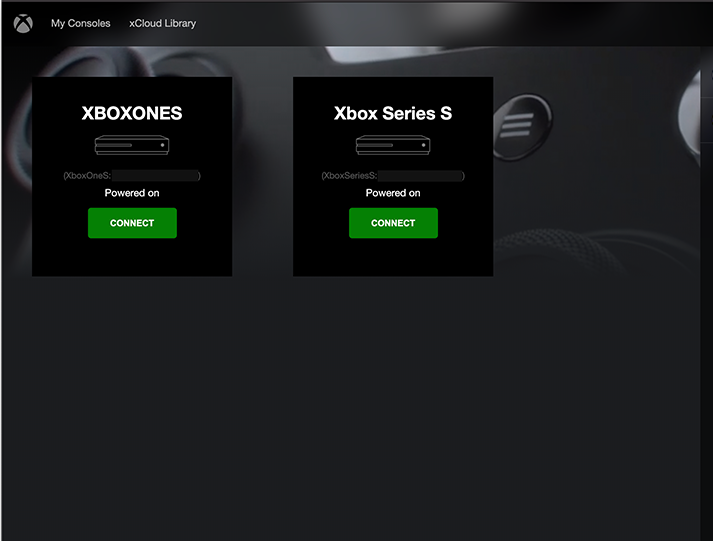
The app's interface resembles a sleek dashboard rather than a cluttered control panel. Its minimal design ensures users can find essential functions quickly—think of it as a breeze through a well-organized library. Features such as game launching, controller configuration, and connection status are prominently displayed, making navigation feel like a walk in the park rather than a maze.
3. Optimized Performance & Compatibility
XRemote is engineered to optimize streaming quality, reducing latency and ensuring smooth gameplay. Its compatibility with Windows 10 and 11 means it caters to a broad user base, whether you're on a laptop or a home desktop. The app intelligently adapts to your hardware setup, delivering the best possible experience whether you're gaming casually or competing in fast-paced titles.
User Experience and Design Language
The overall interface resembles a modern smart home control panel—clean, uncluttered, and inviting. Interactions are fluid, with rapid response times that feel more like flicking a switch than waiting in line. The learning curve is gentle; even newcomers can grasp connection procedures within minutes, thanks to clear instructions and straightforward options. This accessibility is vital, turning a potentially intimidating tech into an everyday tool for gamers of all experience levels.
What Sets XRemote Apart in the Lifestyle and Gaming Category?
While there are other remote play apps, XRemote distinguishes itself through its focus on authenticity and robust performance tailored for Microsoft's ecosystem. Unlike some generic remote streaming tools, it emphasizes compatibility with Xbox Series X/S hardware, ensuring gamers get a faithful, lag-minimized experience. Moreover, PSToolset's commitment to reliability ensures that every connection maintains authenticity – a vital aspect for competitive or immersive gameplay. Think of XRemote as the trusted bridge that ensures your console's capabilities translate smoothly onto your Windows device, resembling a professional translator who preserves the original's nuance rather than a rough interpreter.
Final Recommendation and Usage Advice
If you are a Microsoft Xbox Series X/S owner looking for a dedicated, easy-to-use remote play solution, XRemote deserves a close look. Its strengths lie in quick setup, stable connection, and a user-friendly interface that doesn't sacrifice performance. For casual gamers and those who often switch between their console and PC, this app offers a reliable bridge that feels more like a natural extension of your gaming setup than an external tool. We suggest pairing it with a dedicated controller for the best experience—think of it as upgrading from a bicycle to a smooth, automatic scooter in your gaming commute.
Pros
- Seamless Remote Play Experience
- User-Friendly Interface
- Supports Multiple Devices
- High-Quality Streaming Options
- Free Official App
Cons
- Limited Device Optimization
- Occasional Connectivity Drops
- Battery Consumption on Mobile Devices
- Setup Complexity for New Users
- Limited Customization Options