

- Name InstallAware Virtualization
- Category Developer tools
- Developer InstallAware Software
- Available on PC
- OS Windows 10 version 0.0 or higher
- languages English, English (Afghanistan), English (Åland Islands), English (Albania), English (Algeria), English (American Samoa), English (Andorra), English (Angola), English (Anguilla), English (Antarctica), English (Antigua and Barbuda), English (Armenia), English (Aruba), English (Australia and New Zealand), English (Australia), English (Azerbaijan), English (Bahamas), English (Bangladesh), English (Barbados), English (Belarus), English (Belize), English (Benin), English (Bermuda), English (Bhutan), English (Bolivia), English (Bonaire, Saint Eustatius and Saba), English (Bosnia and Herzegovina), English (Botswana), English (Bouvet Island), English (British Indian Ocean Territory), English (British Virgin Islands), English (Brunei), English (Bulgaria), English (Burkina Faso), English (Burundi), English (Cambodia), English (Cameroon), English (Canada), English (Cape Verde), English (Caribbean), English (Cayman Islands), English (Central African Republic), English (Chad), English (Christmas Island), English (Cocos (Keeling) Islands), English (Comoros), English (Congo (DRC)), English (Congo), English (Cook Islands), English (Côte d'Ivoire), English (Croatia), English (Curaçao), en-cz, English (Djibouti), English (Dominica), English (Dominican Republic), English (Eastern Africa), English (Equatorial Guinea), English (Eritrea), English (Estonia), English (Ethiopia), English (Falkland Islands), English (Faroe Islands), English (Fiji), English (French Guiana), English (French Polynesia), English (French Southern and Antarctic Lands), English (Gabon), English (Gambia), English (Georgia), English (Germany), English (Ghana), English (Gibraltar), en-gr, English (Greenland), English (Guadeloupe), English (Guam), English (Guernsey), English (Guinea-Bissau), English (Guinea), English (Guyana), English (Haiti), English (Heard Island and McDonald Islands), English (Honduras), English (Hong Kong SAR), en-hu, English (Iceland), English (India), English (Indonesia), English (Iraq), English (Ireland), English (Isle of Man), English (Israel), English (Jamaica), English (Jersey), English (Jordan), English (Kazakhstan), English (Kenya), English (Kiribati), English (Kyrgyzstan), English (Laos), English (Latvia), English (Lesotho), English (Liberia), English (Libya), English (Lithuania), English (Macao SAR), English (Macedonia, FYRO), English (Madagascar), English (Malawi), English (Malaysia), English (Maldives), English (Mali), English (Malta), English (Marshall Islands), English (Martinique), English (Mauritius), English (Mayotte), English (Micronesia), English (Moldova), English (Monaco), English (Mongolia), English (Montserrat), English (Mozambique), English (Myanmar), English (Namibia), English (Nauru), English (Nepal), English (Netherlands Antilles (Former)), English (Netherlands), English (New Caledonia), English (New Zealand), English (Nicaragua), English (Niger), English (Nigeria), English (Niue), English (Norfolk Island), English (Northern America), English (Northern Mariana Islands), English (Oman), English (Pakistan), English (Palau), English (Palestinian Authority), English (Papua New Guinea), English (Philippines), English (Pitcairn Islands), English (Puerto Rico), English (Qatar), English (Reunion), English (Romania), English (Rwanda), English (Saint Barthélemy), English (St Helena, Ascension, Tristan da Cunha), English (Saint Kitts and Nevis), English (Saint Lucia), English (Saint Martin (French Part)), English (Saint Pierre and Miquelon), English (Saint Vincent and the Grenadines), English (Samoa), English (San Marino), English (São Tomé and Príncipe), en-sa, English (Senegal), English (Seychelles), English (Sierra Leone), English (Singapore), English (Sint Maarten), English (Slovakia), English (Slovenia), English (Solomon Islands), English (Somalia), English (South Africa), English (South Georgia and the South Sandwich Islands), English (Southern Africa), English (Sri Lanka), English (Sudan), English (Suriname), English (Svalbard and Jan Mayen), English (Swaziland), English (Tajikistan), English (Tanzania), English (Thailand), English (Timor-Leste), English (Togo), English (Tokelau), English (Tonga), English (Trinidad and Tobago), English (Turkey), English (Turkmenistan), English (Turks and Caicos Islands), English (Tuvalu), English (U.S. Minor Outlying Islands), English (U.S. Virgin Islands), English (Uganda), en-ae, English (United Kingdom), English (United States), English (Uzbekistan), English (Vanuatu), English (Holy See (Vatican City)), English (Vietnam), English (Wallis and Futuna), English (Western Africa), English (Zambia), English (Zimbabwe)
Unpacking InstallAware Virtualization for Windows: A Game-Changer in App Deployment
InstallAware Virtualization for Windows is a sophisticated tool designed to streamline and secure application deployment, targeting developers seeking to modernize their installation processes with virtualization capabilities. Developed by InstallAware Software, this application offers a robust solution to isolate applications from the system, reducing conflicts and simplifying updates—much like giving each app its own private sandbox in the vast playground of Windows.
Who Created This Magic? The Minds Behind InstallAware
Built by the seasoned team at InstallAware Software Corporation, this product stems from a legacy of crafting reliable, user-friendly installation tools. With years of experience in software deployment, their focus is on providing developers with innovative solutions that enhance application stability and ease of maintenance.
Key Features That Shine Bright
- Application Virtualization: Isolates applications from the OS, reducing conflicts and enabling cleaner uninstalls or updates.
- Streamlined Deployment Process: Simplifies the packaging and distribution of applications across different Windows environments.
- Compatibility and Integration: Seamlessly integrates with existing developer workflows and supports various deployment scenarios.
- Minimal Impact on System Resources: Ensures virtualization does not significantly burden system performance, maintaining a smooth user experience.
A Fun Ride Through Virtualization Magic
Imagine trying to fit multiple versions of a puzzle piece into an ever-changing landscape without causing chaos—sounds daunting, right? That's where InstallAware Virtualization steps in, acting like a skilled puppeteer that keeps each application's strings neatly managed behind the curtain. This app transforms the often complex world of deployment into a well-orchestrated ballet, assuring developers that their apps won't step on each other's toes.
Core Functionality: Virtualization at Its Finest
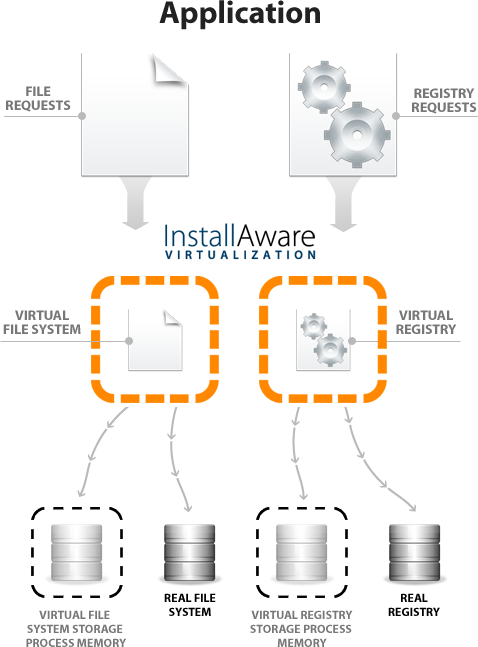
The heart of InstallAware Virtualization lies in its ability to create isolated environments for applications. This means each app runs in its own bubble, shielded from conflicting DLLs or registry entries that might otherwise create a mess. It's akin to giving each musician their own soundproof room—allowing for perfect harmony without noise bleed. The virtualization process is implemented transparently, so end-users experience a seamless operation, almost like magic hidden within the installer.
Makes Deployment a Breeze
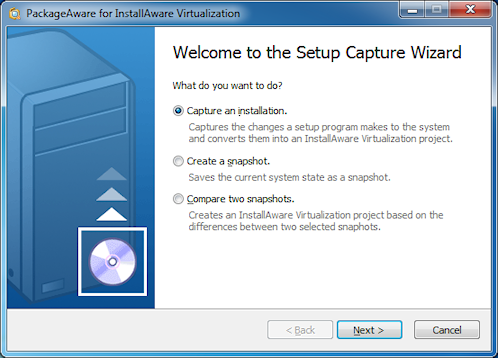
The second standout feature is the deployment process itself. The tool offers an intuitive interface that guides developers through packaging their applications with virtualization enabled. It supports complex deployment scenarios, including those requiring frequent updates, without the typical headaches. Developers can push out updates or changes without disrupting the user environment, much like updating individual Monopoly pieces without upsetting the entire game.
Design and User Experience: A Friendly Interface
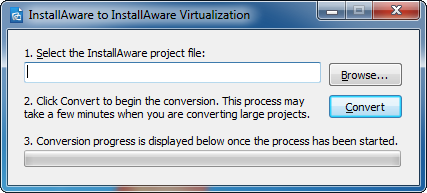
From the moment you open the application, it resembles a well-organized control panel—clean, straightforward, and welcoming. The UI design prioritizes clarity, reducing the learning curve for new users. Operations such as creating virtual environments or packaging applications feel smooth and logically structured, akin to following well-marked hiking trails. Performance-wise, the app is responsive and doesn't cause noticeable lag, which is crucial when managing complex projects.
What Sets It Apart? The Unique Advantages
Compared to other developer tools that offer virtualization or deployment solutions, InstallAware Virtualization distinguishes itself through its tight integration within the familiar InstallAware ecosystem. Its most distinctive feature is the capacity to create highly isolated virtual environments that are easy to configure and manage. Unlike traditional virtualization tools that might require extensive setup or learning, this app simplifies the process with automation capabilities, making it accessible even for developers new to virtualization techniques. Essentially, it offers the power of enterprise-grade virtualization wrapped in a user-friendly package.
Final Thoughts: To Virtualize or Not? That's the Question
All in all, InstallAware Virtualization for Windows is a robust, thoughtfully designed tool that fills a niche often overlooked in the software deployment landscape. For developers aiming to reduce conflicts, simplify updates, and ensure clean executions, this application is definitely worth exploring. Its core strengths—ease of use, seamless integration, and the ability to create isolated virtual environments—make it stand out from the competition. I'd recommend it especially for teams managing multiple applications or those needing a reliable method to safeguard system integrity during deployment. Think of it as giving your apps their own private rooms in the bustling hotel of Windows—peaceful, conflict-free, and ready to impress.
Pros
- Easy virtual machine deployment
- User-friendly interface
- Strong integration with Microsoft ecosystem
- Robust virtualization features
- Reliable performance
Cons
- Limited compatibility with non-Windows platforms
- Requires high system resources
- Occasional bugs during VM creation
- Limited free features in trial version
- Learning curve for advanced options











