
- Name Final Cut Camera-photo editor
- Category Photo & video
- Developer Kidibli
- Available on PC
- OS Windows 10 version 17763.0 or higher
- languages English (United States)
Unveiling Final Cut Camera-photo Editor for Windows: A Fresh Spin on Photo Editing
Imagine a photo editing app that combines powerful tools with an intuitive interface, making your photo enhancements feel like a creative adventure rather than a chore. That's exactly what Final Cut Camera-photo Editor aims to deliver—a versatile, user-friendly tool packed with features designed for both casual users and photography enthusiasts.
Developed by Kidibli: A Focused Team with Big Dreams
Created by Kidibli, a dedicated developer known for crafting accessible multimedia applications, Final Cut Camera-photo Editor reflects their commitment to blending simplicity with functionality. Their focus on delivering professional-grade editing capabilities within an easy-to-navigate environment makes this app appealing for users seeking quality without steep learning curves.
Key Highlights That Make It Stand Out
- Enhanced editing tools: Offers a comprehensive suite of editing options including filters, adjustments, and special effects to elevate your photos.
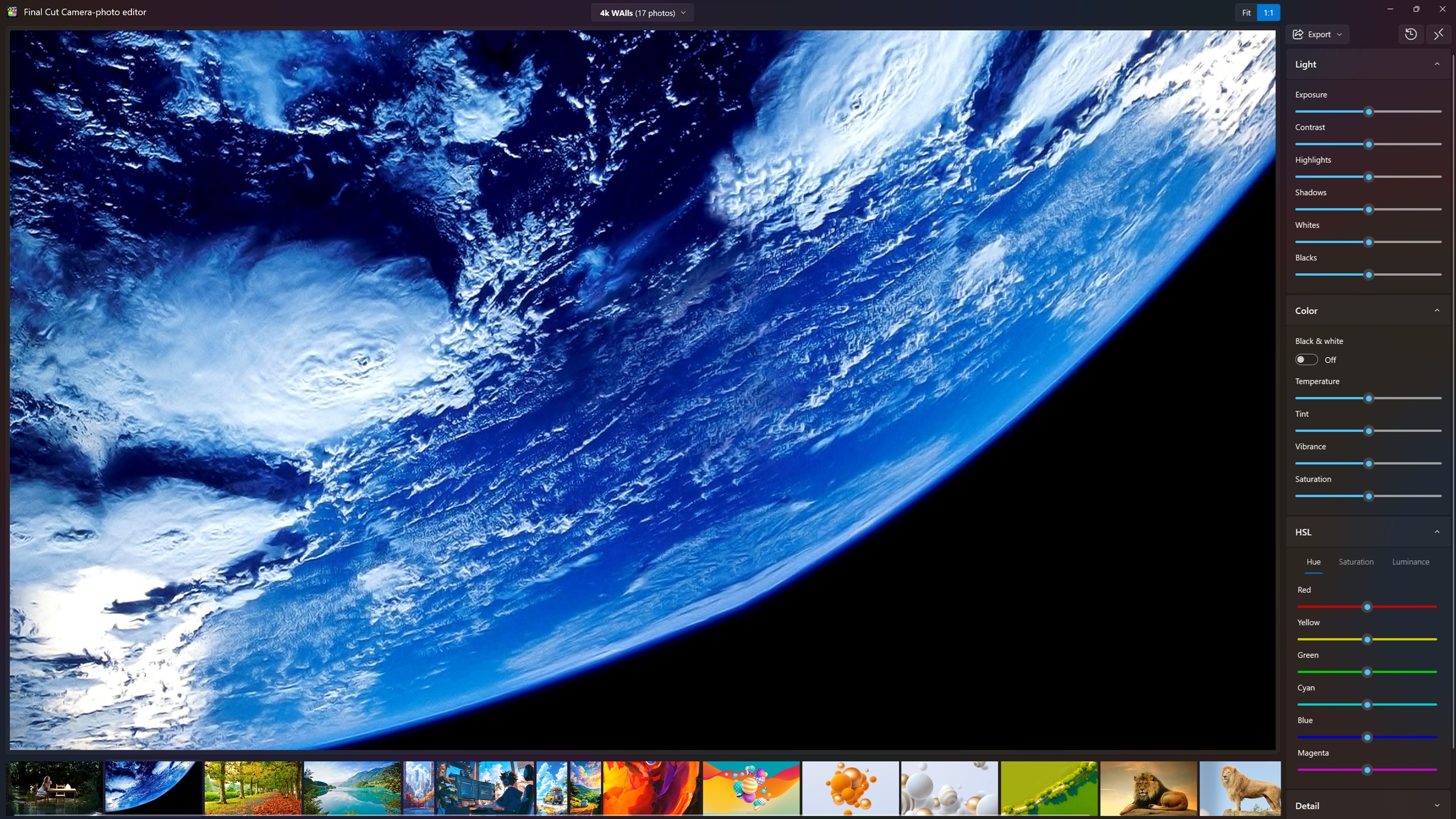
- Intuitive interface: Clean, organized layout that facilitates a smooth editing workflow, even for beginners.
- Speed and performance: Designed to operate smoothly on Windows devices, ensuring quick loading and real-time previews.
- Unique features: Incorporates creative tools like AI-driven enhancements that distinguish it from more generic editors.
Delving Into the Core Features
Powerful Editing Suite for Creative Freedom
Right from the start, Final Cut Camera-photo Editor impresses with its rich selection of editing tools. Whether you're adjusting brightness and contrast or applying sophisticated filters, the app provides all the essentials to transform ordinary photos into eye-catching visuals. Its AI-based enhancements are particularly noteworthy—they intelligently optimize images for clarity and color vibrancy, saving you time and effort. This feature feels like having a digital photo assistant whispering tips in your ear, ensuring your images look professional without needing complex manual tweaks.
Sleek Interface with User-Centric Design
The interface resembles a well-organized workspace—a digital photo studio where every tool is neatly placed for quick access. Unlike cluttered editors that overwhelm newcomers, Final Cut Camera-photo Editor employs a minimalistic approach, allowing users to focus on their creative process. Navigation feels natural; sliders, buttons, and menus are responsive and logically arranged, making the learning curve gentle. Even if you're new to photo editing, you'll find yourself experimenting with confidence, thanks to its thoughtful layout.
Performance and Usability: Smooth Sailing
Running seamlessly on Windows platforms, the app maintains a brisk pace, providing instant previews and reducing wait times—a crucial factor for creative flow. The editing process feels fluid, with no noticeable lag, which is essential when trying to see how adjustments impact your photo in real-time. Moreover, the app's straightforward design minimizes disruption, allowing you to focus solely on your images rather than battling with the interface.
A Unique Blend in the Photo Editing Universe
While many photo editors offer similar features, Final Cut Camera-photo Editor shines with its AI-powered enhancement tools that intelligently boost image quality—nothing too aggressive, but enough to make your photos pop with minimal effort. This AI integration acts like a friendly guide, subtly elevating your images while maintaining a natural look. Furthermore, the developer's emphasis on straightforward usability makes it accessible to those who might find other professional editors intimidating. Its balanced approach between sophistication and simplicity embodies a promising middle ground—something that sets it apart from many cluttered or overly complex alternatives.
Final Verdict and Recommendations
For photography lovers who seek a capable yet approachable photo editor, Final Cut Camera-photo Editor stands as a commendable choice. Its combination of powerful AI-driven enhancements, user-friendly design, and performance efficiency makes it suitable for daily editing tasks or casual creative projects. I would recommend it particularly for users who want quick, quality results without a steep learning curve or subscription commitments.
Whether you're snapping photos on the go or polishing your shot collection at home, this app offers an engaging editing experience that feels both reliable and inspiring. Its distinguished AI features are especially worth exploring—giving your photos that professional touch with a few clicks. Overall, Final Cut Camera-photo Editor for Windows earns a solid recommendation for anyone eager to craft stunning images without getting bogged down in complexity.
Pros
- Intuitive User Interface
- Powerful Editing Tools
- Real-Time Preview
- Fast Performance
- Regular Updates
Cons
- Limited Export Options
- Occasional Crashes on High-Resolution Images
- Watermark on Free Version
- Limited Advanced Features
- UI Customization Options Are Basic











