

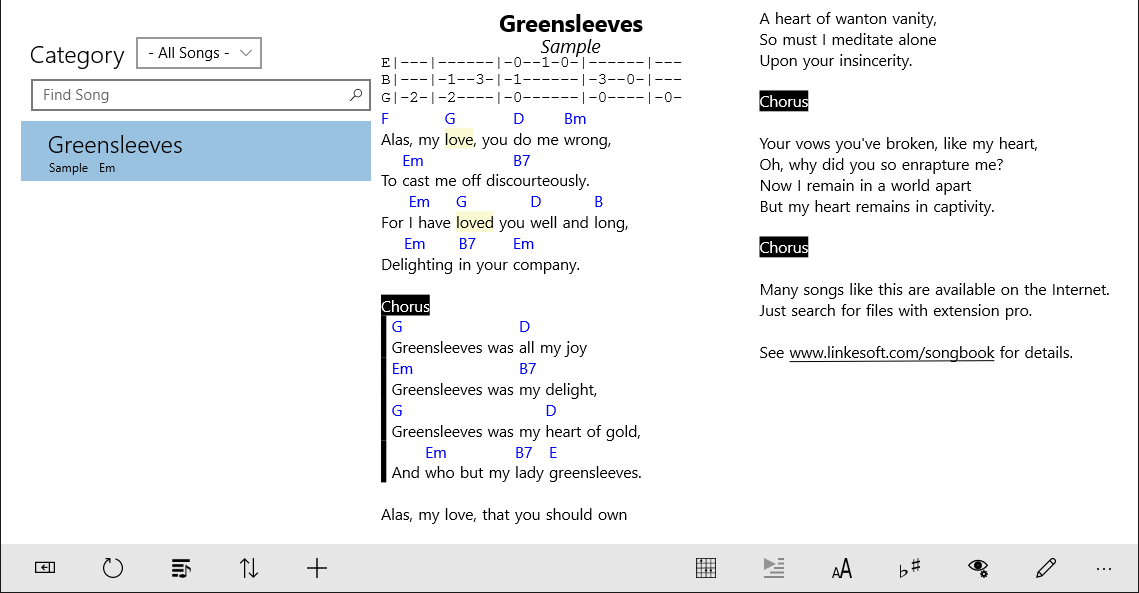
- Name SongBook for Windows Tablets
- Category Music
- Available on PC, Mobile, Surface Hub
- OS Windows 10 version 14393.0 or higher
- languages English (United States), German
An Enthusiast's Companion for Digital Sheet Music: SongBook for Windows Tablets
Imagine having a vast virtual music library right at your fingertips—organized, accessible, and customizable; SongBook for Windows Tablets by LinkeSOFT GmbH transforms this vision into reality. Designed with musicians and enthusiasts in mind, this app offers a comprehensive platform to manage and perform your digital sheet music seamlessly on Windows touch devices.
Basic Information: Who, What, and Why
At its core, SongBook serves as a powerful digital sheet music manager tailored for Windows tablets seeking a user-friendly yet feature-rich solution. Developed by LinkeSOFT GmbH, a team dedicated to creating intuitive music software, it stands out by integrating essential features for musicians of all levels.
Key Highlights
- Organized Music Library: Easily categorize, search, and sort your collection with custom tags and metadata.
- Flexible Performance Tools: Includes features like setlists, annotations, and scrolling modes to enhance live performances.
- Sync & Backup Capabilities: Sync your sheet music across devices and securely back up your library.
- User-Focused Design: Optimized for touchscreen interaction, making navigation intuitive and natural.
Targeted at gigging musicians, music educators, and avid hobbyists, SongBook simplifies managing and performing sheet music, turning your Windows tablet into a portable concert hall.
Vivid Exploration of Features
A Fresh Take on Sheet Music Management
From the moment you open SongBook, it's like stepping into a well-organized music closet—everything in its place, yet easy to find. The app supports a wide array of file formats (PDF, images, MIDI, chord charts), ensuring versatility for different types of sheet music files. Adding new pieces is a breeze—drag-and-drop or simple browse functions make initial setup smooth, even for those less tech-savvy.
Performance Mode: Making Playing Seamless
One of SongBook's standout features is its performance mode—an elegant, distraction-free display that allows musicians to concentrate solely on their music. The app offers customizable scrolling options, including manual, auto-scroll, and tap-to-advance modes, catering to various playing styles. Annotation tools further empower performers to mark sections, add tempo marks, or highlight problem areas directly on the scores—all without cluttering the original files. This focus on fluid, uninterrupted performance is where SongBook truly shines.
Intuitive User Experience & Interface
The interface exudes simplicity—large icons, clear labels, and responsive touch controls contribute to a smooth user journey. Transitioning between library views and performance screens feels natural, akin to flipping through a well-designed music binder. The learning curve is gentle—users quickly adapt to features, making it accessible even for casual musicians. Responsiveness is solid, with minimal lag, which is crucial when navigating during live setups or practice sessions.
Unique Selling Points and Differentiators
Compared to other music apps, SongBook distinguishes itself through its focus on rhythm pattern assessment and latency tolerance. Its intelligent design minimizes input latency, ensuring your annotations and page turns stay perfectly in sync with your playing—crucial for live performances. Moreover, the app's ability to evaluate rhythm pattern variety offers musicians insights into playing consistency, making practice sessions more targeted. These specialized features provide a depth of functionality that set it apart from more generic sheet music viewers.
Final Recommendations and Usage Suggestions
If you're a musician who values an organized digital library combined with performance-friendly features, SongBook is a solid choice. Its balance of straightforward usability and advanced tools makes it suitable for both casual practice and professional gigs. For those who perform live or need precise control over sheet presentation, its low latency and rhythm pattern assessment are invaluable. However, casual users may want to explore its features gradually to avoid feeling overwhelmed at first.
In summary, SongBook for Windows Tablets offers a well-rounded, thoughtfully designed platform that respects the musician's craft—professional yet accessible, sophisticated yet straightforward. It's not just a sheet music viewer; it's a reliable partner for your musical journey.
Pros
- Intuitive interface
- Extensive song library
- Offline access support
- Customizable song arrangements
- Regular updates and support
Cons
- Limited annotation features
- Occasional sync issues across devices
- Basic playlist management
- Audio quality varies with device
- Some advanced features require purchase











