

- Name Amazing Slow Downer
- Category Music
- Developer Roni Music
- Available on PC
- OS Windows 10 version 17763.0 or higher
- languages English (United States)
Introducing Amazing Slow Downer for Windows: Your Musical Companion for Practice and Analysis
Amazing Slow Downer for Windows by Roni Music is a dedicated tool designed for musicians, educators, and music enthusiasts who want to manipulate audio files with precision—slowing down, pitch-shifting, and analyzing music without sacrificing quality. It transforms your Windows PC into a versatile music practice assistant, making learning complex pieces more approachable than ever.
About the Developer and Core Features
Developed and published by Roni Music AB, a company known for producing intuitive audio tools tailored for musicians, Amazing Slow Downer offers features that focus on enhancing music practice efficiency. Its main highlights include:
- Smooth Tempo and Pitch Adjustment: Allows for real-time slowing down or speeding up without distorting the sound, helping users grasp intricate passages.
- Rhythm Pattern Assessment: Supports detailed analysis of rhythm patterns, making it ideal for developing precise timing.
- Robust Audio Compatibility: Handles a broad range of audio formats, ensuring versatility in various musical contexts.
- User-Friendly Interface: Designed to be accessible for both tech-savvy musicians and beginners alike.
The primary target users include instrumentalists, singers, music teachers, and students seeking an efficient way to learn, transcribe, or analyze music directly on their Windows devices.
Engaging and Practical: How Does Amazing Slow Downer Spark Musical Curiosity?
Imagine sitting by your piano, meticulously dissecting a challenging Bach fugue or a guitar solo that sounds like a mysterious melody in a foreign language. Amazing Slow Downer acts like a seasoned music coach, gently slowing down the tempo and enabling you to pick out every nuance, note by note. Its silent whisper in the background helps you to decipher complex rhythms and pitch variations at your own pace, transforming daunting scores into manageable puzzles.
Precise Tempo and Pitch Control
The heart of Amazing Slow Downer lies in its impeccable tempo and pitch adjustment capabilities. Unlike some generic audio players that distort the sound when slowed down, this app preserves audio quality perfectly. Whether you want to slow down at 50% speed or speed up slightly beyond the original tempo, the app ensures clarity and maintains musical integrity. Players can also transpose pitch without affecting tempo—a feature especially useful for singers practicing in different keys or transposing to match vocal ranges.
Rhythm Pattern Analysis and Audio Fidelity
One of the standout features is its ability to assess rhythm patterns deeply. The app offers visualization tools that display rhythmic structures, enabling users to analyze syncopations and subdivisions with ease. This makes it particularly valuable for drummers or percussionists aiming to perfect their timing. Furthermore, its audio fidelity remains high across different formats—whether working with MP3s, WAVs, or other files—making the learning process smooth and enjoyable without distracting artifacts or distortions.
User Experience and Differentiation from Competitors
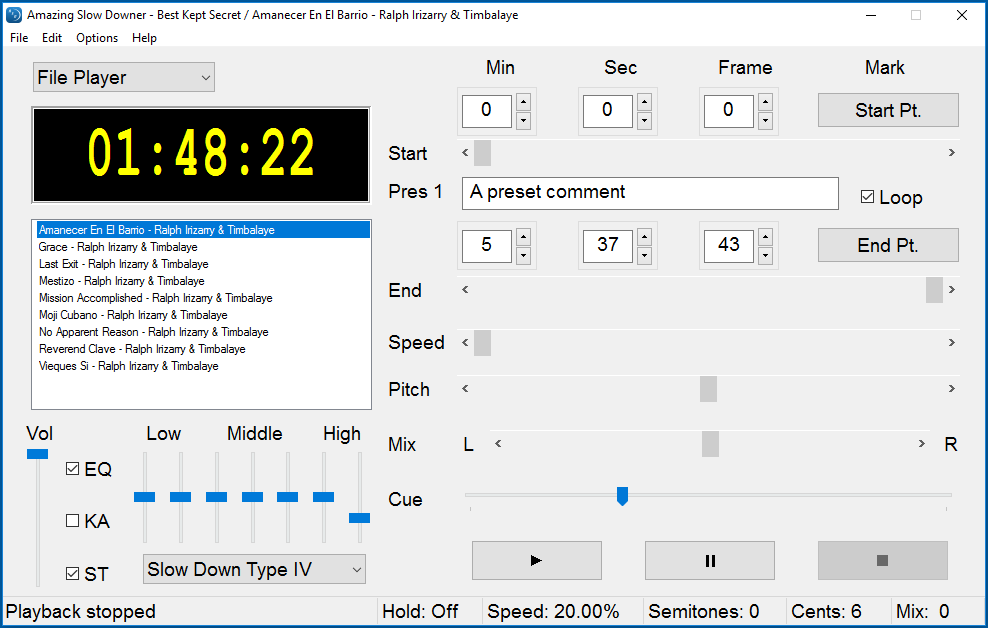
The interface of Amazing Slow Downer is designed with clarity and simplicity in mind—think of it as a well-organized music studio in your pocket. Controls are intuitive; the tempo sliders, pitch controls, and playback buttons are all logically arranged, minimizing the learning curve. The app handles real-time adjustments seamlessly, providing a fluid experience that encourages experimentation without frustration.
Compared to other music apps, Amazing Slow Downer stands out through its superior audio preservation during tempo shifts and its specialized rhythm analysis capabilities. Many competing applications struggle with either sound quality degradation or lack detailed rhythmic assessment. This app's ability to accurately assess and visualize complex rhythmic patterns, coupled with its real-time, artifact-free audio processing, makes it a top-tier choice for serious musicians.
Final Recommendations and Usage Suggestions
If you're a musician aiming to master difficult pieces or a music educator seeking a reliable tool to demonstrate timing and pitch nuances, Amazing Slow Downer for Windows is highly recommended. It's especially advantageous for those who value audio fidelity and analytical depth in their practice routines. Though not necessarily geared toward casual listening, for dedicated practice, this app provides exceptional value.
Use it as your digital rehearsal room—slow down tricky passages, analyze rhythm complexities, and transcribe music with confidence. For best results, pair it with a good pair of headphones and a stable audio source. While the learning curve is minimal, exploring its advanced features will reap the most benefits, especially its rhythm analysis module that distinguishes it from many basic playback tools.
Overall, Amazing Slow Downer is a thoughtfully crafted, reliable companion that can elevate your musical practice. If precise control over tempo and rhythm analysis are what you seek, give it a try—you'll find your musical skills speeding up along with your confidence.
Pros
- Intuitive interface
- Precise speed adjustment
- Supports multiple audio formats
- Built-in pitch correction features
- Integration with music libraries
Cons
- Limited training resources
- Occasional lag with large files
- Basic editing features
- Compatibility issues on older devices
- Limited customization options for interface










