



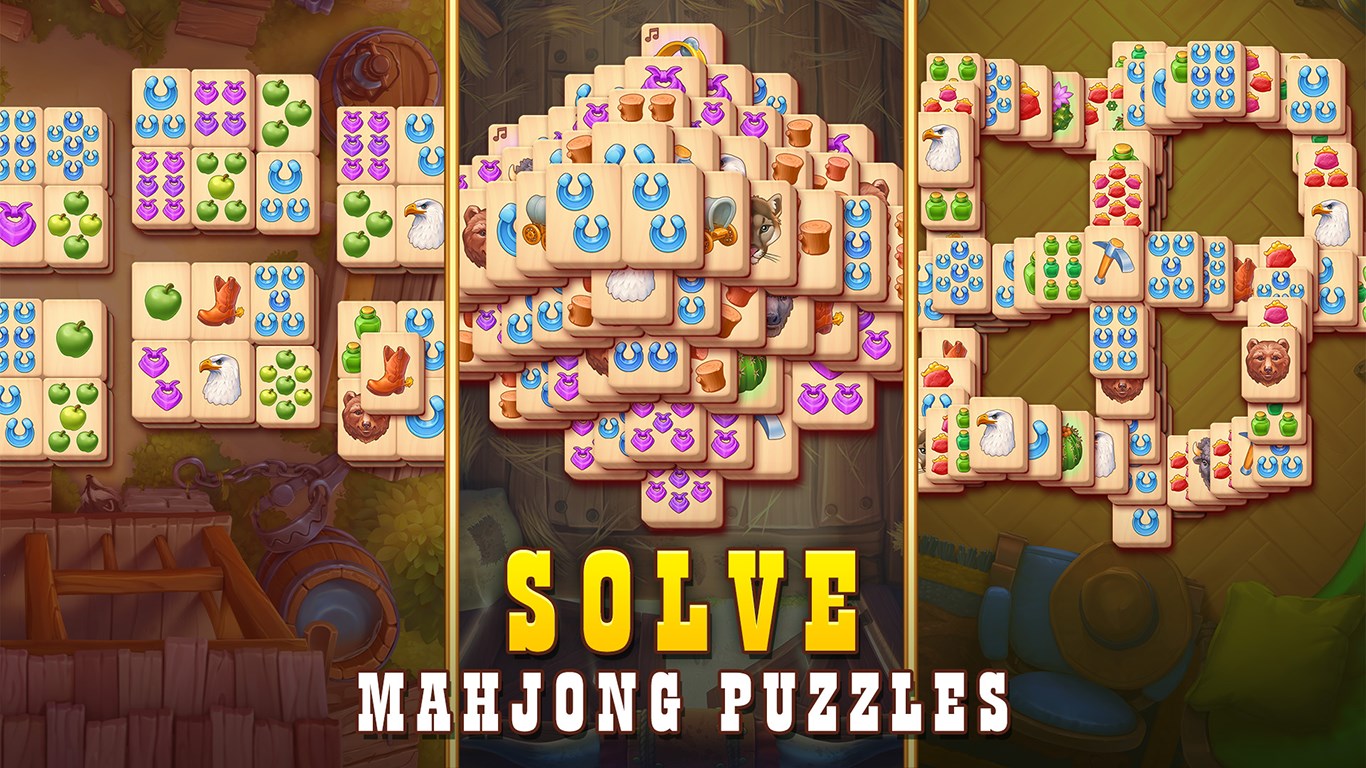




- Name Sheriff of Mahjong Solitaire: Classic Tile Match
- Category Card & board
- Available on PC
- OS Windows 10 version 16299.0 or higher
- languages Chinese (Simplified), English, French, German, Italian, Japanese, Korean, Russian, Spanish
Introducing Sheriff of Mahjong Solitaire: Classic Tile Match
Sheriff of Mahjong Solitaire: Classic Tile Match is a digital reinvention of the beloved tile-matching puzzle, combining traditional Mahjong with modern gameplay mechanics to deliver a charming and engaging experience on Windows.
About the Developer: G5 Entertainment AB
Developed by G5 Entertainment AB, a reputable studio renowned for their numerous casual puzzle and adventure games, this title benefits from their expertise in crafting polished, user-friendly iOS and Windows experiences that appeal to a broad audience.
Key Features that Make It Stand Out
- Authentic Mahjong Experience with a Twist: Maintains the classic tile-matching principles but introduces new puzzle layouts and power-ups, making each game feel fresh yet familiar.
- User-Friendly Interface and Visuals: Bright, colorful graphics paired with intuitive controls ensure smooth gameplay for both newcomers and seasoned players.
- Progressive Difficulty and Game Modes: Features multiple levels with escalating challenges, including time-limited and move-limited puzzles, catering to various skill levels and preferences.
- Relaxing Soundtrack and Ambience: Paired with calming background music, creating a cozy atmosphere suitable for quick play sessions or relaxing after a long day.
Game Play and User Experience
From the moment you launch Sherlock of Mahjong Solitaire, you'll find yourself in a crisp, visually inviting environment that beckons you to explore its myriad puzzles. The interface design strikes a perfect balance—simple enough for beginners to grasp but with enough complexity to keep veteran players engaged. The controls are highly responsive; swapping tiles or selecting matches feels natural and unhurried, which is vital for maintaining immersion and flow.
One of the standout aspects is the game's learning curve. It introduces new obstacles gradually, allowing players to master foundational mechanics before tackling more difficult levels. The game also offers hints and undo options, which serve as gentle guidance rather than frustrating crutches, enhancing overall accessibility.
What Sets It Apart from Similar Tile Games
While there is a multitude of Mahjong apps available, Sheriff of Mahjong Solitaire differentiates itself through its combination of traditional tile-matching with custom game modes and power-ups that add a layer of strategic depth. For example, special tiles can clear entire rows or reveal hidden tiles, turning a simple matching game into a tactical puzzle.
Moreover, G5 Entertainment's attention to thematic detail—such as thematic backgrounds, satisfying animations, and a storyline element in certain game paths—provides a richer experience than many other conventional Mahjong apps that often feel repetitive or clinical.
Recommendation and Usage Tips
Overall, Sheriff of Mahjong Solitaire is highly recommended for casual players seeking a relaxing yet engaging Mahjong experience. Its balance of challenge and accessibility makes it suitable for quick escapes during breaks or lengthy gaming sessions. For best results, newcomers should start with the easier levels to familiarize themselves with tile patterns and gradually move toward more complex puzzles. Puzzle enthusiasts who enjoy strategic planning will especially appreciate the game's unique power-ups and level design.
If you're a fan of classic tile-matching games but crave innovative twists and polished presentation, this app deserves a spot on your Windows device. Think of it as a familiar friend who gently challenges you, all while providing a visually pleasing environment that invites you to unwind and enjoy a timeless game with a modern touch.
Pros
- Intuitive gameplay mechanics
- Elegant and user-friendly interface
- Variety of tile layouts and themes
- Smooth and responsive controls
- Clear and helpful hints system
Cons
- Limited game modes
- Occasional loading delays
- In-app ads can interrupt gameplay
- Limited customization options
- No multiplayer or social features











