




- Name Hardwood Spades
- Category Card & board
- Available on PC, Surface Hub, HoloLens
- OS Windows 10 version 19041.0 or higher
- languages English, English (United States)
Introduction to Hardwood Spades for Windows: A Refreshing Take on Classic Card Games
If you're a fan of card games that blend strategy with a touch of tradition, Hardwood Spades for Windows is designed to bring that timeless experience right to your computer screen. Crafted by Silver Creek Entertainment, this app elevates the classic Spades game by integrating modern features and delightful visuals, making it a perfect companion for casual players and seasoned card enthusiasts alike.
Who Developed It and What Are Its Main Highlights?
Developed by Silver Creek Entertainment, a reputable team known for quality digital adaptations of classic games, Hardwood Spades aims to deliver an authentic yet accessible Spades experience. The app shines in several areas:
- Customizable Gameplay Options: From bidding rules to player configurations, it allows users to personalize their game settings extensively.
- Intuitive, User-Friendly Interface: Clear visuals and straightforward controls ensure quick onboarding for new players while satisfying veterans.
- Offline Play Capability: Enjoy seamless gaming without the need for an internet connection, great for travel or quiet evenings.
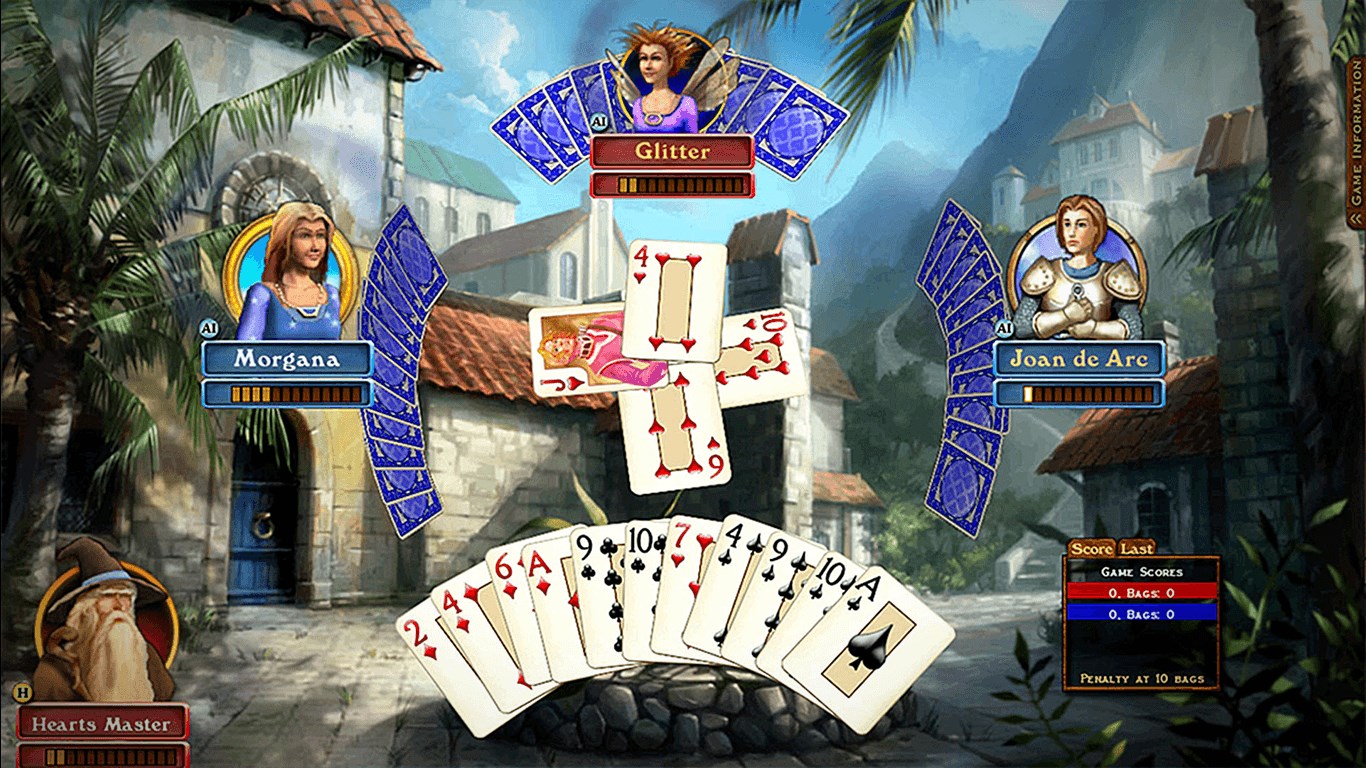
- Elegant Visuals with a Vintage Touch: The interface combines classic card motifs with a modern sleek design, creating a warm yet refined ambiance.
The target audience includes casual players, families, and friends seeking a digital version of the classic card game, as well as seasoned Spades players looking for a reliable offline option with customizable rules.
Vivid Gameplay and Engaging Features
Stepping into the world of Hardwood Spades feels akin to sitting down at a well-loved card table in your favorite cozy café. The game captures that nostalgic charm while offering enhancements that make gameplay smooth and engaging. Let's explore some core features that stand out:
Authentic and Flexible Game Mechanics
At its heart, Hardwood Spades faithfully emulates the traditional rules—bidding, trump suits, nil declarations, and penalty points—yet it welcomes players to tweak settings to suit their preferences. Whether you prefer a straightforward game or a more challenging variation, the customization options are compelling. The AI opponents are thoughtfully programmed, providing a balanced challenge that adapts to your skill level, whether you're just learning or trying to perfect your bluffing strategies.
Clear, Stylish Interface with Ease of Use
The game's visual design is both elegant and functional, reminiscent of vintage card parlors. The cards are easy to read, with crisp graphics and subtle animations that do not distract from gameplay. Navigation feels intuitive, with minimal clutter—it's like having a well-organized deck of cards laid out perfectly on your digital table. The learning curve is gentle; even new players can pick up the game quickly, thanks to helpful tooltips and a well-organized menu system.
Playing Solo or with Friends—Offline and Local Multiplayer
One of the app's standout features is its flexibility in modes. You can enjoy solo play against AI or invite friends to play locally on the same device or network. This makes Hardwood Spades a versatile app for family game nights or quick friendly matches. The offline capability means no dependency on internet connectivity, avoiding frustration during travel or in areas with weak signals. This quality makes it particularly appealing to those who value privacy and uninterrupted gaming.
What Sets Hardwood Spades Apart from Similar Card & Board Games?
While many digital card games offer basic versions of Spades, Hardwood Spades distinguishes itself through its combination of authenticity, customization, and refined aesthetics. Unlike generic implementations, this app emphasizes a vintage aesthetic that appeals to both nostalgic gamers and modern design lovers. Its flexible rule options stand out—allowing groups to tailor their experience consistently with house rules rather than forcing a one-size-fits-all approach. Additionally, the seamless and smooth gameplay experience gives it an edge over clunky or sluggish counterparts, ensuring that players stay immersed without technical frustration.
Final Thoughts and Recommendations
I would recommend Hardwood Spades for anyone looking for a dependable, well-crafted digital version of the classic card game. Its core strengths—authentic gameplay, elegant design, and customization flexibility—make it an excellent choice for casual and dedicated players alike. However, if you're seeking multiplayer online features or community tournaments, you might find its offline-focused approach somewhat limiting. Overall, for those wanting a cozy, reliable, and beautifully designed Spades experience, this app is definitely worth a try. Just imagine yourself at that vintage card table, but with the convenience of digital magic—it's a timeless game made modern and accessible.
Pros
- Intuitive user interface
- Smooth gameplay experience
- Offline mode availability
- Regular updates and bug fixes
- Engaging multiplayer options
Cons
- Limited game customization options
- In-app purchase prompts during gameplay
- Occasional match-making delays
- Lack of in-depth tutorial for new players
- Limited language options











