


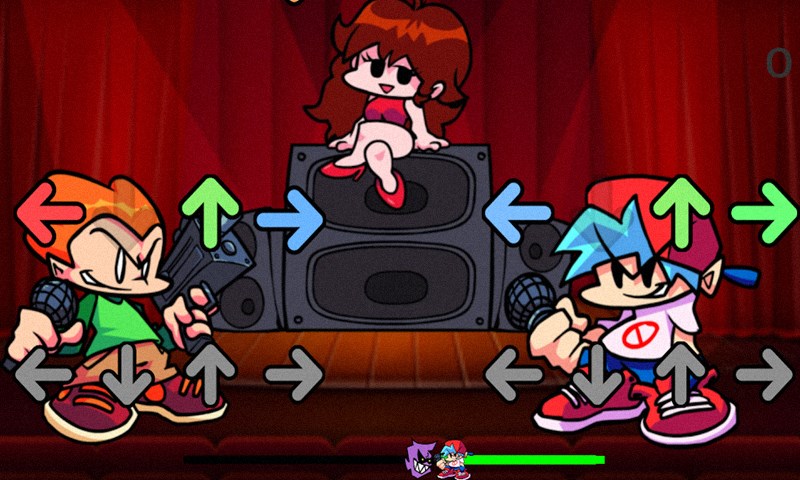
- Name Friday Night Funkin Music
- Category Music
- Available on PC, Mobile, Surface Hub, HoloLens
- OS Windows 10 version 10240.0 or higher
- DirectX Version 10
- Mouse Integrated Mouse
- languages English (United States)
An Enthralling Rhythm Journey: Friday Night Funkin Music for Windows
Imagine stepping into a vibrant world where beats pulse through your fingertips, transforming your desktop into a lively dance floor—welcome to Friday Night Funkin Music for Windows, an engaging rhythm game that offers a fresh spin on musical challenge and fun.
About the App: What Is It All About?
Friday Night Funkin Music for Windows, developed by adilogames, is a rhythm-based game designed to test your musical timing and coordination in a lively, cartoonish environment. It captures the aesthetic and energy of the popular Friday Night Funkin' game series, bringing the experience directly to your Windows PC.
- Key Features:
- Accessible and instinctive gameplay that appeals to both newcomers and rhythm game enthusiasts.
- Advanced rhythm pattern assessment, providing a diverse and challenging musical experience.
- Seamless integration with Windows, ensuring smooth performance and easy access.
The target audience includes casual gamers, students, and music lovers who enjoy rhythm challenges, as well as fans of the original Friday Night Funkin' looking for an immersive desktop version.
Immersive Gameplay and Core Features
Rhythm Pattern Variety for Endless Fun
This app stands out with its impressive collection of rhythm patterns that mimic the complexity and diversity of real musical compositions. Unlike simpler rhythm games, it dynamically assesses pattern variations, offering a gameplay experience that feels both fresh and stimulating. Whether you're grooving to a straightforward beat or navigating complex melodic sequences, the game ensures you're constantly challenged and engaged. Its capability to evaluate rhythm pattern variety means that no two songs are exactly alike, encouraging players to refine their timing and coordination continually.
Responsive and Latency-Tolerant Performance
One of the most notable features is its robust tolerance for input latency—think of it as a game that knows you're imperfect but still keeps the groove flowing smoothly. This responsiveness reduces frustration, especially on varied hardware setups, allowing players to focus on dance moves rather than technical hiccups. As a result, the app offers a forgiving yet challenging environment that elevates the overall user experience, making rhythmic precision more accessible even for beginners.
Intuitive Interface and User Experience
The game's interface resembles a lively dance floor, filled with animated characters and vibrant visuals that draw players into the musical universe. Navigation feels natural, with menus that are simple to understand, reducing the learning curve for new users. The gameplay itself is fluid—moves and beats sync seamlessly, and the controls are responsive, creating an immersive feeling of being in the middle of a musical battle. This combination of attractive design and smooth operation ensures that players enjoy their session without unnecessary technical distractions, maintaining engagement from start to finish.
What Sets It Apart?
Beyond its core rhythm gameplay, Friday Night Funkin Music for Windows subtly distinguishes itself through its focus on rhythm pattern assessment and input latency tolerance. These features collectively foster a more nuanced and realistic musical challenge compared to other music apps. While many rhythm games merely encourage rhythm matching, this app evaluates the complexity of your pattern recognition and your ability to adapt to varied beat structures—delivering a more authentic musical dance experience for those who seek depth in their rhythm challenges.
Final Thoughts and Recommendations
All in all, Friday Night Funkin Music for Windows offers a compelling blend of vibrant visuals, diverse musical patterns, and responsive performance that makes it worth checking out, especially if you're interested in a rhythm game that balances challenge with accessibility. It's particularly recommended for players wanting a game that stands out in pattern variety and input tolerance—making your desktop a mini dance floor full of beats waiting to be conquered.
If you enjoy rhythm-based challenges and want an engaging application that adapts to different skill levels without missing a beat, this app is a solid choice. Its user-friendly design and unique focus on rhythm pattern assessment make it a fun and rewarding experience for music enthusiasts and casual gamers alike.
Pros
- Engaging and vibrant visuals
- Extensive song library
- Intuitive user interface
- Responsive touch controls
- Offline gameplay support
Cons
- Limited customization options
- Occasional crashes on older devices
- In-app ads can disrupt gameplay
- Limited tutorial for new players
- Some song packs may require additional purchase











