



- Name Epic Games Store
- Category Entertainment
- Developer Epic Games
- Available on PC
- OS Windows 10 version 0.0 or higher
- Keyboard Integrated Keyboard
- Mouse Integrated Mouse
- Memory 2 GB
- DirectX Version 9
- languages English, Arabic, German, Spanish (Spain), Spanish (Mexico), French, Italian, Japanese, Korean, Polish, Portuguese (Brazil), Russian, Thai, Turkish, Chinese (Simplified), Chinese (Traditional Chinese)
A Seamless Gateway into Epic Gaming Worlds
Epic Games Store for Windows is a dedicated application that elevates your digital gaming experience by offering a streamlined, user-friendly platform tailored specifically for Epic's extensive game library and community features. Think of it as your personal ticket into a universe of gaming adventures, all housed within a sleek, expertly designed interface.
About the App: Who's Behind the Curtain?
Developed and published by Epic Games Inc., this application is crafted by one of the industry's most innovative and influential teams. With a reputation built on blockbuster titles like Fortnite and robust digital distribution, Epic Games brings its expertise directly to your desktop platform to ensure smooth, integrated access to their ecosystem.
Key features亮点 include:
- Dedicated game library with easy browsing and sorting options.
- Integrated social features for connecting with friends and community updates.
- Automatic updates and seamless installation processes for Epic titles.
- Personalized recommendations based on gameplay preferences.
Its target audience spans casual gamers seeking quick access to popular titles, hardcore enthusiasts looking for the latest releases, and even newcomers eager to discover new gaming experiences within a centralized hub.
Immersive Experience with a Personal Touch
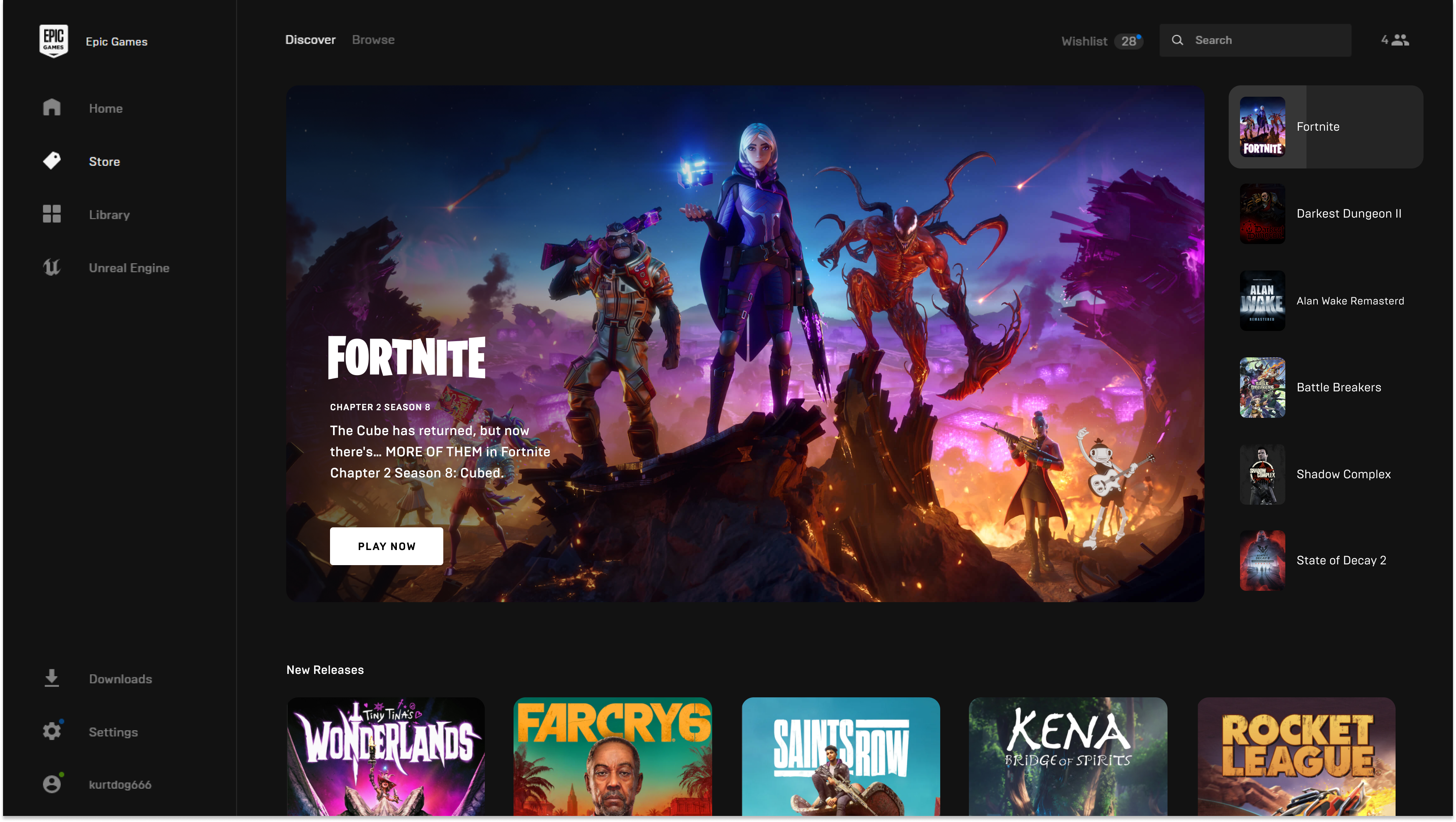
Imagine yourself reclining in your favorite chair, a steaming cup of coffee at hand, as your gaming universe unfolds effortlessly on your screen. The Epic Games Store for Windows makes this scene a reality, delivering a platform that's as inviting as it is powerful. Its clean interface and intuitive navigation feel like a well-organized bookshelf—easy to browse, with every book (or game) right where you expect it to be.
Core Functionality: Smooth, Smart, and Personal
The first standout is its personalized content discovery algorithm. Unlike generic app stores, Epic's recommendation engine learns from your gaming habits—tracking genres, play frequencies, and wishlist items—to serve tailored game suggestions. Think of it as having a friendly shopkeeper who knows exactly what you like, helping you discover hidden gems alongside popular blockbusters.
Secondly, the integration of social features transforms the app from a mere store into a vibrant community hub. You can effortlessly see your friends' activity, join multiplayer sessions, or share your latest achievements—turning solitary gaming into shared adventures. This connectivity fosters a sense of belonging, an essential ingredient in today's social gaming era.
Third, the update and installation process is remarkably streamlined. With one-click updates and automatic launcher integration, you avoid the frustration of manual file management. It's akin to having a loyal assistant who keeps your library organized and ready—so your focus stays on playing rather than troubleshooting.
User Experience: Navigating Like a Pro
The app's interface design strikes a balance between visual appeal and practicality. The dark-themed layout with vivid game artwork invites exploration without overwhelming—much like wandering through a curated exhibition. Responsiveness is excellent; menu transitions and load times are smooth, making the experience feel natural and glitch-free.
Learning curve-wise, new users will find onboarding straightforward. Clear icons, helpful tooltips, and a guided setup ease the initial setup, while seasoned gamers appreciate the depth of customization options available. Overall, the user experience fosters confidence and enjoyment—no steep hills to climb, just a gentle descent into gaming bliss.
What Sets It Apart? Unique Features in a Crowded Market
Across the digital entertainment landscape, personalized recommendation algorithms are commonplace, but Epic Games Store distinguishes itself through its focus on content discovery and community integration. Its recommendation system isn't just about highlighting trending titles; it carefully curates suggestions based on nuanced gameplay preferences, making it feel less like an advertisement and more like a trusted friend's suggestion.
Furthermore, the social connectivity embedded into the platform nurtures a sense of community that many competitors overlook. With seamless friend interactions, shared libraries, and in-app chat, it blurs the line between store and social hub, creating a more holistic gaming environment.
Final Verdict and Recommendations
Overall, Epic Games Store for Windows earns a solid recommendation for users seeking a dedicated, feature-rich platform tailored for Epic's titles and community. Its personalized content discovery and integrated social features are particularly compelling, making it a standout in the crowded landscape of digital game stores. Whether you're a casual player or a dedicated gamer, this app can serve as a reliable companion on your gaming journey.
For best results, newcomers should explore its personalization options early on to tailor the experience to their tastes. Advanced users will appreciate its streamlined update processes and community engagement tools. Given its thoughtful design and unique focus on content relevance, it's worth making part of your gaming toolbox—especially if you enjoy discovering new titles with a personal touch.
Pros
- Extensive game library
- Regular exclusive deals
- User-friendly interface
- Integrated launcher support
- Frequent free game offerings
Cons
- Limited regional availability
- Occasional launcher bugs
- Requires login for most functions
- Limited social features
- Download speeds depend on network











