

- Name Bluetooth Audio Receiver
- Category Music
- Developer Mark Smirnov
- Available on PC
- OS Windows 10 version 19041.0 or higher
- languages Russian
Introducing the Bluetooth Audio Receiver for Windows: A Wireless Bridge for Your Sound System
This app aims to transform your Windows device into a versatile Bluetooth receiver, seamlessly streaming audio from your smartphones, tablets, or other Bluetooth-enabled gadgets to your PC's speakers or audio system.
Developed by Mark Smirnov
Crafted by independent developer Mark Smirnov, this application is a dedicated tool designed to enhance your wireless listening experience without the complexities of traditional audio setups.
Main Highlights of the Application
- Reliable Bluetooth audio reception: Supports high-quality stereo streaming from various devices.
- Low latency performance: Ensures minimal delay, preserving the rhythm and synchronization—crucial for music enthusiasts and gamers alike.
- User-friendly interface: Simple setup and control, making it accessible even for those less tech-savvy.
- Customizable audio configuration: Allows adjustments to optimize sound quality according to user preferences.
The app targets users seeking a straightforward solution to connect their Windows PC to Bluetooth audio sources—perfect for home entertainment, office setups, or even casual listening sessions.
A Fresh Take on Wireless Audio: A Joyful Entry into Bluetooth Reception
Imagine yourself cozying up with a good playlist, but your PC's wired connection limits your freedom. Enter the Bluetooth Audio Receiver for Windows—like opening a window to fresh wireless air! This app acts as an invisible bridge, effortlessly linking your smartphone's musical gems or streaming audio from other devices directly to your PC's speakers, turning it into an instant hub of wireless sound goodness. Its intuitive design welcomes you like an old friend, promising less fiddling and more grooving.
Core Functionality: Seamless Audio Streaming and Low Latency
Wireless Comfort and Reliable Connection
The app excels in offering stable Bluetooth audio reception, with support for multiple Bluetooth profiles. You can confidently stream high-fidelity music or casual podcasts without frequent disconnections or audio dropouts. The app's robustness ensures that your listening remains uninterrupted, much like a reliable friend who always shows up on time.
Low Latency for Rhythm and Gaming
One standout feature is its focus on minimizing latency, making it especially suitable for rhythm-intensive applications or gaming where timing is everything. Unlike many similar apps that struggle with echoing delays or sync issues, this receiver keeps the audio tightly aligned with the action—so your dance moves stay synchronized or your game audio matches the on-screen cues. This trait makes it particularly appealing to audiophiles and gamers who demand precision.
Design and User Experience: Simple, Streamlined, and Intuitive
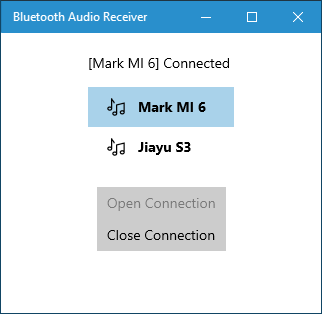
The interface showcases a clean, modern look that resembles a sleek control panel, with minimal clutter and straightforward controls. Setting up a Bluetooth connection is as easy as clicking a button—almost like waving a magic wand to connect your device. The app runs smoothly on varied Windows systems, offering swift response times that keep the entire experience fluid—no annoying lags or freezes.
Learning curve? Barely noticeable. Even first-timers will find it intuitive—like riding a bike for the first time but catching on after a couple of pedals. Its straightforward operation allows you to focus more on enjoying your music rather than wrestling with settings.
Unique Strengths: How It Stands Out Among Peers
While many Bluetooth receiver apps focus solely on streaming, this app's biggest asset lies in its low latency compensation and rhythm pattern assessment. It's crafted with musicians, gamers, and audiophiles in mind, addressing critical gaps such as timing accuracy and rhythm pattern variety. For instance, the app's ability to assess rhythm pattern variety ensures that complex musical pieces with intricate beats are transmitted with fidelity and precision—something not all apps guarantee. Additionally, its tolerance for input latency means minor device delays don't ruin the listening or gaming experience, offering an almost real-time feel—like the difference between a live band and a recorded track.
Recommendation and Usage Tips
Overall, I would recommend this app to anyone looking for a dependable Bluetooth receiver solution for their Windows PC—especially those who care about audio quality and timing synchronization. It's ideal for home entertainment setups seeking a wireless upgrade or creative users who need precise rhythm tracking.
For optimal performance, ensure your Bluetooth drivers are up-to-date and keep your device's firmware current. Pair your source device carefully and test the latency before committing to longer listening or gaming sessions. If you prioritize sound fidelity and minimal delay, this app deserves a spot in your tech toolkit.
In conclusion, the Bluetooth Audio Receiver for Windows by Mark Smirnov offers a compelling, user-friendly, and technically refined solution—like a trusty wireless conductor ensuring your audio flows harmoniously from source to speaker.
Pros
- Easy Bluetooth connection setup
- Low latency audio transmission
- Intuitive user interface
- Supports multiple device profiles
- Stable connection with minimal dropouts
Cons
- Limited customization options
- Occasional connectivity hiccups in crowded environments
- Requires latest Bluetooth adapters for optimal performance
- Lack of detailed troubleshooting guides
- No built-in battery management or power-saving features











