

- Name Audiobook Player - Audible AAX to MP3
- Category Entertainment
- Developer BBA Windy
- Available on PC, Mobile, Surface Hub, HoloLens
- OS Windows 10 version 17763.0 or higher
- languages English (United States)
Meet Your New Audiobook Companion: Audiobook Player - Audible AAX to MP3 for Windows
If you're someone who loves immersing themselves in captivating audiobooks but finds the process of managing and converting files a bit of a hassle, then BBA Windy's Audiobook Player might just become your new best friend. Designed to streamline your audiobook experience on Windows, this app promises straightforward functionality wrapped in an intuitive interface, making your listening sessions smoother and more enjoyable.
Who's Behind the Curtain? The Developer and Core Offerings
Developer & Publisher: BBA Windy
Developed and published by BBA Windy, a lesser-known yet dedicated team focusing on multimedia tools, this application reveals their intent to simplify audiobook management and conversion. Their attention to detail and user needs shine through in this lightweight yet functional software.
Main Features That Make a Difference
- AAX to MP3 Conversion: The app's core function allows users to effortlessly convert Audible's AAX files into MP3 format, making them compatible across many media players and devices.
- Seamless Playback & Organization: A built-in audiobook player enables users to listen directly within the app, with features for bookmarking and organizing chapters for the perfect listening experience.
- User-Friendly Interface: An intuitive, clutter-free UI simplifies the process, reducing the learning curve typically associated with audio formatting tools.
- Batch Processing: Convert multiple files at once, saving time for users with large libraries.
This blend of core functionalities targets audiobook enthusiasts who seek both convenience and quality in handling their audio content.
Experience Matters: Interface, Usability & User Engagement
Design and Layout – Navigating a Friendly Interface
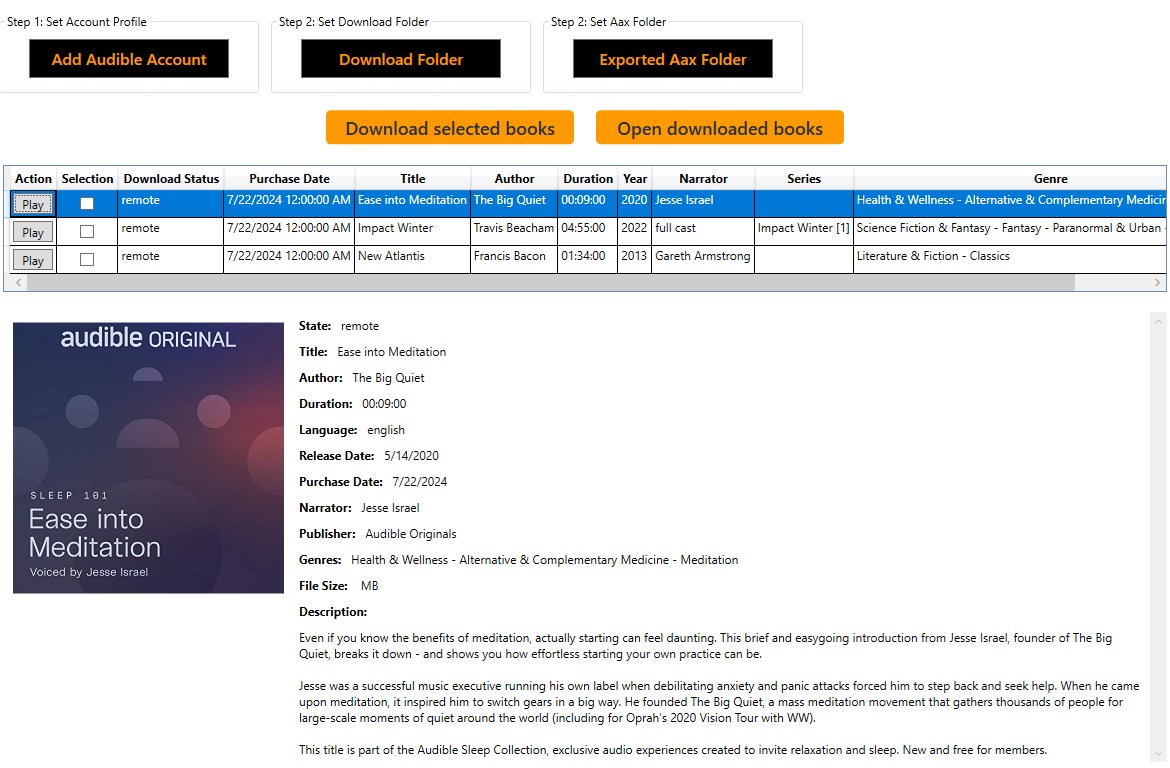
Imagine walking into a cozy library with clearly labeled shelves—that's the feeling this app's interface evokes. Clean lines, straightforward menus, and thoughtfully organized controls make finding your files and starting conversions feel as effortless as flipping through a well-organized catalog. It's designed to cater to users across experience levels, ensuring both newcomers and tech-savvy audiophiles feel at home.
Performance & Smooth Operation
Once in the act of converting or playing, responsiveness is key—and this app delivers. Transitions are snappy, conversions proceed without hiccups, and playback controls respond intuitively. Even during batch processes, it maintains stability, allowing you to continue working on other tasks or enjoy your audiobook without noticeable lag. Such fluidity is crucial for a satisfying user experience and keeps the focus on your listening adventure.
Learning Curve & Ease of Use
Spyglass in hand, users will find themselves navigating this app within minutes. Its minimalistic layout minimizes confusion, and helpful tooltips guide you through less familiar functionalities such as customizing output settings or managing multiple files. It's design philosophy revolves around accessibility—making powerful multimedia handling feel like second nature.
Standing Out in the Crowd: Unique Features & Differentiators
Smart Content Handling & Conversion Efficiency
Unlike many competitors that treat conversion and playback as separate processes or require complex setups, this app's most notable strength lies in its integrated approach—converting AAX files directly within the same environment you listen. This not only cuts down on unnecessary steps but also ensures files retain fidelity during the process.
Personalized Experience & Content Indexing
Its ability to organize and bookmark chapters means you can tailor your listening journey, making the app feel like a personalized library. While other audiobook players might lack this level of granularity, BBA Windy's solution helps you pick up right where you left off, maintaining context and engagement with minimal fuss.
Algorithmic Content Discovery Comparison
Although primarily a conversion and playback tool, its straightforward architecture means the app focuses on the content you bring into it rather than pushing recommendations or algorithms. This positions it uniquely—serving as a neutral platform that prioritizes stability and fidelity over content suggestion, which can be advantageous for users wary of algorithmic content clutter often seen in broader entertainment apps.
To Use or Not to Use: The Final Word
Overall, Audiobook Player - Audible AAX to MP3 for Windows distinguishes itself through its dedicated focus on converting Audible files seamlessly and managing them effectively within a unified interface. Its standout features—particularly the combination of batch conversion with an integrated player and its user-friendly design—make it a commendable choice for audiobook aficionados who need a reliable, straightforward tool.
While it may not replace comprehensive audiobook libraries with advanced discovery algorithms, its niche focus offers a no-nonsense experience that is both accessible and efficient. I'd recommend it to anyone who regularly works with Audible files and appreciates a simple, effective solution. For casual listeners, it's a perfect companion to unlock the full potential of their audiobook collection without unnecessary complexity.
Pros
- High-Quality Audio Conversion
- User-Friendly Interface
- Batch Conversion Support
- Fast Conversion Speed
- Compatibility with Various Devices
Cons
- Limited Free Features
- Occasional Software Crashes
- Basic Editing Functions Missing
- Interface Could Be More Modern
- Customer Support Response Delays











