

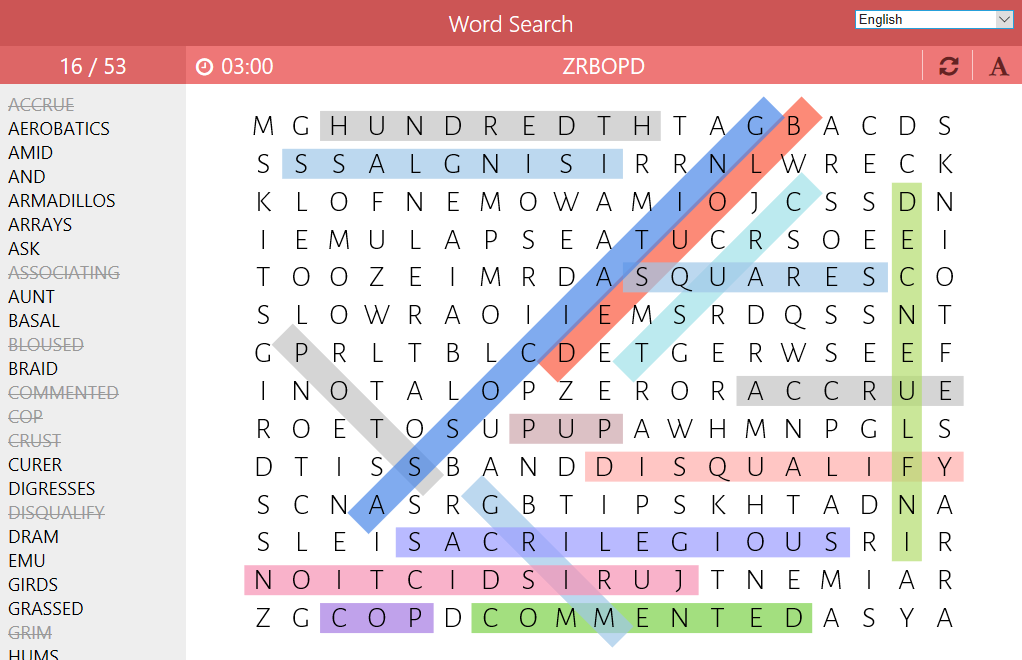
- Name Word Search - Puzzles
- Category Puzzle & trivia
- Developer LR Studios
- Available on PC, Mobile, Surface Hub, HoloLens
- OS Windows 10 version 10240.0 or higher
- languages Dutch, English (United States), French, German, Italian, Polish , Spanish (Spain)
Unlocking the Classic Charm of Word Search on Windows
If you're a fan of word puzzles that combine nostalgic gameplay with a modern electronic twist, Word Search - Puzzles for Windows by LR Studios offers an engaging experience. It encapsulates the timeless appeal of searching for words within grids, enhanced with intuitive design and thoughtful features tailored for puzzle enthusiasts everywhere.
About the App: Your Daily Dose of Vocabulary Fun
This app positions itself as a classic word search game adapted for the Windows platform, blending simplicity with challenge to keep players hooked. Developed and published by LR Studios, a team dedicated to creating straightforward yet entertaining digital puzzles, it aims to cater to users seeking mental stimulation and casual relaxation through word games.
- Key Features Highlights:
- Various difficulty levels that cater to both beginners and seasoned word puzzle fans.
- A large, customizable grid system that increases replayability and challenge.
- Daily puzzles to keep players engaged and returning regularly.
- Supplementary hints and learning modes suitable for all ages.
- Target Audience: Casual puzzle lovers, students looking to expand vocabulary, parents seeking educational entertainment for children, and anyone who enjoys relaxing yet stimulating mental activities.
A Playful and Engaging User Interface
The first thing that catches your eye is how neatly the interface is designed—think of it as your friendly neighborhood puzzle shop where everything is accessible and inviting. The grid layout is clean, with vibrant color schemes that avoid eye fatigue. Navigating through menus feels like flipping through a well-organized booklet, which makes onboarding remarkably smooth for first-time users. The overall design promotes a stress-free experience, making it easy to jump right into the puzzles without a steep learning curve.
Seamless Performance and User Experience
The game runs smoothly on Windows without noticeable lag, even when handling larger grids or more challenging difficulty levels. The responsiveness of touch interactions or mouse clicks makes selecting words feel natural—almost as if the grid is whispering, “Go ahead, find me.” The app's learning curve is gentle; even new players quickly grasp the core mechanics, thanks to intuitive controls and helpful hints integrated seamlessly within the game interface.
Most Unique: The Adaptive Vocabulary Challenge
What sets Word Search - Puzzles for Windows apart from many other puzzle apps is its adaptive difficulty settings that tailor the challenge to the player's skill. As you progress, the game subtly adjusts grid size, letter density, and time limits, creating a personalized puzzle experience that remains engaging without becoming overwhelming. This feature transforms the app from a simple word hunt into a dynamic mental workout, encouraging players to improve their vocabulary and observation skills gradually.
Additionally, the app's daily puzzles serve as a motivating factor—think of it as your daily crossword calisthenics team, keeping your brain limber and your mind sharp with fresh challenges each day.
Final Thoughts and Recommendations
Overall, Word Search - Puzzles for Windows by LR Studios is a thoughtfully crafted app that offers a satisfying blend of simplicity, challenge, and educational value. Its sleek interface, smooth performance, and adaptive difficulty make it a solid choice for casual players and puzzle newcomers alike. If you enjoy classic word searches or want to improve your vocabulary while relaxing, this app deserves a spot on your Windows device.
While it doesn't aim to reinvent the wheel—after all, it's a modern twist on a classic game—it excels in providing a stable, accessible, and subtly personalized puzzle experience. I recommend it for those seeking a calming yet stimulating way to pass the time, whether during a coffee break or a quiet evening at home.
Pros
- User-Friendly Interface
- Variety of Puzzle Sizes
- Offline Mode Support
- Regular Content Updates
- Minimal Ads
Cons
- Limited Customization Options
- Puzzle Difficulty Scaling
- Absence of Hint System
- Limited Social Sharing
- Device Compatibility










