



- Name Sudoku - Pro
- Category Puzzle & trivia
- Available on PC, Mobile, Surface Hub, HoloLens
- OS Windows 10 version 18362.0 or higher
- languages Chinese (Simplified), Chinese (Traditional Chinese), Chinese (Traditional), Dutch, English (United States), French, French (Canada), German, Italian, Japanese, Polish, Polish , Portuguese, Portuguese (Brazil), Portuguese (Portugal), Russian, Spanish, Spanish (Mexico), Spanish (Spain), Swedish
A Closer Look at Sudoku - Pro for Windows: A Brain-Teasing Companion
If you're a puzzle enthusiast or just looking to sharpen your mind during commutes or quiet evenings, Sudoku - Pro for Windows offers a sleek and engaging way to dive into classic number puzzles. It promises a refined experience tailored for Sudoku lovers craving both challenge and clarity.
Basic Information: What's This App All About?
Sudoku - Pro for Windows is a dedicated Sudoku game designed to provide a clean and user-friendly platform for puzzle solving. Developed by Random Salad Games LLC, this application aims to bring the timeless Sudoku experience to your desktop, combining traditional gameplay with modern design.
- Developer/Team: Random Salad Games LLC
- Main Features & Highlights:
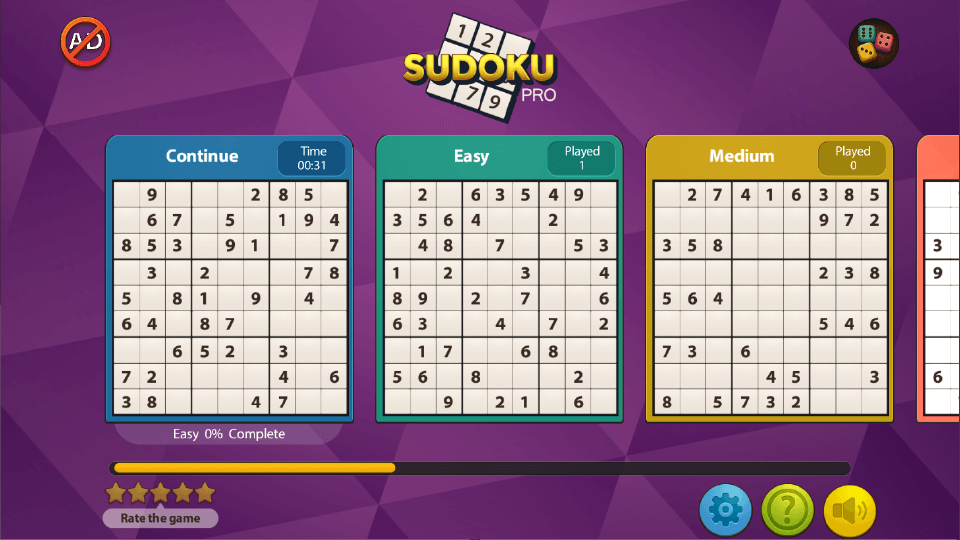
- Multiple difficulty levels ranging from Easy to Expert, catering to all skill levels.
- Intuitive and minimalistic interface reducing distractions and focusing on puzzle-solving.
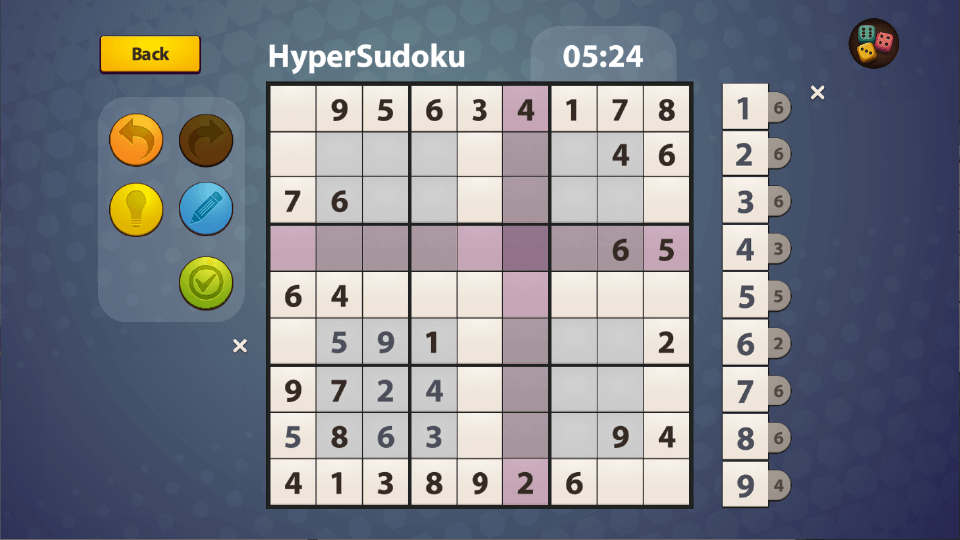
- Automatic error checking and highlighting to help users learn and improve.
- Hints system to assist when stuck, without overwhelming casual players.
- Target Audience: Puzzle enthusiasts, students, professionals seeking mental acuity exercises, and casual gamers who enjoy stimulating brain teasers.
A Fresh Take on a Classic Puzzle
Step into the world of Sudoku - Pro for Windows, and you'll discover a digital playground that makes the age-old number puzzle feel like a fresh, engaging challenge. Its sleek design and responsive gameplay create an inviting atmosphere, where each blank grid awaits your strategic touch—like a chessboard ready for a master's move. Whether you're new to Sudoku or a seasoned solver, this app promises a smooth journey into labyrinths of logic, all while maintaining a friendly, approachable vibe.
Core Features That Make It Stand Out
1. Adaptive Difficulty & Smart Hints
One of Sudoku - Pro's distinctive strengths lies in its adaptive difficulty options, which serve as a gentle ramp-up for beginners or a stern challenge for veterans. The game's hints system is particularly noteworthy—it intelligently spots candidates you might overlook and highlights possible moves. This feature is akin to having a patient friend coaching you through the toughest puzzles, making learning curve smooth without feeling patronizing.
2. Error Prevention & Learning Mode
Unlike many Sudoku apps that penalize mistakes harshly or become frustrating, Sudoku - Pro integrates an automatic error-checking mechanism. If you try to place an incorrect number, the app subtly signals the mistake—like a gentle tap on the shoulder—helping you identify errors in real-time. Moreover, it offers a dedicated learning mode that provides explanations for certain puzzles, turning the app into a functional tool for improving your skills over time.
3. User Interface & Performance
The app's interface strikes a commendable balance—clean, uncluttered, and easy to navigate, much like a well-organized desk inviting you to start work. The controls are responsive, with smooth zooming and tapping, ensuring puzzles feel natural to manipulate. The background music is minimalist and non-intrusive, allowing you to focus entirely on the puzzle at hand. From loading a new puzzle to filling in candidates, everything flows seamlessly, making the experience feel polished and frustration-free. Its learning curve is gentle, and even new users can quickly acclimate without a steep initial hurdle.
Unique Selling Points & Differentiation
What truly sets Sudoku - Pro apart from other puzzle apps is its thoughtful integration of learning tools and adaptive hints. While many Sudoku applications focus solely on puzzle variety or aesthetic appeal, this app emphasizes player growth. Its intelligent hints system not only provides aid but also subtly educates you about strategies—whether it's naked singles or more complex techniques—transforming pure entertainment into a skill-building activity. Additionally, the minimalistic interface combined with smooth performance ensures a distraction-free experience, making it feel like a refined digital version of the classic puzzle book.
Final Verdict & Recommendations
All in all, Sudoku - Pro for Windows is a solid choice for anyone seeking a well-designed, user-friendly Sudoku experience. Its highlight features—particularly the adaptive hints and error-checking mechanisms—make it suitable for casual players eager to learn or more experienced users who want a clean, distraction-free environment. I'd recommend this app for its thoughtful approach to both challenge and education, especially if you appreciate a puzzle that respects your pace and skill level. Whether you're looking to kill time, train your brain, or master the art of Sudoku, this app delivers a rewarding, accessible experience.
Pros
- Intuitive User Interface
- Variety of Puzzle Difficulties
- Auto-Save and Resume Functionality
- Highlighting and Error Detection
- Customizable Themes
Cons
- Limited Offline Features
- In-App Purchase Prompts
- Lack of Tutorial for Beginners
- Limited Custom Puzzle Options
- Minor Graphics Glitches











