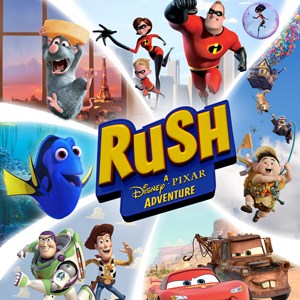
- Name Rush: A DisneyPixar Adventure
- Category Family & kids
Bright and Whimsical Adventure for the Whole Family
Rush: A DisneyPixar Adventure for Windows is a charming and engaging casual game designed to bring beloved Pixar characters to life in a vibrant, interactive world. Perfect for kids and nostalgic adults alike, it offers a friendly entry point into storytelling and cooperative gameplay that emphasizes fun over complexity.
Developed by Xbox Game Studios with a Heart for Family Play
Created by the renowned Xbox Game Studios, Rush is part of their commitment to delivering wholesome, accessible gaming experiences. The game merges the magic of Disney and Pixar storytelling with approachable gameplay mechanics, making it suitable for players of all ages.
Top Features That Make the Game Stand Out
- Interactive Play with Iconic Pixar Characters: Join characters from Toy Story, Cars, Up, and more, exploring beautifully animated worlds grounded in storytelling that appeals across generations.
- Cooperative Multiplayer Experience: Designed for local co-op, allowing family and friends to play together, encouraging teamwork and shared discovery.
- Varied Mini-Games and Puzzles: A collection of themed mini-games that challenge players' creativity and problem-solving in a playful, accessible manner.
- Vivid Artistic Design: Clean, colorful graphics aimed at captivate young players' attention while offering enough detail and charm for older audiences.
Captivating and User-Friendly Interface
The game's interface embodies a cheerful, intuitive layout—think of it as a friendly guidebook to a magical world. Main menus are straightforward, with large icons and clear labels for easy navigation, even for younger users. The design's clarity ensures players can jump right into their adventure without confusion.
Operability is smooth, with responsive controls tailored for keyboard, mouse, and gamepad, ensuring seamless gameplay across devices. The learning curve is gentle; new players will grasp the mechanics quickly, thanks to helpful tooltips and gradual difficulty progression. The game's pacing maintains engagement without overwhelming, making it inviting for players of all skill levels.
Unique Features: Pixar's Magic Meets Family Fun
One of the most remarkable aspects of Rush is its ability to seamlessly blend storytelling with gameplay. Unlike many family-oriented apps that focus solely on mini-games or passive watching, this game offers a narrative-driven experience where players actively participate in familiar stories, like helping Buzz Lightyear or Lightning McQueen accomplish their missions. This interactive storytelling elevates the game from mere entertainment to an immersive experience that fosters emotional connection and shared joy.
Moreover, the cooperative multiplayer mode stands out as its greatest asset. It turns solitary gaming into a shared adventure—imagine playing a Pixar film unfold as a team, where each member's contribution advances the story. This feature encourages communication, patience, and collaboration, making it not just fun but also a bonding activity.
Final Thoughts: Who Should Play and How to Enjoy
Overall, Rush: A DisneyPixar Adventure earns a solid recommendation for families seeking wholesome, engaging entertainment that encourages cooperation and exploration. Its friendly interface and enchanting visuals make it accessible to children, while the charming storytelling appeals to adults and Pixar enthusiasts.
For best experience, play with your kids or friends for shared fun—whether it's a weekend family game night or a casual afternoon activity. Because it is gentle yet captivating, it's particularly suitable for children aged 4 and up, but anyone with a love for Disney and Pixar can find joy within its colorful worlds.
In conclusion, Rush stands out among family-friendly titles for its unique blend of narrative richness, cooperative gameplay, and charming visuals. It's a delightful digital playground where everyone can step into the shoes of their favorite Pixar characters—and that's what truly makes it worth a try.
Pros
- Engaging DisneyPixar characters and storylines
- Colorful and vibrant graphics
- Multiplayer cooperative gameplay
- Educational elements integrated into gameplay
- Accessible controls for young players
Cons
- Occasional performance lag on lower-end devices
- Limited content update frequency
- In-app purchase prompts can be intrusive
- Battery consumption can be high during extended play sessions
- Some users report minor bugs or graphical glitches