

Samsung Email: The Ultimate Solution for Managing Multiple Accounts Seamlessly
Are you tired of juggling multiple email accounts on your smartphone and looking for a streamlined, secure way to handle your personal and business emails? Samsung Email is a powerful app designed specifically for Samsung devices running Android OS, offering a comprehensive solution to organize and protect your emails with ease. This feature-rich email client combines user-friendly design, robust security features, and versatile account management to enhance your email experience.
Getting Started with Samsung Email
The setup process for Samsung Email is straightforward and intuitive. Once you launch the app, you'll be guided through a simple configuration wizard that allows you to add various email accounts effortlessly. Whether you're integrating popular providers like Gmail, Outlook, or configuring corporate email accounts via Exchange, Samsung Email supports a wide range of email protocols including POP3 and IMAP. The app’s quick setup ensures all your inboxes are synchronized and accessible from a single interface, eliminating the need to switch between multiple apps for managing emails.
Key Features of Samsung Email
Unified Inbox and Smart Organization
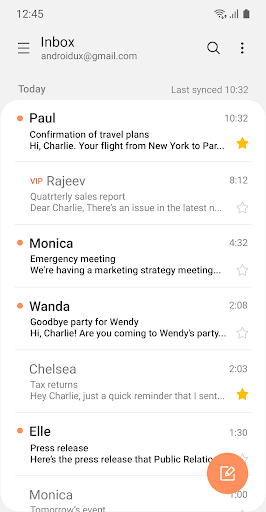
One of the standout features is the Smart Inbox, which intelligently sorts your emails, prioritizing messages based on importance. This helps you focus on what matters most without sifting through countless spam or promotional emails. The app also offers options to categorize and archive emails easily, maintaining a tidy inbox and boosting productivity.
Secure Email Communication
Security is paramount in Samsung Email. It includes S/MIME encryption to safeguard sensitive information, ensuring your communications remain private and protected from unauthorized access. With robust spam filters and phishing protection, the app helps keep your inbox secure from malicious threats, giving you peace of mind in your daily email interactions.
Advanced Synchronization and Policy Management
Samsung Email supports Exchange ActiveSync (EAS) integration, enabling your organization to synchronize emails, calendars, contacts, and tasks seamlessly. Administrators can also enforce various policies, making it suitable for business environments that require controlled access and security protocols.
Customizable User Experience
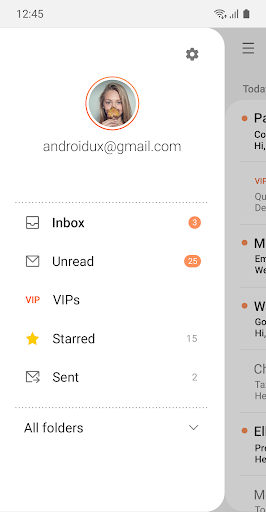
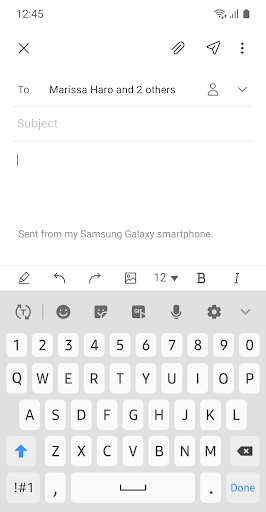
The app allows you to personalize your experience with adjustable notifications, synchronized schedules, SPAM management, and combined mailboxes. Whether you prefer a minimalistic view or detailed notifications, Samsung Email adapts to your preferences for a tailored email management experience.
Conversation and Thread View
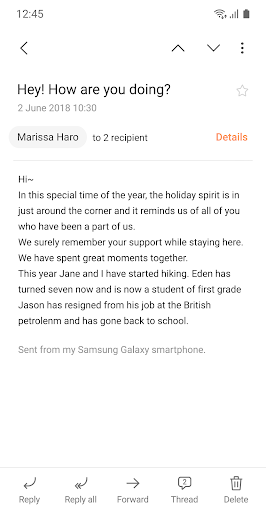
To enhance readability, Samsung Email offers a conversation view that groups related emails into threads. This helps you follow ongoing discussions easily, simplifying email management and ensuring you never lose track of important conversations.
App Access Permissions and Privacy
Samsung Email requires certain permissions to deliver its full functionality. While there are no mandatory permissions, optional ones include access to camera for attaching photos, location for sharing current location data, and contacts to link email recipients with your contact list. Additional permissions for attaching files, media, and notifications are also supported depending on your Android device version. Rest assured, the app adheres to strict privacy policies to protect your data and maintain confidentiality.
Why Choose Samsung Email?
If you're a Samsung device user, Samsung Email offers seamless integration within the Samsung ecosystem, providing a cohesive experience across your phone, tablet, and other devices. Its user-centric design, combined with secure and versatile features, makes managing multiple email accounts simpler than ever. Even for non-Samsung users, the app's compatibility with various email services and protocols makes it a compelling choice for efficient email management.
Final Thoughts
In today's fast-paced digital environment, having a reliable and efficient email app is essential. Samsung Email stands out as a feature-packed solution that balances security, usability, and versatility. Whether you're handling personal emails or managing your work communications, this app simplifies the process, making email management less of a chore and more of an organized, secure experience. Give Samsung Email a try and discover how it can transform your mobile email workflow into a smoother, more productive experience.
Pros
- Seamless integration with Samsung devices
- Supports multiple email accounts
- Customizable user interface
- Robust security features
- Efficient and smooth performance
Cons
- Limited support for third-party app integrations
- Occasional synchronization problems
- Lack of a dark mode option
- Basic spam filtering capabilities
- Limited cloud storage options











