

ID.me Authenticator Overview
ID.me Authenticator is a simple and free two-factor authentication (2FA) solution designed to enhance the security of your ID.me account. This innovative app helps protect your online accounts on websites that support 2FA, ensuring that only you can access your sensitive information. Whether you're managing social media profiles, email accounts, or banking services, ID.me Authenticator offers a reliable layer of security.
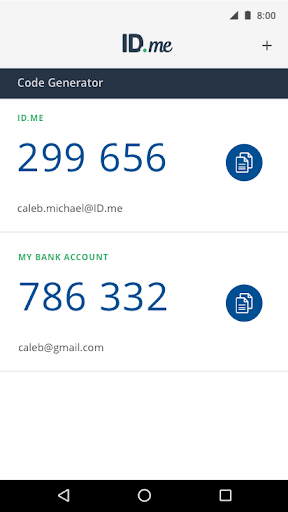
One of the key features of ID.me Authenticator is its ability to generate 6-digit Time-Based One-Time Passwords (TOTP). This means that every time you log in, the app produces a unique verification code that expires after a short period, adding an extra barrier against unauthorized access. Additionally, it supports PUSH notification-based authentication, allowing you to approve login requests with a simple tap on your phone—an incredibly convenient way to secure your digital presence.
Key Features of ID.me Authenticator
Enhanced Security with TOTP Codes
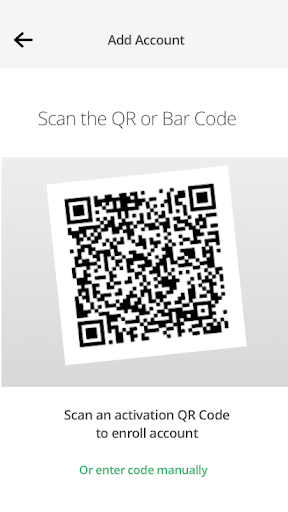
Setting up ID.me Authenticator as a TOTP code generator is straightforward. During account setup, you just scan a QR code, linking the app to your ID.me account. Once configured, you'll receive verification codes directly on your device, even without an internet or cellular connection. This offline functionality ensures that your security remains consistent, no matter where you are.
Every login requires three elements: your username, your password, and a verification code generated by the app. This multi-layered approach significantly reduces the risk of unauthorized access, making your online presence much more secure.
Push Notification-Based Authentication
Another powerful feature of ID.me Authenticator is its push notification authentication. After entering your username and password, you receive a notification on your phone asking for approval. Simply tap "Approve" to complete the login process. This method not only speeds up authentication but also provides an extra layer of protection, as unauthorized users would need your device and your permission to gain access.
To enable this feature, you need to enroll and connect the app to your ID.me account during setup. Once connected, every login becomes a simple yet secure process.
Why Choose ID.me Authenticator?
Recently, I decided to try out the ID.me Authenticator to see if it lives up to the hype. Honestly, I was impressed by how it enhances security without complicating the login process. In today’s digital age, safeguarding online identities is more crucial than ever, and this app provides an effortless way to do so.
The setup process is extremely easy-peasy. It offers an intuitive interface that guides you through connecting your accounts without technical jargon or confusing steps. The sleek, clean design makes navigation straightforward, ensuring that users of all experience levels can benefit from its features.
Security is highly robust. The two-factor authentication system acts like a digital bouncer, adding an extra barrier that protects your accounts even if your password is compromised. With seamless integration across multiple services—be it social media, email, or financial platforms—ID.me Authenticator is an essential tool for anyone looking to boost their online security.
Final Thoughts: Is It Worth Using?
In conclusion, if you’re serious about protecting your online identity, the ID.me Authenticator is definitely worth considering. Its user-friendly interface, robust security features, and seamless integration make it a standout choice for digital security enthusiasts and everyday users alike. By adding this layer of protection, you can significantly reduce the risk of cyber threats and unauthorized access.
So, why not give ID.me Authenticator a try? In a world where online security is more vital than ever, this app provides a simple yet powerful way to safeguard your digital life.
Pros
- Easy to set up and operate.
- Supports multiple accounts.
- Improves security through two-factor authentication (2FA).
- Free to download.
- Simple, user-friendly interface.
Cons
- Limited options for customer support.
- Occasional synchronization problems.
- No desktop version available.
- Needs internet connection for verification.
- Consumes battery rapidly.











