

- Name VR Desktop
- Category Business
- Available on PC, Mobile, Surface Hub, HoloLens
- OS Windows 10 version 17763.0 or higher
- Keyboard Integrated Keyboard
- Mouse Integrated Mouse
- languages English (United States)
Transform Your Windows Desktop into a Virtual Reality Workspace
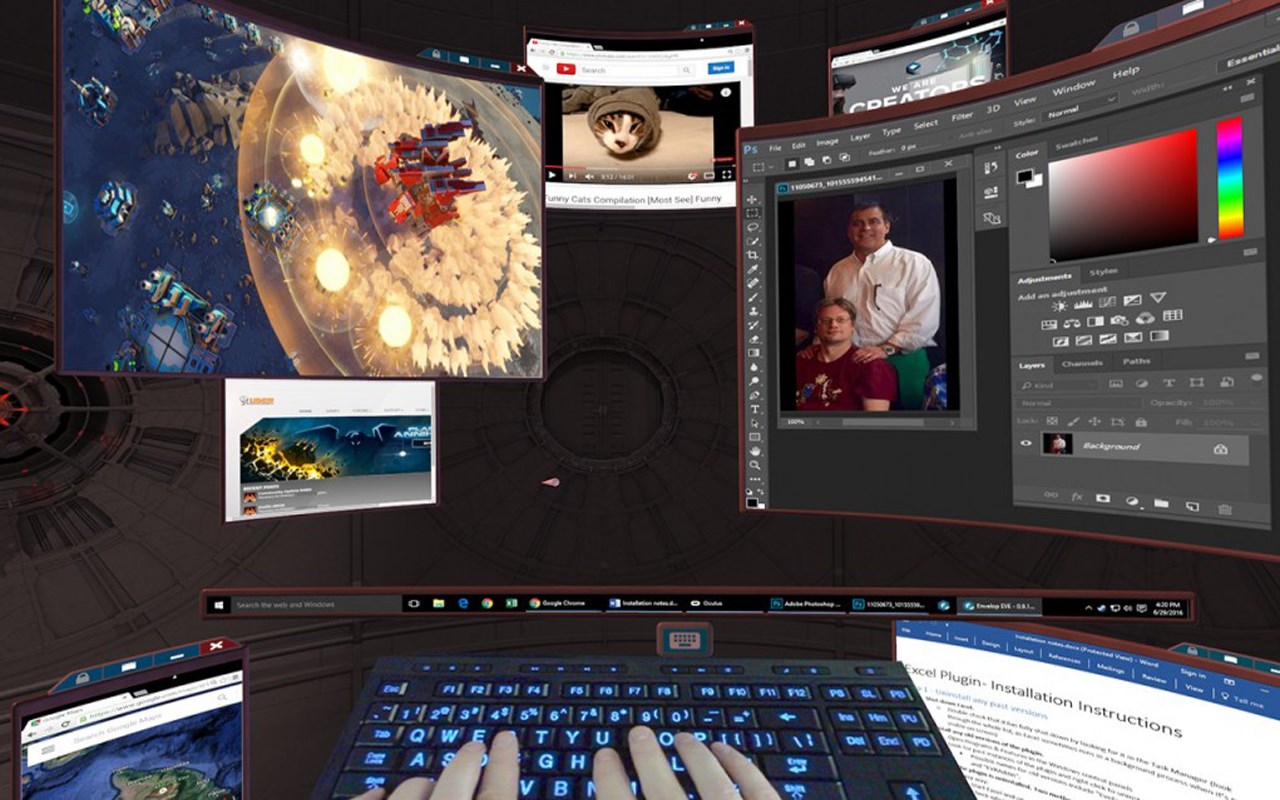
VR Desktop for Windows by Integrated Web Solutions offers a seamless way to immerse yourself in a full VR environment, transforming your traditional desktop experience into an engaging, 3D virtual space. It's a game-changer for users seeking to amplify productivity or simply enjoy a more immersive digital environment.
Who's Behind the Virtual Curtain? – Developer and Core Highlights
Developed by Integrated Web Solutions, a company dedicated to merging virtual reality with everyday computing, VR Desktop aims to bridge the gap between conventional desktops and immersive VR. The app's main features include multi-monitor support within a VR environment, intuitive task management, and enhanced collaboration tools—allowing users to multitask efficiently and work with colleagues in a virtual space. Its target audience ranges from remote workers and digital artists to VR enthusiasts wanting an alternative to traditional computing setups.
Step Into the Future of Desktop Computing: An Immersive Experience
Imagine stepping into a digital command center—walls of screens, floating windows, and a sense of openness that just isn't possible on a physical desk. VR Desktop transforms your Windows environment into this sort of sci-fi setting, but without the complexity. Setting up was surprisingly straightforward; within minutes, I found myself navigating a virtual multi-monitor setup that responded smoothly to my gestures and controller inputs.
Interface Design and User Experience
The app boasts a sleek, minimalist interface that prioritizes ease of use. Virtual interfaces are intuitively arranged, mimicking real-world desk setups, which makes transitioning from your physical desktop feel natural. During my tests, I appreciated how the UI adapts to different headsets and controllers, maintaining fluidity and responsiveness. While the initial learning curve involves mastering VR interactions, the app provides clear on-screen prompts and tutorials—making it accessible even for VR newcomers. Overall, the experience is smooth, with minimal lag or jitter, enhancing concentration and comfort during extended use.
Core Features That Set It Apart
The most distinctive aspect of VR Desktop is undoubtedly its collaborative work feature. Unlike many VR desktop apps that are primarily single-user, this app allows multiple users to access and interact within the same virtual workspace, making remote teamwork feel more natural and engaging. Whether you're briefing a colleague or brainstorming with a team, the shared environment fosters a sense of presence that video calls simply can't match.
Another highlight is its task management integration, which allows users to organize open windows, assign tasks, and even leave notes directly within the VR environment. This integrated approach minimizes the need to switch back and forth between disparate apps, streamlining workflow and keeping your focus sharp.
Final Verdict — Is It Worth a VR Venture?
All in all, VR Desktop for Windows stands out as a thoughtfully designed VR application, especially for those who wish to turn their virtual environment into a productive hub or collaborative space. Its most compelling features—interactive shared workspaces and integrated task management—are where it truly excels, providing a unique advantage over competitors that lack real-time collaboration capabilities in VR. The app's user interface and responsive controls make it accessible without a steep learning curve, and the overall experience feels polished and immersive.
If you're looking to enhance your remote work setup or explore new ways of multitasking in VR, I would confidently recommend giving VR Desktop a try. It's not just a novelty; it's a practical virtual workspace that may redefine how you approach digital productivity.
Pros
- Seamless VR Desktop Experience
- Wide Compatibility
- Multiple Display Support
- Intuitive User Interface
- Stable Performance
Cons
- Limited Customization Options
- Occasional Latency Issues
- Performance Dependent on Hardware
- Limited Customization of Controls
- Initial Setup Can Be Complex











