

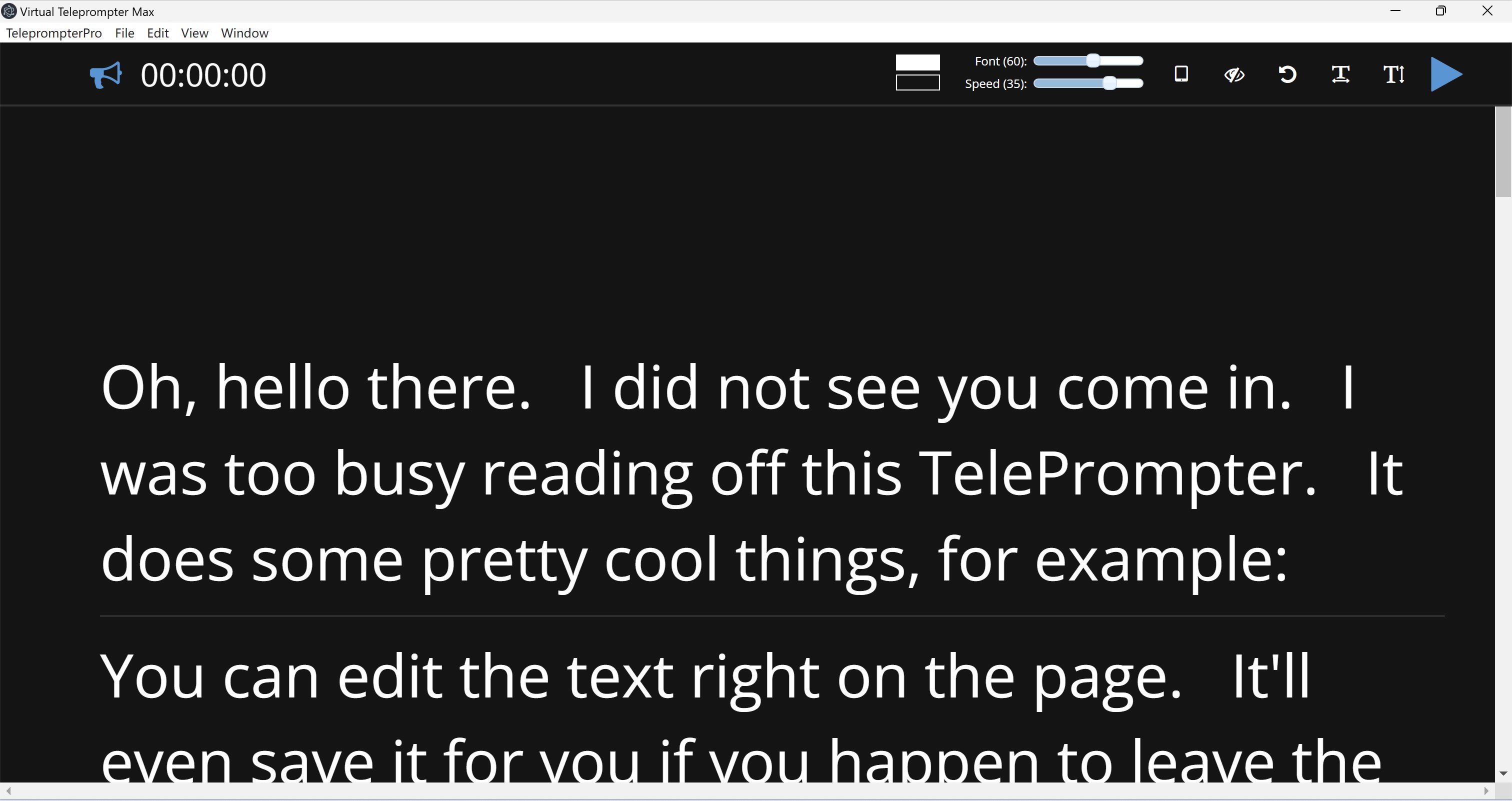
- Name Teleprompter Pro`
- Category Business
- Available on PC
- OS Windows 10 version 14316.0 or higher
- languages English (United States)
Introducing Teleprompter Pro for Windows: Your Professional Speech Companion
Teleprompter Pro for Windows is a versatile and user-friendly application designed to help speakers, presenters, and content creators deliver their lines smoothly and confidently. Whether you're recording a video, delivering a live speech, or practicing for an upcoming presentation, this app aims to streamline your workflow with its robust features.
About the Developer: Linnef Studio
Developed by Linnef Studio, a dedicated team specializing in multimedia and productivity applications, Teleprompter Pro leverages years of experience to provide a reliable tool for professional and amateur speakers alike.
Key Features at a Glance
- Customizable Scrolling & Speed Control: Adjust speech pace seamlessly to match your delivery style.
- Split-Screen & Remote Control Support: Use multiple monitors or remote devices for flexible teleprompting setups.
- Multiple Script Management & Cloud Sync: Load, save, and synchronize scripts effortlessly across devices.
- Collaborative & Task Management Features: Unique capabilities to enhance teamwork and streamline preparation.
The app primarily targets public speakers, video content creators, educators, and professionals who need a reliable teleprompter solution on Windows.
Engaging Your Audience with a Smooth Delivery
Imagine standing confidently before your audience or camera, your script flowing effortlessly in sync with your voice—no awkward pauses, no missed lines. That's the magic Teleprompter Pro aims to bring into your daily routine. Its intuitive design makes it feel like having a personal script assistant right on your desktop, ready to boost your confidence and professionalism at a moment's notice.
Core Functionality Deep Dive
Customizable Scrolling & Speed Control
The heartbeat of any teleprompter is its scrolling feature, and Teleprompter Pro excels here. The app offers precise control over text speed, allowing you to fine-tune the pace to suit your natural delivery. Whether you prefer a slow, deliberate narration or a brisk, energetic presentation, adjusting the scroll is as simple as dragging a slider or entering a specific value. Additionally, the ability to pause, resume, or adjust speed mid-script offers dynamic control that adapts to your flow, mimicking a real-life conversation more closely.
Flexible Multi-Screen & Remote Support
One of the standout features of Teleprompter Pro is its support for split screens and remote control. If you're using a multi-monitor setup, you can customize your script display on a secondary monitor, keeping your primary screen free for notes or video controls. Remote control compatibility means you can operate the teleprompter from a tablet or smartphone, giving you the freedom to move around freely during your speech or recording session. These features are particularly beneficial for professional videographers or live event hosts who require flexible setups.
Script Management & Collaborative Workflow
Managing multiple scripts is a breeze with the app's built-in script library, allowing you to save, load, and organize multiple files effortlessly. Even more impressive is the cloud synchronization feature—perfect for teams working on the same content across different locations. This, coupled with task management tools like annotations and version history, transforms Teleprompter Pro from a simple scrolling app into a collaborative workspace—ideal for content teams preparing scripts for videos or speeches collectively.
User Experience and Differentiation
The interface of Teleprompter Pro is clean and minimalistic, much like a sleek dashboard in a modern vehicle—everything you need is accessible, clutter-free, and easy to find. The learning curve is gentle; even first-time users can start using it effectively within minutes. Smooth operation ensures there are no jarring glitches or delays, making the experience feel natural and professional.
Compared to other teleprompter applications, especially those aimed at business or collaboration, Teleprompter Pro's key differentiator lies in its integration of collaborative work and task management features combined with customizable remote controls. It turns a simple teleprompting tool into a comprehensive platform suitable for team projects, rehearsal planning, and multi-user environments, giving it a notable edge.
Should You Give It a Try?
Absolutely. I recommend Teleprompter Pro for anyone looking for a robust, flexible teleprompter solution on Windows, whether you're a solo creator or part of a larger team. Its combination of intuitive controls, multi-screen support, and collaborative features makes it a versatile choice. For professionals who need a reliable tool that adapts to different kinds of speech or recording scenarios, this app is worth considering.
In conclusion, Teleprompter Pro for Windows offers a subtle yet powerful set of features that can elevate your presentation game. Think of it as your reliable co-pilot—guiding your words smoothly from script to stage, ensuring your message lands with clarity and confidence.
Pros
- Intuitive and user-friendly interface
- Smooth scrolling and adjustable speed
- Supports custom scripts and formatting
- Backup and synchronization features
- Reliable performance for live presentations
Cons
- Limited customization options for themes and backgrounds
- Occasional lag with very large scripts
- No integrated teleprompter remote control feature
- Basic editing features within the app are limited
- Sometimes synchronization across devices can be delayed










