

- Name Checkbook Manager
- Category Business
- Available on PC
- OS Windows 10 version 14316.0 or higher
- languages English (United States)
Introducing Checkbook Manager for Windows: Your Personal Finance Companion
Checkbook Manager for Windows, developed by White Beach, is a robust yet user-friendly personal finance application designed to help individuals keep track of their finances with ease and precision. Its straightforward approach makes it accessible for users seeking to manage budgets, monitor expenses, and stay on top of their financial goals without the complexity of more advanced accounting software.
Core Features That Stand Out
At its heart, Checkbook Manager simplifies the intricate world of personal finance through key features such as intuitive transaction recording, detailed reporting, and seamless synchronization options. Its standout highlight lies in its ability to provide clear visual insights into your financial health, making data both accessible and actionable.
A Fresh Take on Expense Tracking and Budgeting
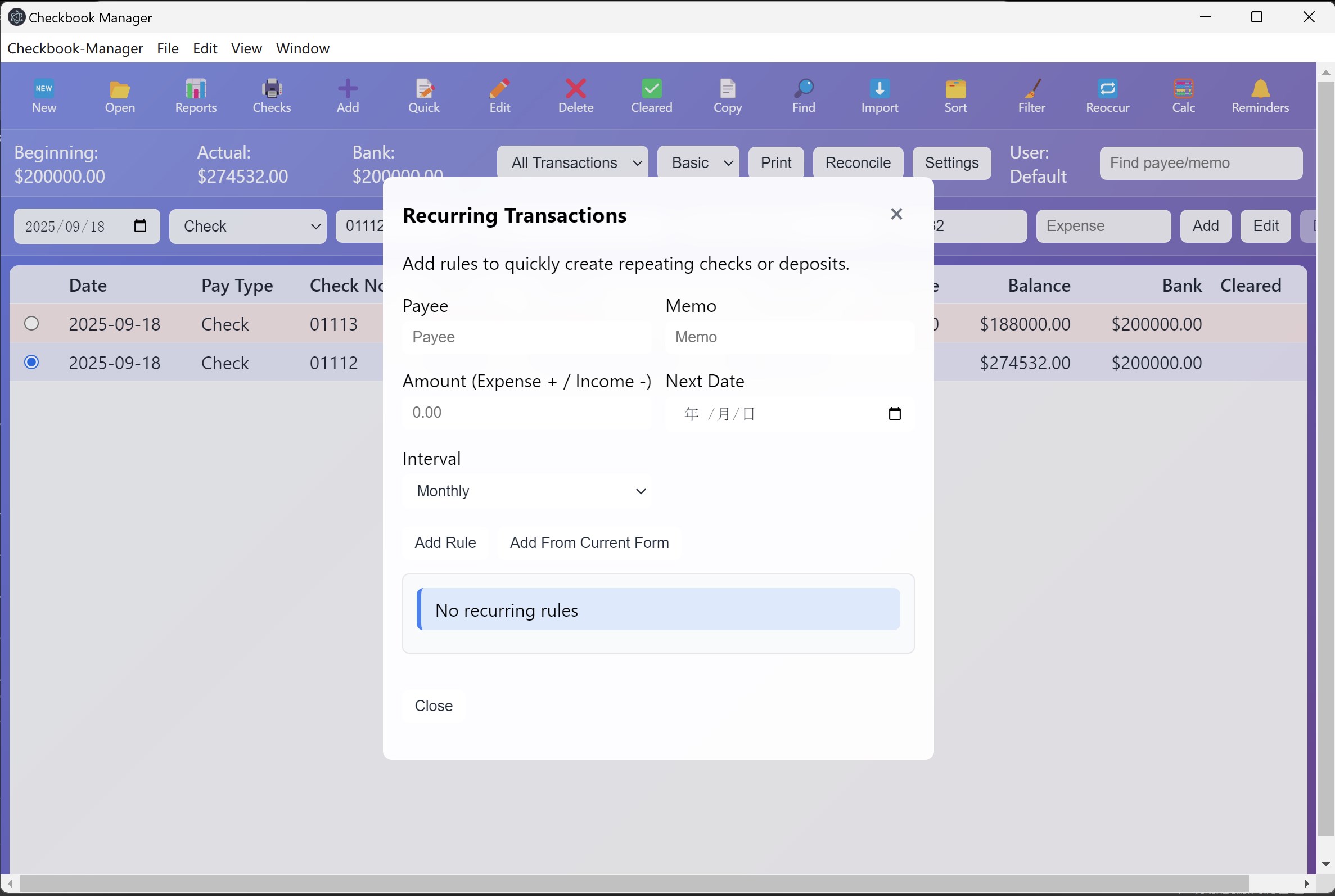
Imagine having a trusted financial assistant sitting right at your desktop, quietly ensuring that every dollar is accounted for. Checkbook Manager makes this possible with its user-friendly interface that transforms the sometimes daunting task of expense tracking into a straightforward experience. The application allows quick entry of transactions, categorization of expenses, and real-time balance updates, making it feel more like a personal ledger than a complex software tool—yet packed with enough functionalities to satisfy the meticulous budgeter.
Design and User Experience
The interface design of Checkbook Manager is clean and organized, reminiscent of a well-structured ledger but with a modern digital twist. Navigating through different modules feels natural, akin to flipping through familiar physical notebooks. The operation is smooth, with minimal lag, supporting a seamless workflow that encourages frequent usage without frustration. For newcomers, the learning curve is gentle; intuitive icons and straightforward menus act as helpful signposts guiding users through every step. Long-time budgeters will appreciate the logical layout that makes reviewing past transactions as simple as perusing a well-marked map.
Digestible Data and Collaborative Highlights
While many similar apps focus solely on individual expense management, Checkbook Manager pushes the envelope with its collaborative work features. It allows users to manage shared financial data with family members or partners effortlessly—think of it as a communal financial scrapbook that can be updated by multiple hands. This feature makes it particularly useful for households or small teams seeking transparency without losing control over sensitive data. Additionally, its task management aspect helps users set financial goals, reminders, and deadlines, turning budgeting into a collaborative and organized effort rather than a solitary chore.
How Does It Set Itself Apart?
Compared to other personal finance apps, Checkbook Manager's biggest advantage is its dual focus on simplicity and collaboration. Unlike many apps that are either overly complex or too basic, this application strikes a careful balance. Its collaborative features give it the edge for households or small groups aiming for transparency and joint accountability. Furthermore, its straightforward design paired with robust functionalities makes it a practical choice for users who want reliable tracking without an overload of features that can obscure usability.
Recommendation and Usage Suggestions
Overall, I would recommend Checkbook Manager for Windows to users who value clarity, ease, and effective personal finance management. It's best suited for individuals, small families, or shared households who need a reliable digital ledger with collaborative capabilities. If you're seeking an application that makes expense tracking feel less like a chore and more like a shared project, this is a solid option. Beginners will find the intuitive interface welcoming, while experienced budgeters will appreciate the detailed reports and task management features.
In conclusion, Checkbook Manager stands out for its thoughtful blend of simplicity and sharing features—making financial management approachable without sacrificing depth. It may not replace complex enterprise solutions, but for everyday use, it offers a dependable, user-centric approach to maintaining your financial health on Windows.
Pros
- User-Friendly Interface
- Comprehensive Financial Tracking
- Customizable Budget Planning
- Synchronization Across Devices
- Regular Updates and Support
Cons
- Limited Import/Export Options
- Lack of Advanced Reports
- Occasional Sync Delays
- Minimal Customization for Visuals
- Offline Access Is Restricted










