

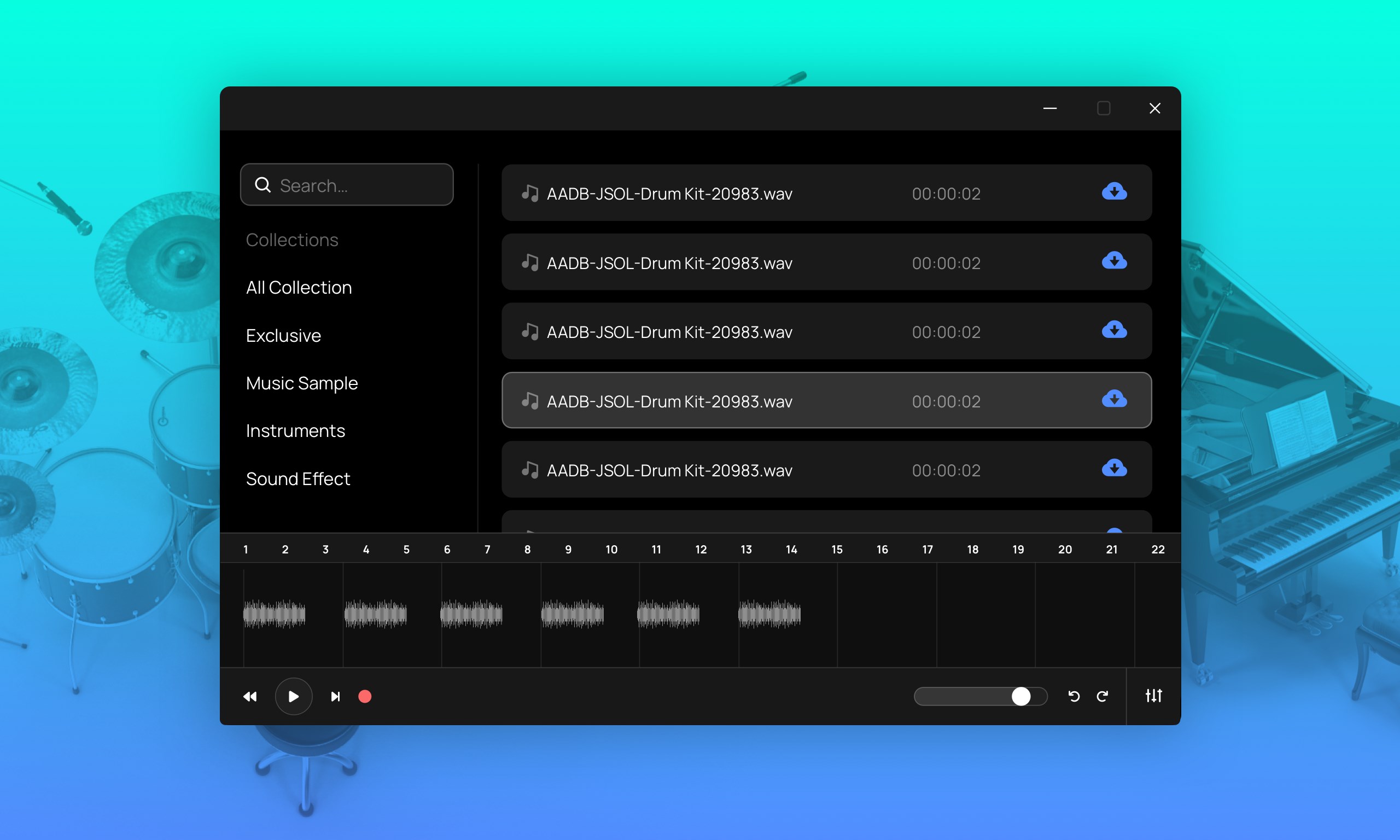
- Name Sound Pack for FL Studio
- Category Business
- Available on PC, Mobile, Surface Hub, HoloLens
- OS Windows 10 version 17763.0 or higher
- Keyboard Integrated Keyboard
- Mouse Integrated Mouse
- languages English (United States)
Introducing Sound Pack for FL Studio: Your Sonic Companion for Creative Freedom
Sound Pack for FL Studio for Windows by Global Software is a curated collection of high-quality sounds designed to elevate music production within the popular FL Studio environment. This application aims to streamline the process of finding and integrating diverse samples into your projects, making it a handy tool for producers seeking inspiration without the hassle of sourcing individual sounds.
A Closer Look: Who, What, and Why?
Developer and Company Background
Produced by Global Software, a reputable publisher known for developing user-centric multimedia and music production tools, Sound Pack for FL Studio is crafted specifically to enhance the creative workflow of digital musicians and beatmakers.
Main Features and Highlights
- Extensive Sound Library: Over thousands of samples spanning genres from hip-hop to EDM, offering versatility for various musical styles.
- Seamless Integration: Designed to quickly load into FL Studio, allowing for effortless drag-and-drop sample management.
- Organized Categorization: Sounds are neatly categorized by type and genre, reducing time spent searching and increasing focus on creativity.
- Customizable Presets and Loops: Pre-made loops and customizable presets help jumpstart your tracks or serve as inspiration.
Target Audience
This application is ideal for amateur producers, seasoned beatmakers, and music educators seeking a comprehensive sound resource to enhance their digital audio workstation experience.
A Dynamic Exploration: Our Hands-On Review
Setting the Scene: A Producer's New Creative Playground
Imagine diving into a treasure chest of sounds that instantly sparks your creativity—whether you're crafting a banger in the studio or layering sounds for an ambient piece, Sound Pack for FL Studio acts like your musical sidekick. Its intuitive interface feels less like a complex software and more like a well-organized toolkit tailored for musicians of all levels.
Core Functionality: Sound Library and Ease of Use
The heart of this app is undoubtedly its vast sound library. Navigating through categorized folders feels akin to walking through a well-labeled vinyl record collection—each section neatly arranged, making it effortless to find precisely what you need. The sounds themselves are of high clarity, ensuring that when you drop them into your project, they retain their richness and impact.
The interface boasts a clean, minimalistic design, with a sidebar for categories and a main window showcasing sound previews. Loading samples into FL Studio is as simple as dragging and dropping—no complicated import procedures, making the workflow smooth even for beginners.
Performance and User Experience
From the moment you open the app, responsiveness is noticeable—loading times are minimal, and switching between categories or previewing sounds feels instantaneous. The learning curve is quite gentle; even users new to sample packs will find it easy to navigate and utilize the content effectively. It's like having a well-curated record collection that invites spontaneous exploration and experimentation.
Highlighting Differentiators: Collaboration and Task Management
Unlike many static sample libraries, Sound Pack for FL Studio emphasizes collaborative work features. When paired with FL Studio's own project sharing and collaborative tools, this app allows multiple users to access and comment on sound selections, streamlining creative teamwork. Moreover, its organized categorization supports task management by helping producers plan sound sourcing systematically—perfect for projects with multiple collaborators or production phases. This focus on collaborative workflows transforms a simple sound library into a community-centric creative hub.
Should You Add This Tool to Your Studio?
Overall, Sound Pack for FL Studio for Windows stands out as a reliable, user-friendly library that complements existing digital audio workstations. While it doesn't reinvent the wheel, its thoughtful organization, easy drag-and-drop functionality, and focus on collaborative features make it particularly appealing for producers who value efficiency and teamwork. I would recommend it primarily to those looking for an accessible, high-quality sample resource that integrates smoothly into their existing production setup.
For seasoned professionals, it might serve better as a supplementary library, whereas beginners can leverage its intuitive design to accelerate their creative journey. If you're someone who appreciates having a diverse, well-organized sound palette at your fingertips—think of it as your musical toolbox—then this app deserves a spot in your software arsenal.
Pros
- Extensive Sound Library
- Easy Integration with FL Studio
- User-Friendly Interface
- Regular Updates
- Good Value for Money
Cons
- Limited Customization Options
- Requires Internet Connection for Downloads
- Large Download Size
- Occasional Sound Overlap
- Limited Compatibility Outside FL Studio











