
- Name Simplefax - fax without subscriptions
- Category Business
- Developer Furnace Creek Software
- Available on PC, Mobile
- OS Windows 10 version 17763.0 or higher
- languages English (United States)
Simplefax: Your No-Subscription Fax Solution for Windows
If you're tired of bulky subscriptions and hidden fees just to send a simple fax, Simplefax by Furnace Creek Software might be the sleek, straightforward alternative you've been seeking. This application promises hassle-free faxing directly from your Windows device, making it a handy tool for professionals and small businesses alike.
Developer and Core Features at a Glance
Developed and published by Furnace Creek Software, Simplefax positions itself as an easy-to-use, no-subscription fax app designed specifically for Windows users. Its primary appeal lies in offering a fixed-price, subscription-free way to send and receive faxes – a feature that caters to users seeking cost predictability.
- Send and receive faxes without requiring a phone line or fax machine.
- One-time purchase model, with no recurring fees or hidden costs.
- Intuitive interface with uncomplicated workflows tailored for quick faxing.
- Compatibility with modern Windows systems, ensuring smooth operation.
This app is particularly geared towards freelancers, small business owners, and professionals who occasionally need to send or receive faxes without the overhead of ongoing subscriptions.
A Tangible, User-Friendly Faxing Experience
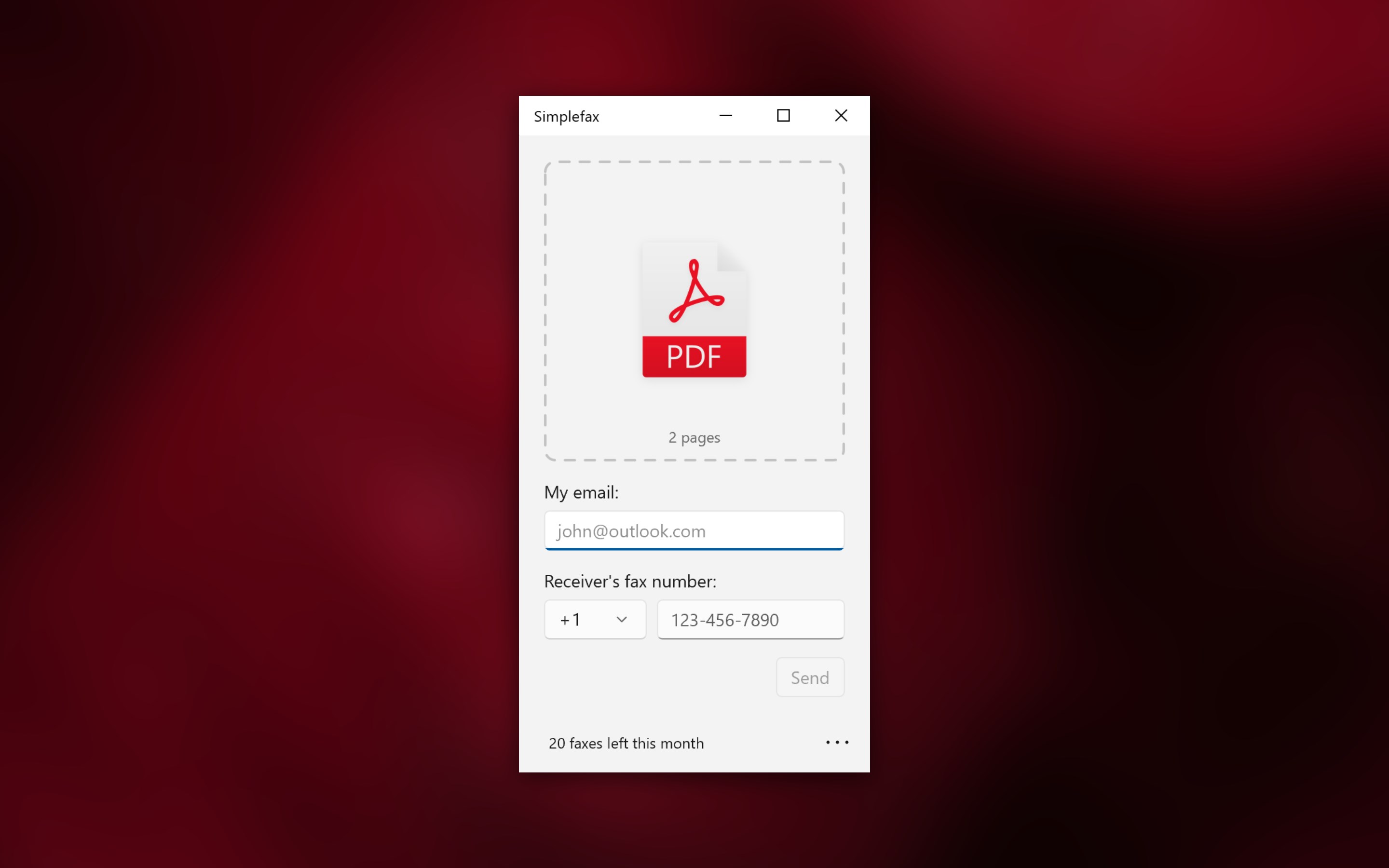
Using Simplefax feels akin to flipping open a well-organized reference book—clear, accessible, and no-nonsense. Upon launching, the interface welcomes you with a clean, modern design, making the entire process feel like a comfortable chat rather than setting up complex machinery. Whether you're sending a contract or a quick note, the app's layout simplifies each step, making faxing an almost effortless task.
Core Functionality 1: Hassle-Free Send/Receive
The heart of Simplefax lies in its core ability to send and receive faxes seamlessly. Unlike traditional fax machines or online services with confusing tiered plans, Simplefax lets you load your document, enter the recipient's fax number, and hit send—nothing more. For incoming faxes, it notifies you instantly, storing files for easy access. This direct approach significantly minimizes middlemen, keeping things quick and to the point.
Core Functionality 2: Straightforward Document Management
Managing documents within Simplefax is a breeze. The app supports common file formats like PDF, DOCX, and images, streamlining your workflow. You can preview, organize, and re-send documents without juggling multiple apps or complex procedures, making it feel like having a tidy, digital fax cabinet at your fingertips.
Assessing User Experience: Design, Flow, and Learning Curve
The app's interface is designed for ease of use, especially for those who aren't tech-savvy. Its minimalist layout means less clutter and more focus on the task at hand. Navigating from document selection to sending is intuitive, with clearly labeled buttons and helpful prompts guiding the process. The app performs smoothly on modern Windows machines, with no noticeable lag, which adds to its polished feel.
For newcomers, the learning curve is gentle—most users will be able to start sending faxes within minutes. More advanced features or options are minimal but accessible, emphasizing simplicity over complexity. This makes Simplefax a good choice for users who want quick results without getting bogged down by extensive settings.
Unique Selling Points: Collaborative and Task Management Features
Compared to similar business applications, Simplefax stands out with its focus on essential functionality, but what truly sets it apart is its approach to collaborative work and task management. Unlike platforms that emphasize broad communication channels, Simplefax's strength lies in its dedicated, reliable fax service designed for single-purpose efficiency.
While it may not have extensive collaboration tools like shared task lists or integrated messaging, Simplefax's advantage is its ability to be integrated into a broader workflow effortlessly—sending important documents without leaving your familiar Windows environment. Its predictable, fixed cost model means teams can plan their communication expenses without surprises, a rare find in the digital fax world.
Final Thoughts and Recommendations
All in all, Simplefax delivers a no-frills, efficient faxing experience tailored for users who value simplicity and transparency. Its standout feature—the absence of subscription plans—is a breath of fresh air in a market often dominated by recurring fees. If you occasionally need to send faxes and prefer a straightforward, Windows-native solution, Simplefax is definitely worth considering.
For those seeking comprehensive collaboration tools or integrated task management, you might want to explore more feature-rich applications. However, for reliable, economical, and user-friendly faxing, Simplefax gets a solid recommendation. We suggest trying it out if your workflow involves sporadic faxing needs; it's like having a dependable digital fax machine without the bulk or ongoing costs.
Pros
- User-Friendly Interface
- No Subscription Needed
- Cross-Device Compatibility
- Fast Fax Transmission
- Secure Data Handling
Cons
- Limited Fax Storage
- Basic Features Only
- Occasional Connectivity Issues
- Limited International Support
- No Free Trial Version











