
- Name SewCat
- Category Utilities & tools
- Developer S & S Computing
- Available on PC
- OS Windows 10 version 0.0 or higher
- Keyboard Integrated Keyboard
- Mouse Integrated Mouse
- Memory 300 MB
- languages English (Algeria), Danish, Dutch, French, German, Italian, Spanish, Portuguese, English (United States)
SewCat for Windows: A Handy Companion for Seamless Sewing Projects
If you're someone passionate about sewing or quilting, SewCat for Windows offers a refreshing digital touch to your craft. This app promises to streamline pattern management and project planning, making your creative process more organized and enjoyable.
Who's Behind SewCat? Crafting a User-Friendly Tool
Developed by S & S Computing, SewCat is a thoughtfully designed application tailored for sewing enthusiasts. S & S Computing specializes in creating practical, user-focused software solutions that cater to niche hobbies and crafts, combining technical expertise with an understanding of the creative community.
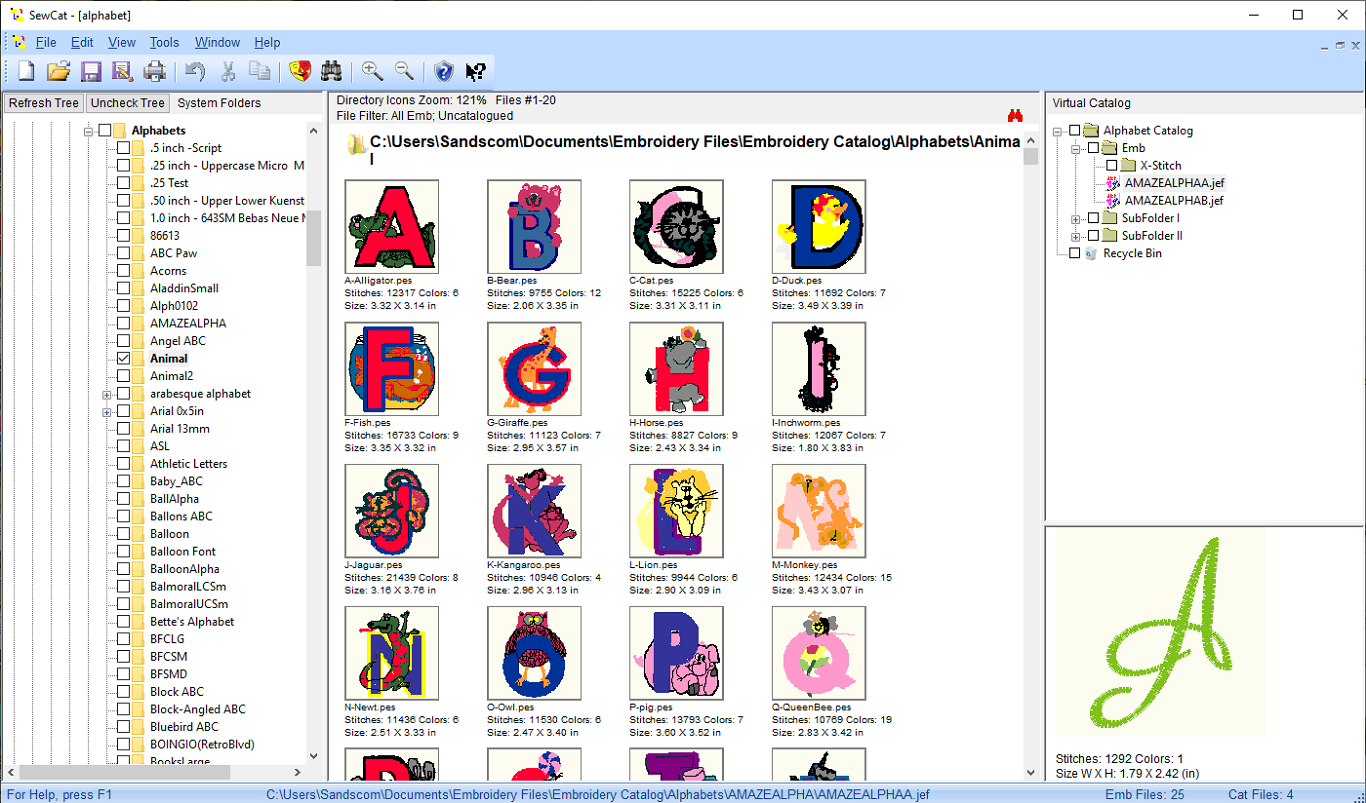
The main features of SewCat include pattern catalog management, fabric and supply tracking, and project planning assistance. These highlights aim to simplify the often complex world of sewing projects, turning it into a more manageable and enjoyable experience.
Targeted at hobbyists, semi-professionals, and even sewing teachers, this app is suitable for anyone looking to bring more organization into their sewing endeavors—whether you're designing intricate quilts or keeping tabs on your fabric stash.
Bright Start: First Impressions & Ease of Use
Imagine opening a well-organized sewing drawer—that's the feeling SewCat gives as you launch it for the first time. The interface is clean, intuitive, and inviting, guiding you like a friendly sewing buddy. Navigating through patterns, supplies, and project sections feels seamless, almost like flipping through a well-loved fabric catalog. Even if you're new to digital planning tools, SewCat's learning curve is gentle, offering tips and straightforward menus to get you started quickly.
Pattern and Supply Management: Your Digital Pattern Envelope
One of SewCat's standout features is its robust pattern catalog management. Think of it as your virtual sewing room's personal library. You can easily add, categorize, and search for patterns—be they printed PDFs, hand-drafted sketches, or purchased designs. This feature transforms a messy pile of paper patterns into a neatly organized digital archive, accessible anytime.
Complementing this is the fabric and supply tracker. With just a few clicks, you can log your fabric inventory, jot down quantities, and note specific details like fiber content or color. It's akin to having a digital fabric stash organizer, preventing unwanted surprises when you're ready to cut.
Project Planning & Workflow Optimization
SewCat excels in converting your creative visions into structured projects. You can assign patterns, resources, and timelines, turning a vague idea into a clear roadmap. This function acts like your sewing project's gps—helping you stay on course and avoid unnecessary detours.
Moreover, the app supports progress tracking, allowing you to mark three stages—planned, in progress, completed. This feature is especially helpful for those juggling multiple projects, providing a satisfying sense of achievement once each is checked off.
Overall User Experience & Unique Advantages
Using SewCat feels like working with a trusted sewing companion—responsive, straightforward, and subtly intelligent. The interface's simplicity and logical organization greatly reduce the overhead often associated with digital cataloging, making it accessible for users of various tech skill levels. The smooth operation supports quick data entry and edits, ensuring your creative flow remains uninterrupted.
Where SewCat truly sets itself apart from other utility apps is its focused approach to sewing project management—offering specialized features like fabric tracking and pattern organization in one package. This tailored functionality makes it stand out in a crowded field of generic note-taking or inventory apps, providing an integrated experience catered specifically to sewists.
Final Verdict: A Recommended Digital Sewing Assistant
All in all, SewCat for Windows is a well-crafted application that offers meaningful benefits for sewing enthusiasts seeking better project organization. Its intuitive design, combined with unique features like pattern and fabric management, make it a valuable addition to your sewing toolkit.
I would recommend SewCat for hobbyists and semi-professionals who want a reliable, easy-to-use software to streamline their craft. While it may not replace dedicated project management software, its specialized focus makes it the go-to companion for anyone serious about organizing their sewing universe. Give it a try—you might find this digital needle thread to be just what you need to bring more order and joy into your sewing projects.
Pros
- Intuitive User Interface
- Fast Gaming Performance
- Wide Range of Cat-themed Content
- Regular Updates and Bug Fixes
- Free to Download with Optional In-App Purchases
Cons
- Limited Customization Options
- Occasional Ads During Play
- Small Bug Occurrences
- Device Compatibility Constraints
- Limited Language Support











