

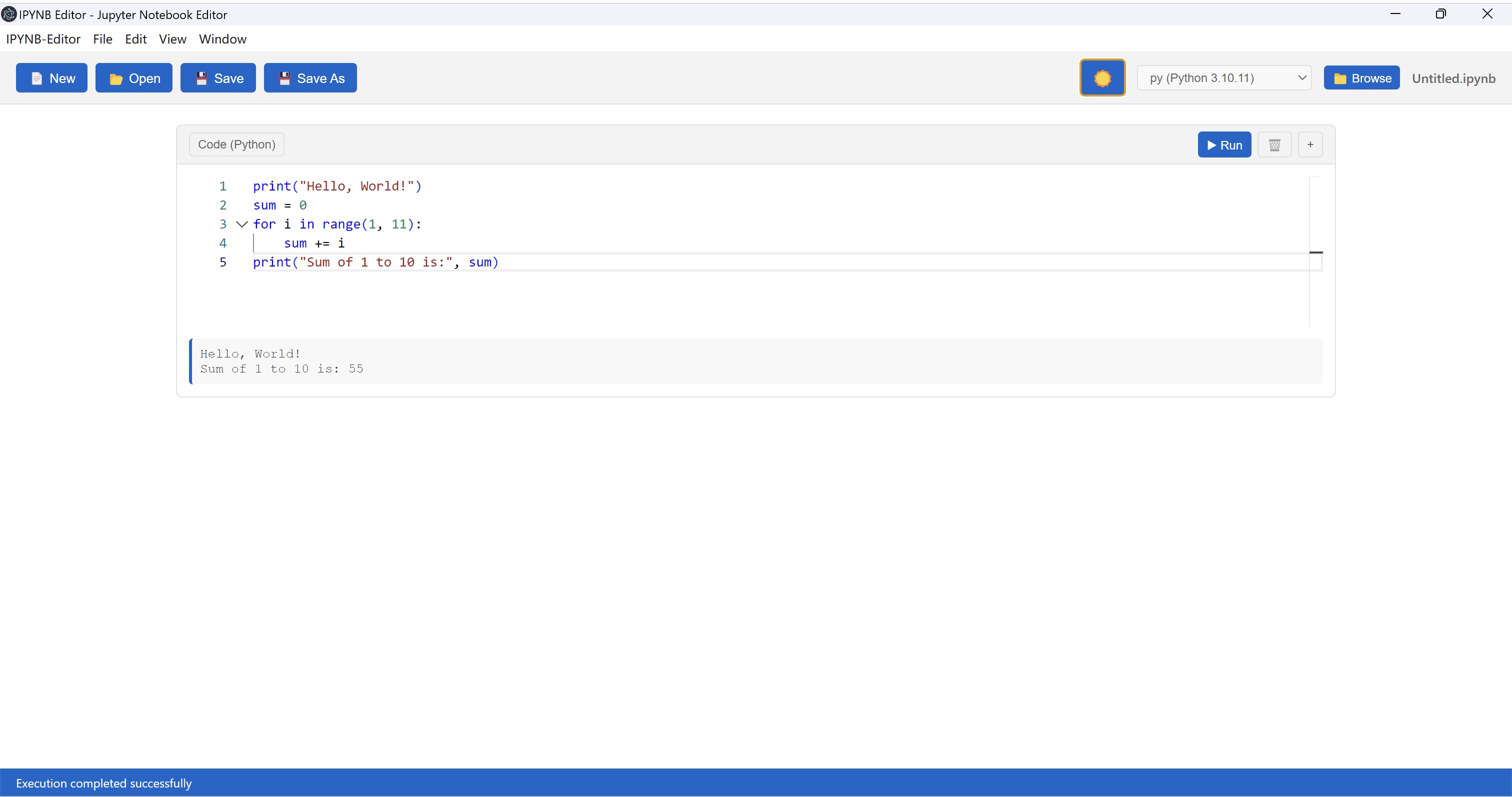
- Name IPYNB Editor - Jupyter Notebook Editor
- Category Utilities & tools
- Developer Goldenman Limited
- Available on PC
- OS Windows 10 version 14316.0 or higher
- languages English (United States)
Introducing IPYNB Editor: Your Elegant Companion for Jupyter Notebook on Windows
Imagine having a sleek, dedicated workspace for your data exploration and coding projects on Windows — IPYNB Editor by Goldenman Limited promises just that. Designed specifically for Jupyter Notebook users, this app aims to streamline your workflow with an intuitive interface and a focus on productivity. It's like having a personalized, portable notebook that's always ready to assist with your data science, machine learning, or academic research projects.
Core Features That Make a Difference
Seamless Jupyter Notebook Experience
At its heart, IPYNB Editor provides a smooth environment for creating, editing, and running Jupyter notebooks directly on Windows. It supports all familiar markdown and code cell functionalities, making it feel natural for existing Jupyter users while offering a native Windows experience. The app handles code execution efficiently, ensuring minimal lag and quick responsiveness, much like flipping through pages in a well-bound book.
Intelligent Code Management & Syntax Highlighting
The editor excels in offering intelligent syntax highlighting and real-time code suggestions that help avoid common pitfalls. This feature is akin to having a friendly programming coach sitting beside you, nudging you when your code veers off the beaten path. It simplifies debugging and enhances readability—great for both novices and seasoned developers aiming for cleaner notebooks.
Enhanced User Interface & Customization
What sets IPYNB Editor apart is its thoughtfully designed interface, combining minimalism with practicality. Bright, accessible menus and customizable themes create a welcoming environment that adapts to your working style. The app's layout resembles a well-organized lab bench—everything in its place, reducing distractions and allowing your focus to stay on the task. Navigating between cells and managing notebooks feels fluid and intuitive, lowering the learning curve even for newcomers.
A Closer Look at the User Experience
The interface design of IPYNB Editor is reminiscent of a high-end writing desk—clean lines, logical layout, and easy access to tools. The app's responsiveness is remarkable; you'll find yourself flipping from cells to menus without lag, akin to gliding smoothly on well-oiled gears. Even if you're new to Jupyter Notebooks, the app's streamlined onboarding process minimizes the usual steep curve, inviting users to start coding right away with minimal fuss.
What Makes It Stand Out Among Tools
Compared to other utilities and tools for Jupyter notebooks—like Anaconda or JupyterLab—IPYNB Editor offers a notable emphasis on polish and simplicity. Its native Windows design ensures better integration with the OS environment, providing cleaner file management and shortcuts. Moreover, its dedicated focus on optimizing notebook editing and viewing without overwhelming users with extra features makes it uniquely suited for those who want a straightforward, powerful tool. The app's ability to run seamlessly without the overhead of a browser-based interface or complex installations is a significant plus, especially for users seeking a lightweight yet capable solution.
Final Recommendation and Usage Suggestions
If you're a data scientist, student, or researcher seeking an efficient, elegant way to handle Jupyter notebooks on Windows, IPYNB Editor is worth a try. It is especially suitable for those who prefer a minimalist, focused environment over bulky IDEs or web-based tools. While it may lack some of the advanced features of larger platforms, its streamlined design and core functionalities make it an excellent choice for daily notebook management. I'd recommend starting with it if you value quick setup, a clean interface, and smooth performance—your notebooks will thank you for it.
Pros
- Intuitive Jupyter Notebook editing interface
- Seamless integration with Microsoft Store ecosystem
- Supports core Jupyter functionalities like markdown, code cells, and variable inspection
- Lightweight and quick startup time
- Regular updates and bug fixes through Microsoft Store
Cons
- Limited customization options for the interface
- Basic support for extensions compared to full Jupyter Notebook
- Potential difficulties in managing complex environments or dependencies
- Occasional lag or performance issues with large notebooks
- Limited offline documentation features










