
- Name Scan Document to PDF
- Category Utilities & tools
- Developer Some Media Apps
- Available on PC, Mobile, Surface Hub, HoloLens
- OS Windows 10 version 17763.0 or higher
- languages English (United States)
Transforming Paper Trails into Digital Clarity: An Honest Look at Scan Document to PDF for Windows
In a world where documents are kings and paper chaos reigns supreme, the need for a reliable, straightforward scanning solution feels like a beacon of hope. Enter "Scan Document to PDF for Windows" — a tool promising to turn your physical files into neatly organized digital PDFs. But does it truly deliver on its promise? Let's unpack this app like a seasoned reviewer, cutting through the jargon to reveal what's really under the hood.
Straightforward and Focused: The Core of the App
Developed by Some Media Apps, this utility aims to serve those who need quick, hassle-free document scanning. Its main selling points include ultra-simple PDF conversion, support for multiple document types, and an intuitive interface designed for users at all levels. Think of it as your digital photocopier that not only scans but also assembles the resulting images into a polished PDF file — perfect for students, professionals, and anyone who prefers screens over stacks of paper.
Core Functionality Highlights
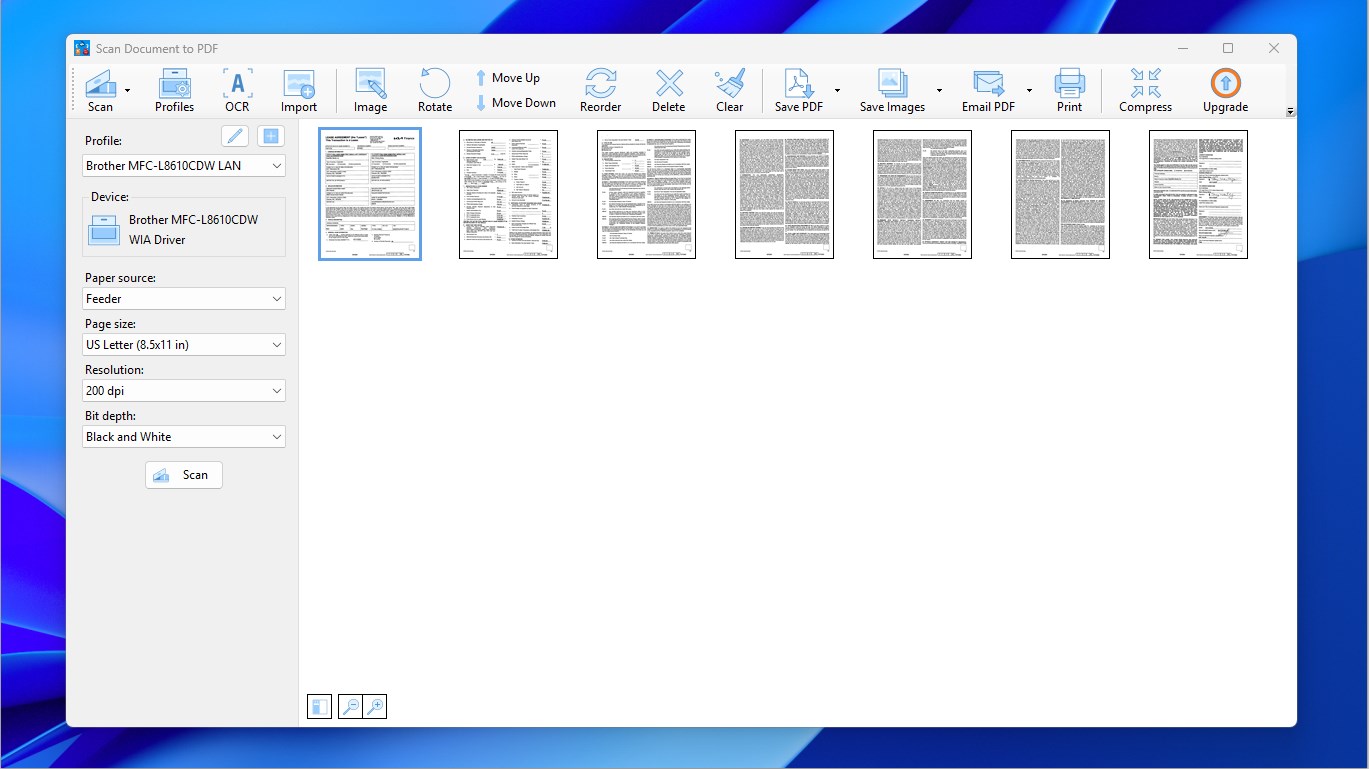
- One-Click PDF Conversion: The app excels at turning scanned images into PDFs with minimal fuss. You simply scan your document and press a button—voila! Your files are ready for sharing or storage, making it ideal for those who need results fast and without cluttered menus.
- Multiple Document Support: Whether you're digitizing a single page or multiple sheets, the app smoothly handles batch processing. Imagine you're scanning a multi-page contract or a recipe book—this tool keeps the process light and efficient.
- Image Optimization and Cropping: Built-in editing features allow for basic adjustments such as cropping, rotating, or enhancing scans. It's akin to having a mini photo editor focused solely on making your scanned documents crisp and readable.
- User-friendly scanning interface
- High-quality PDF output
- Multiple file management options
- Supports multiple document pages
- No additional hardware needed
- Limited editing tools
- Occasional auto-cropping inaccuracies
- Occasional app crashes during large scans
- Watermark on free version
- Limited export formats
Design, Usability, and User Experience
The interface strikes a balance between simplicity and functional clarity. It's clean, with large buttons that feel like friendly signposts guiding your every move. The learning curve is gentle—if you've ever used a basic camera app or a scanner, you'll find this intuitive. The app performs with consistent speed, ensuring you don't have to wait long during your scanning sessions. Its straightforward flow allows users to go from opening the app to exporting a PDF in just a few taps, making it accessible for tech novices and busy professionals alike.
What Sets It Apart in the Crowd?
Compared to other utilities in the same space, "Scan Document to PDF for Windows" stands out with its hallmark feature: streamlined, one-step PDF creation. Unlike more complex document scanners that flood users with options or integrations, this app keeps it minimal and focused, ideal for quick tasks rather than heavy-duty document management. This streamlined approach is as refreshing as a cool breeze on a hot day—no unnecessary distractions, just immediate results. Its emphasis on ease of use makes it particularly appealing for users who need a reliable tool without steep learning curves or monthly subscriptions.
Recommendation and Usage Advice
In a nutshell, I'd recommend this app to anyone who needs a straightforward, reliable scanner and PDF converter for occasional use. It's especially beneficial if your main goal is speed and simplicity, rather than advanced editing or file management features. However, for bulk document processing or extensive editing needs, you might want to explore more feature-rich alternatives. Think of it as a trusty pocketknife—perfect for quick fixes and everyday tasks.











