

- Name Loomy Screen Recorder
- Category Utilities & tools
- Developer DADEM
- Available on PC
- OS Windows 10 version 17763.0 or higher
- languages Chinese (Simplified), Czech, English (United States), Hungarian, Italian, Japanese, Portuguese (Portugal), Sinhala, Spanish (Spain), Turkish
A Clear-Cut Tool for Effortless Screen Recording
Loomy Screen Recorder for Windows by DADEM is designed to simplify the process of capturing your digital environment, making it accessible for both everyday users and professionals alike. If you've ever wanted a reliable, straightforward way to record your screen without the fuss, this app promises just that.
About the App: Basic Info
Positioned as a lightweight yet powerful screen capture utility, Loomy Screen Recorder aims to streamline the process of creating tutorials, gameplay footage, or instant demos. Developed and published by DADEM, the application embodies the ethos of simplicity and efficiency in screen recording tools.
- Main Features:
- Simple and intuitive user interface designed for quick start-up.
- Flexible recording options including full screen, window, or custom area.
- Support for high-quality video output with minimal impact on system performance.
- Easy sharing options directly from the app or saved files.
- Target Audience: From casual users wanting to capture game moments, to educators preparing online tutorials, to professionals creating product demos, Loomy Screen Recorder is aimed at anyone needing a straightforward recording solution.
Engaging the Viewer: A User-Friendly Experience
Imagine you're trying to record a quick tutorial or capture an exciting gaming moment. Loomy Screen Recorder puts the power in your hands without making you jump through hoops. Its simple setup and swift response turn what could be a tedious task into an engaging, even enjoyable, experience. Within seconds, you're ready to start recording—no complicated menus or steep learning curves here. It's like having a friendly assistant always on standby, prepared to capture your screen exactly as you see it.
Core Functionality: Simplified Yet Robust
Seamless Recording Flexibility
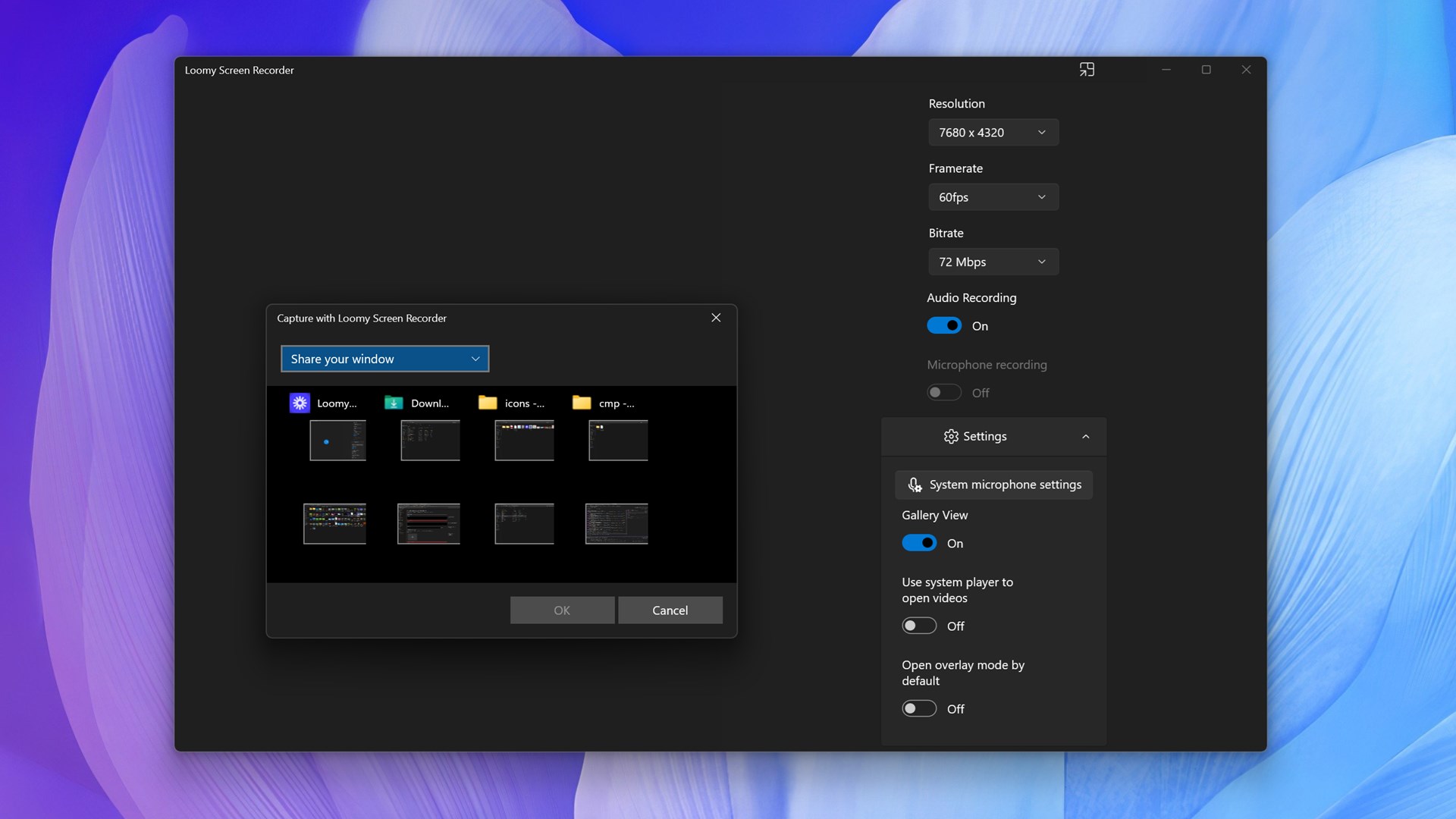
The application's most prominent feature is its ability to quickly switch between different recording modes. Whether you want to record the entire desktop during a webinar, focus on a specific window like your browser or game, or draw a custom recording area, Loomy Screen Recorder handles it gracefully. Its intuitive interface ensures even first-time users can select their preferred mode with a few clicks, turning complex tasks into a few simple actions. The app's high compatibility with various resolutions ensures your recordings are crisp, whether for sharing on social media or professional presentations.
High-Quality Output with Minimal System Impact
One of the standout qualities of Loomy Screen Recorder is its ability to produce high-quality video files without bogging down your PC. Thanks to optimized encoding algorithms, users can record in HD or higher settings without fearing lag or system crashes. This makes it particularly appealing for gamers and content creators who need reliable capture tools that won't interfere with their workflow or entertainment experience.
Effortless Sharing and Storage
After recording, Loomy offers straightforward options to share your videos directly or save locally. It supports common formats, making it easier to upload to YouTube, Vimeo, or internal project folders. This focus on seamlessness eliminates the usual hassle of file conversions or complicated export procedures, streamlining your entire creative process.
Design, Usability, and Unique Advantages
Visually, Loomy Screen Recorder sports a clean, modern interface that feels approachable yet professional. Its layout guides users effortlessly from setup to recording, minimizing the learning curve. The app's responsive performance ensures that switching between modes and starting/stopping recordings is smooth, akin to flipping a light switch—quick and reliable.
Compared to many utilities that clutter their interfaces or require extensive configurations, Loomy shines with its unobtrusive design focused on core functionalities. Its ability to quickly adapt to different recording needs without unnecessary complications is a clear differentiator. Especially noteworthy is its support for high-definition recordings with optimized performance, making it suitable for professional use without demanding high-end hardware.
Final Verdict and Recommendations
All things considered, Loomy Screen Recorder offers a balanced approach—combining ease of use with respectable performance. Its standout features, such as flexible recording modes and high-quality output, make it a reliable choice for users seeking simplicity without sacrificing capability. While it may not boast the bells and whistles of more comprehensive editing suites, it excels as a no-fuss recording tool.
For casual users, educators, or small business folk needing quick captures, I'd recommend giving Loomy a try. Its straightforward workflow means you'll spend less time figuring out how to record and more time creating. That said, if your needs include advanced editing or post-processing, you might want to pair it with dedicated video editing software.
Overall, Loomy Screen Recorder stands out as a particularly user-friendly, efficient utility—an unobtrusive yet reliable partner in your screen capturing endeavors. Its unique strengths lie in its simplicity and high-quality output, making it a recommended addition to your digital toolbox for everyday recording tasks.
Pros
- High-Quality Recording
- User-Friendly Interface
- Fast Recording Speed
- Built-in Editing Tools
- Multiple Export Options
Cons
- Limited Customization Options
- Occasional Lag During Playback
- Watermark on Free Version
- Limited Cloud Storage Integration
- Occasional Software Crashes











