

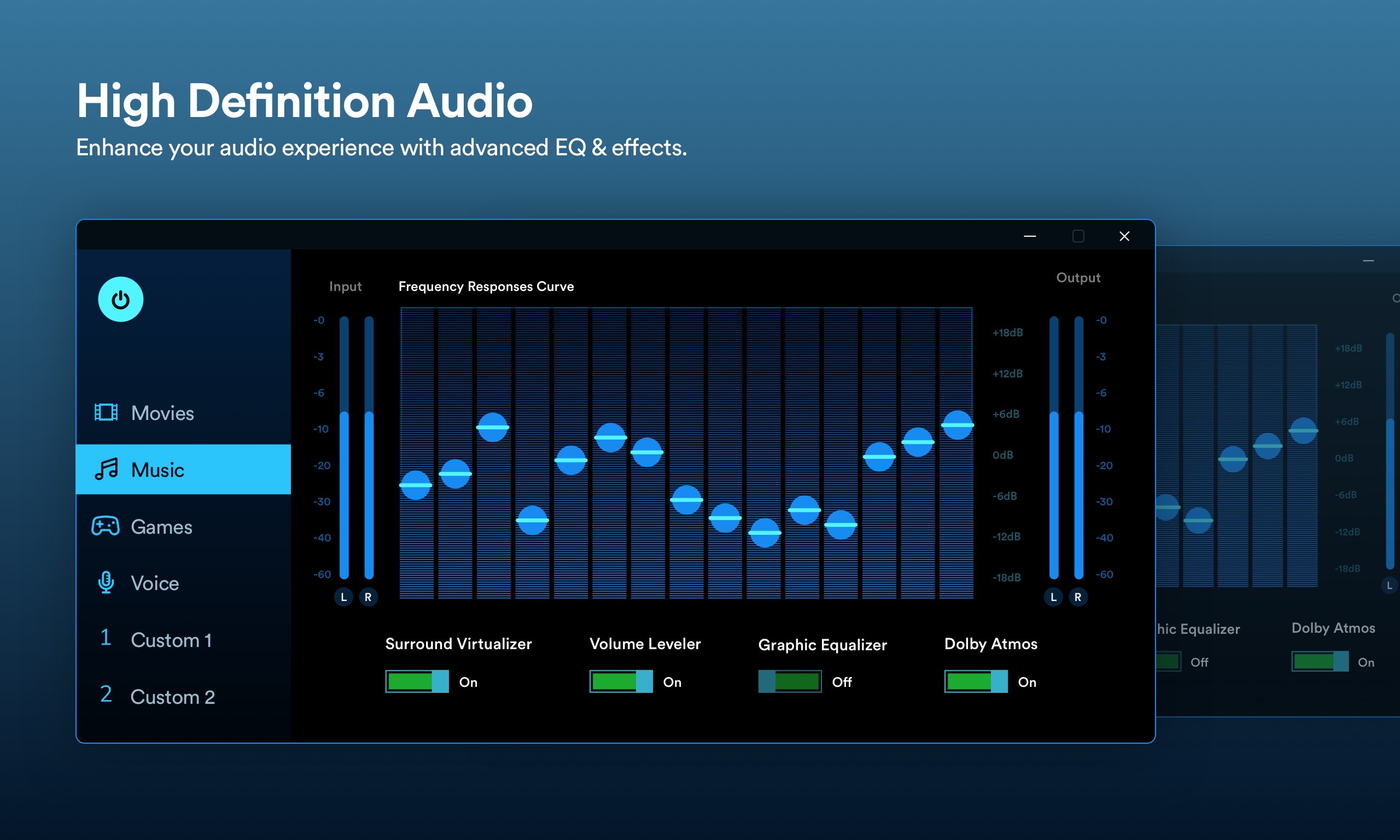
- Name High Definition Audio.
- Category Business
- Available on PC, Mobile, Surface Hub, HoloLens
- OS Windows 10 version 17763.0 or higher
- Keyboard Integrated Keyboard
- Mouse Integrated Mouse
- languages English (United States)
Clear and High-Quality Sound Control for Windows: An In-Depth Review of High Definition Audio
In today's digital age, having pristine audio quality isn't just a luxury—it's a necessity for an immersive experience, whether you're working, gaming, or simply enjoying music. High Definition Audio for Windows by Global Software Co presents itself as a streamlined solution to optimize your audio setup, promising crystal-clear sound and easy management. But does it truly deliver? Let's dive deep to find out.
Essential Information: What Is This App?
Positioned as a professional audio enhancement tool for Windows users, High Definition Audio aims to elevate your sound experience by providing intuitive controls and detailed customization options.
Developer and Publisher
Developed and published by Global Software Co, a company known for creating user-friendly utility apps designed to improve system performance and user experience.
Main Features & Highlights
- Advanced Audio Profiles: Easily switch between predefined or custom sound profiles tailored for various scenarios like gaming, music listening, or conference calls.
- Enhanced Audio Fidelity: Fine-tune the frequency response and volume levels to achieve studio-quality sound directly from your PC speakers or headphones.
- User-Friendly Interface: Designed for both novices and tech-savvy users, offering straightforward navigation and control.
- System Integration: Seamlessly integrates with Windows audio settings, ensuring consistent performance across applications.
Target Audience
This app is ideal for audiophiles, remote workers, gamers, or anyone seeking a more refined audio experience on their Windows PC without the complexity of professional audio editing software.
Engaging and Practical Audio Enhancement
If you've ever felt that your computer's sound just doesn't hit the right note, imagine dialing up the boost button on your favorite song — that's the essence of what High Definition Audio offers. It's like having a mini sound engineer tucked inside your PC, ready to fine-tune your audio environment to perfection. The app's design makes it feel intuitive, not intimidating, turning what could be a technical nightmare into a delightful symphony of control.
Three Pillars of Performance: Deep Dive into Core Features
Adaptive Sound Profiles for Every Scenario
The app excels at offering versatile profiles that adapt to your activities. Whether you're immersed in a gaming session, conducting a virtual meeting, or simply relaxing with music, you can effortlessly switch between predefined options or craft personalized settings. This dynamic adaptability ensures your audio experience is always aligned with your needs, enhancing clarity, bass, or treble with just a few clicks.
Precision Audio Customization
One standout feature is the app's ability to fine-tune multiple audio parameters. Think of it as owning a professional mixing console, but within a friendly user interface. You can adjust equalizer settings, balance, and output volume across different channels. This level of control allows audiophiles to explore every nuance of sound, transforming ordinary speakers into a concert hall or turning a mundane call into crystal-clear communication.
Seamless System Integration and User Experience
The app's interface is sleek and logically organized, akin to a well-curated workspace. Navigation is smooth, with minimal lag, making adjustments feel instantaneous. Compatibility with Windows is robust, and settings are retained across sessions, so you don't need to redo your preferences every time you reboot. For new users, the learning curve is gentle, thanks to straightforward controls and helpful prompts. It's like having a friendly tech buddy guiding you through the tuning process.
Distinctive Advantages: What Sets It Apart?
Compared to other audio enhancement tools, High Definition Audio shines with its combination of collaborative friendliness and task-specific customization. Its ability to create multiple sound profiles tailored for different activities goes beyond the typical one-size-fits-all approach found in many similar applications. Additionally, its seamless integration with Windows' core audio settings means that adjustments are applied system-wide, ensuring consistent sound quality across all applications—something many competitors lack.
This app's standout feature is its focus on user-centric customization, empowering users to craft their ideal listening environment without complex interfaces. Its collaborative work features—like easy switching between profiles—make it especially suitable for multi-user households or office setups, where different scenarios demand different audio preferences.
Final Verdict and Recommendations
High Definition Audio for Windows is a thoughtfully designed tool that caters to users seeking improved audio fidelity and flexible sound management. Its core strengths lie in intuitive profile management and precise tuning capabilities, making it a valuable addition to any Windows environment aiming for better sound quality.
For audiophiles, remote workers, and gamers alike, I recommend giving this app a try, especially if you often switch between different audio contexts. Its straightforward interface and powerful features justify a positive recommendation. However, casual users who are content with built-in Windows sound settings may find the app's advanced options more than they need.
Overall, this app earns a solid spot in the toolkit of anyone serious about their sound experience, providing professional-level control with user-friendly ease. It's like having an audio specialist in your corner—ready to help your PC's sound system reach its full potential.
Pros
- High-quality audio output
- Seamless integration with Windows
- Low latency performance
- Automatic updates
- User-friendly interface
Cons
- Limited customization options
- Occasional compatibility issues
- Requires latest Windows updates
- Basic diagnostics tools missing
- UI may seem simplistic for advanced users











