

- Name FxSound
- Category Utilities & tools
- Developer FxSound LLC
- Available on PC
- OS Windows 10 version 0.0 or higher
- languages English
Introducing FXSound for Windows: Elevate Your Audio Experience
FXSound for Windows is a versatile audio enhancement application designed to bring richer, clearer, and more immersive soundscapes to your PC. Whether you're grooving to music, gaming, or enjoying movies, this tool aims to fine-tune your audio environment effortlessly.
Developed by FxSound LLC: A Team Dedicated to Sound Clarity
Produced by FxSound LLC, a company focused on creating user-friendly audio tools that enhance the listening experience, FxSound has established itself as a reliable name in the realm of sound optimization software.
Top Features that Make FXSound Stand Out
- Advanced equalizer that allows personalized sound adjustments
- Presets for different listening scenarios such as music, movies, gaming
- Real-time audio processing with minimal latency, ensuring seamless sound enhancement
- Automatic normalization for consistent loudness levels
Target Audience: Who Will Benefit Most?
This app is perfect for audiophiles seeking improved sound quality, gamers aiming for an immersive experience, remote workers who need clear communication, and anyone looking to upgrade their default audio settings without complicated setup procedures.
A Fresh Take on Audio Enhancement: A Vibrant Introduction
Imagine sitting at your desk, headphones whispering melodies that feel oddly more alive, or gaming sessions where every explosion and footsteps come through with stunning clarity. FXSound transforms your everyday audio into a vibrant orchestration—it's like giving your existing speakers or headphones a powerful, personalized upgrade without the need for new hardware. The interface welcomes you like a friendly guide rather than an intimidating control panel, ready to unlock the full potential of your soundscape.
Core Functionality One: Customize with Precision Using the Equalizer
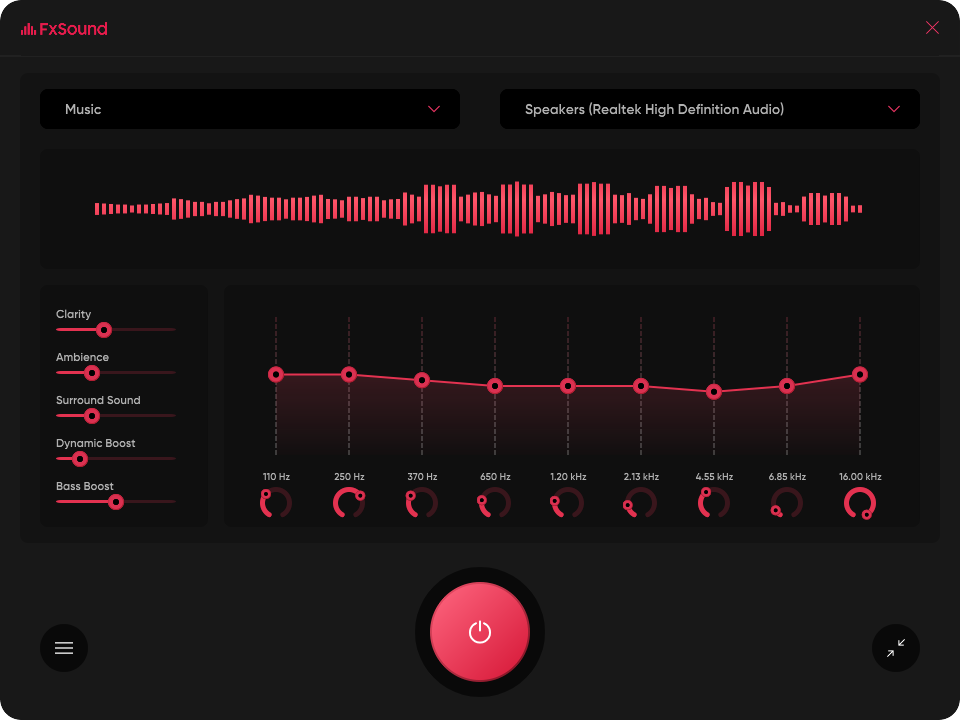
The heart of FXSound's appeal lies in its intuitive equalizer. With a simple slider-based system, users can craft their preferred sound profile or choose from a range of presets designed for specific genres or scenarios. Unlike many basic equalizers, FXSound offers a pre-set tailored for bass lovers, crystal-clear vocals, or balanced sound, making it easy to find that "sweet spot" without deep technical knowledge. This level of customization means you can make your audio distinctly yours—imagine turning your laptop into a portable concert hall or a gaming battleground packed with rich, immersive sounds.
Core Functionality Two: Scenario-Based Presets and Automatic Optimization
Imagine not having to fiddle with settings every time you switch from listening to music to watching a movie. FXSound equips you with a menu of scene-specific presets—whether you're gaming, watching a film, or enjoying music. These presets are intelligently designed to optimize the audio for each situation, enhancing bass, clarity, or spatial effects accordingly. Additionally, the real-time processing capability ensures that your audio is dynamically improved as you go, without noticeable lag or disruption. This feature is like having a personal sound engineer adjusting your audio on-the-fly, ensuring optimal quality at all times.
Design, Usability, and Unique Advantages
The interface of FXSound is refreshingly straightforward—think of it as a sleek dashboard rather than a confusing control panel. Its design prioritizes ease of use, enabling even beginners to quickly navigate and customize their settings. The app's smooth operation, with minimal latency, means you won't experience frustrating delays or crashes, making it a reliable companion during long listening sessions. Compared to other utilities that often require intricate configurations, FXSound's automated presets and user-friendly interface stand out as a major advantage—bringing professional-grade audio tuning to the masses without the steep learning curve.
Recommendation and Usage Suggestions
If you're someone who spends a lot of time on your PC listening to audio—whether for entertainment or productivity—FXSound offers a practical upgrade. Its core strength lies in delivering noticeable improvements with minimal hassle, especially through its scenario presets and intuitive design. I would recommend this app for users seeking quick, effective sound enhancement without the need to understand complex audio engineering. For those who love tinkering and personalized settings, the rich equalizer options provide ample room for customization.
In conclusion, FXSound for Windows stands out as a reliable, user-centric audio enhancement tool that can significantly elevate your PC sound experience. While it doesn't boast overly flashy marketing language, its real power lies in delivering consistent, high-quality audio improvements—making your digital listening environment more engaging and enjoyable.
Pros
- Enhanced audio clarity
- User-friendly interface
- Customizable sound presets
- Real-time audio enhancement
- Wide compatibility
Cons
- High CPU usage
- Limited free features
- Possible audio delay
- Occasional stability issues
- Limited customization options for advanced users











