

- Name Free Download Manager
- Category Utilities & tools
- Available on PC
- OS Windows 10 version 0.0 or higher
- Keyboard Integrated Keyboard
- Mouse Integrated Mouse
- languages English, Russian, French, German, Portuguese, Spanish
An Overview of Free Download Manager for Windows
Free Download Manager (FDM) for Windows is a versatile and user-friendly download accelerator designed to streamline and optimize your downloading experience. Whether you're torrenting, downloading large files, or managing multiple downloads simultaneously, this application aims to keep things smooth and organized.
Meet the Minds Behind FDM
Developed by SOFTDELYUKS, OOO, a company known for creating practical and reliable utility tools, FDM is part of their suite of productivity applications. Their focus on delivering efficient software solutions ensures that users get a seamless experience with minimal fuss.
Highlighting Key Features
- Intelligent Download Acceleration: Breaks files into smaller pieces and downloads them concurrently, increasing download speeds by leveraging multiple connections.
- Robust Support for Protocols and Formats: Supports HTTP, HTTPS, FTP, BitTorrent, and more, making it adaptable for various sources and file types.
- Built-in Video Grabber: Allows users to effortlessly download videos directly from popular streaming sites, simplifying content collection.
- Advanced Management and Scheduling: Enables users to pause, resume, schedule, and organize downloads efficiently, reducing manual oversight.
The app targets everyday users needing quick, reliable downloads—ranging from casual internet surfers to tech-savvy professionals working with large datasets or media files.
Engaging and Practical User Experience
Using Free Download Manager feels akin to having a trusty assistant by your side, working quietly behind the scenes to boost your download speeds while keeping everything neatly organized. Its interface strikes a balance between simplicity and functionality, making even newcomers feel at home without overwhelming with clutter.
Smooth Interface and Intuitive Workflow
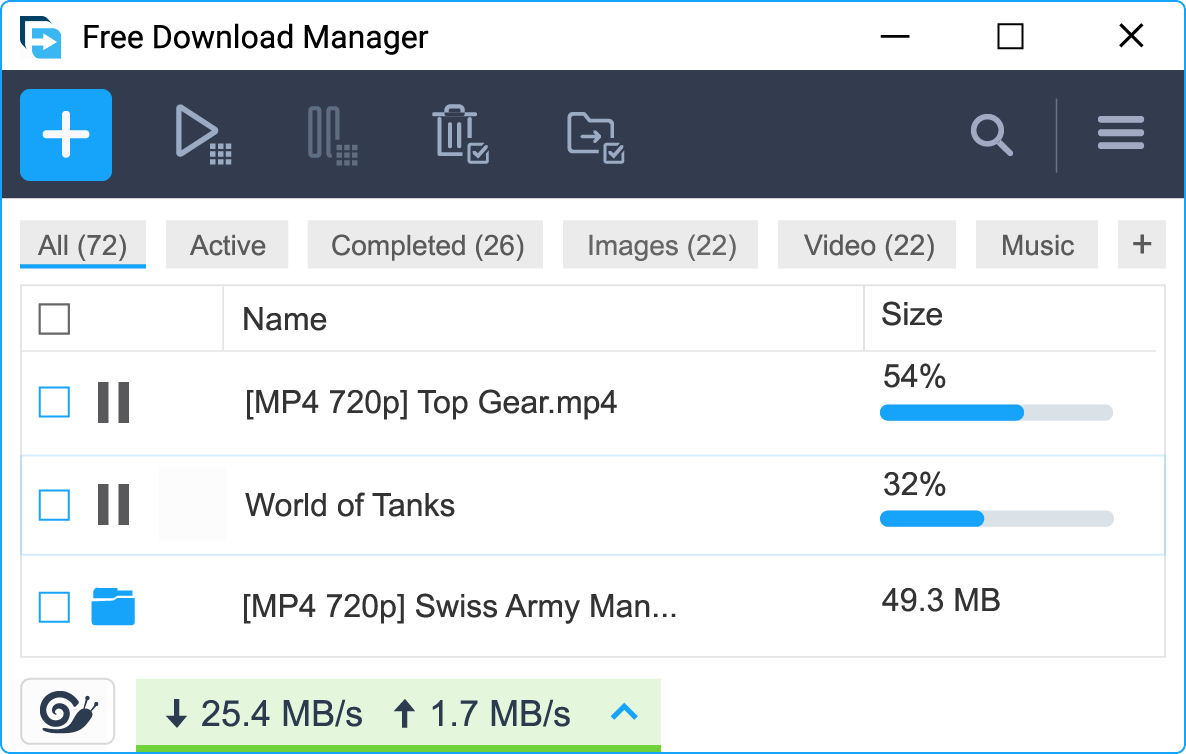
The interface sports a clean, modern design with clearly labeled controls, icons, and progress indicators. Starting a download is as easy as clicking a link or dragging a file into the application—no complicated setups. The overall operation flows seamlessly, with downloads starting, pausing, or resuming with minimal latency. For users new to download managers, the learning curve is gentle; even the most technically challenged will find it straightforward to get started.
Core Functionality Deep Dive
- Download Acceleration and Reliability: By segmenting files and utilizing multiple connection points, FDM can significantly cut down your waiting time. Plus, it smartly manages retries and errors, ensuring your files download intact even amidst network hiccups.
- Video and Media Downloads: The integrated video grabber stands out as a particularly handy tool. Instead of manually copying URLs, users can simply activate the feature while browsing and save videos in various formats. It's a feature that streamlines content collection, especially for media enthusiasts and content creators.
- Task Scheduling and Organization: Managing multiple downloads becomes a breeze through scheduling options, priority setting, and categorization. Imagine setting a batch of files to download overnight—FDM takes care of the rest while you sleep soundly.
Comparative Advantages and Unique Selling Points
While many download managers share similar core features, FDM distinguishes itself with its robust support for torrents combined with traditional HTTP/FTP downloads. The integrated video grabber also offers a distinct edge for media collectors—no need for third-party tools. Furthermore, the application's efficient resource management ensures that it runs smoothly alongside other programs without hogging system resources, a common gripe for some competitors.
Final Verdict and Recommendations
All in all, Free Download Manager for Windows is a reliable, accessible, and efficient tool that caters to a broad spectrum of users. If you frequently download large files or enjoy collecting media content, this app offers some particularly valuable features—especially its intelligent acceleration and media download capabilities. Its user-friendly design makes it suitable for beginners, yet its deeper management options also satisfy power users.
Based on its performance, features, and ease of use, I confidently recommend FDM as a solid addition to your utility toolkit. Whether you're managing everyday downloads or handling more complex tasks, it provides a stable and effective solution without unnecessary complexity. Give it a try—you might find it becomes your go-to download helper, simplifying your digital life one file at a time.
Pros
- Advanced Download Management
- User-friendly Interface
- Browser Integration
- Speed Limiting and Scheduling
- Free and Lightweight
Cons
- Limited Compatibility with Certain File Types
- Lack of Built-in Virus Scanning
- Occasional Download Interruptions
- Limited Advanced Features
- Ads and Popups











