

- Name EarTrumpet
- Category Utilities & tools
- Available on PC
- OS Windows 10 version 14393.0 or higher
- languages Chinese (Simplified), Chinese (Traditional Chinese), Chinese (Traditional, Hong Kong SAR), English (United States), French, German, Norwegian (Bokmål)
Introducing EarTrumpet for Windows: A Sleek Solution for Superior Audio Management
EarTrumpet for Windows is a streamlined, open-source application designed to enhance how users control and manage audio on Windows devices. It aims to replace the default volume mixer with a more intuitive and feature-rich interface, making sound adjustment a pleasant experience rather than a chore.
A Closer Look at Its Core Features
Dynamic Volume Control for Individual Apps
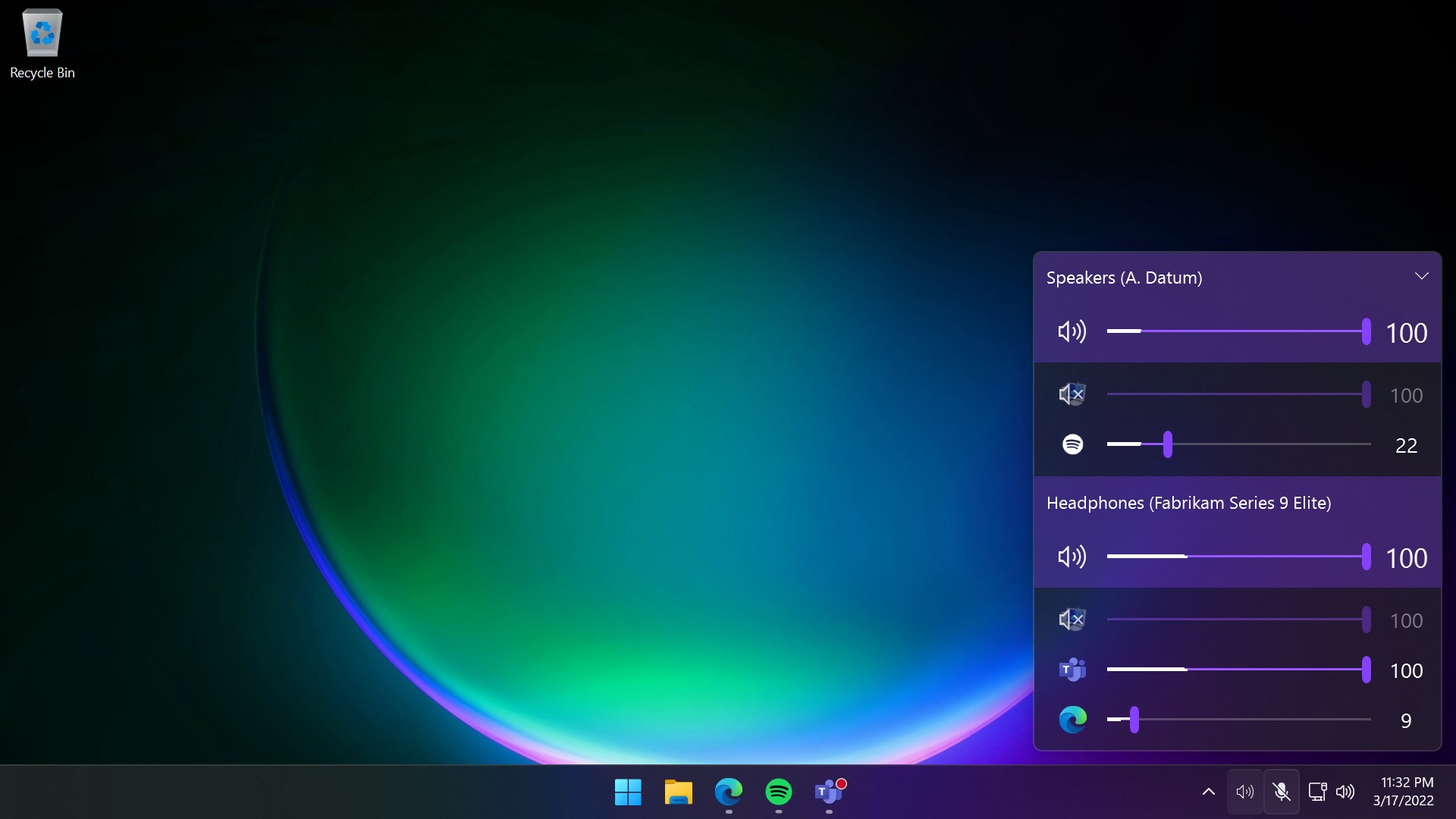
One of EarTrumpet's standout features is its ability to let users adjust the volume for each application independently. Imagine you're gaming, listening to a podcast, and chatting simultaneously; you can now fine-tune each audio stream without disturbing others. This granular control is a godsend for multitaskers and media enthusiasts, providing a level of flexibility akin to having a dedicated audio engineer at your fingertips.
Seamless Integration with Windows Taskbar
The app lives right where you need it—in the Windows taskbar—offering instant access to volume controls through a sleek, modern interface. Clicking the EarTrumpet icon brings up a clean, visually appealing volume mixer that displays all active applications with their respective volume sliders. No more jumping between settings menus or navigating complex options; everything is just a click away, making volume adjustments feel natural and quick.
Advanced Audio Device Management
Beyond individual app controls, EarTrumpet also provides an easy way to switch between audio output devices—like headphones, speakers, or Bluetooth devices—directly from the app window. This feature simplifies managing multiple audio outputs, ensuring you're never caught off guard when switching environments or devices. It's like having a remote control for your entire audio setup, organized neatly in your taskbar.
User Experience and Design: Simple Yet Powerful
The interface of EarTrumpet is both minimalistic and ergonomic, resembling a familiar volume slider but with enhanced functionalities. Its design feels like a well-tailored suit—professional, unobtrusive, but packed with useful pockets. The responsiveness of the app is impressive; adjustments are reflected instantly, making interactions feel fluid. Even users new to such tools will find the learning curve gentle, thanks to its straightforward layout and clear icons.
Compared to the default Windows volume mixer, EarTrumpet offers a significant upgrade—more intuitive controls, better organization, and smoother operation. It feels like upgrading from a basic analog radio to a high-fidelity sound system—improved clarity, control, and user satisfaction.
What Sets EarTrumpet Apart from Other Utilities
Where many audio management tools focus solely on basic volume adjustments, EarTrumpet shines with its app-specific volume controls and integrated device management. Unlike some utilities that require navigating through multiple menus or require complex setup, EarTrumpet's seamless Windows integration makes it feel like a natural extension of the system—almost as if Windows itself had a more intelligent volume control built-in.
The app's open-source nature also ensures continual improvements and community-led innovations, setting it apart from proprietary solutions limited by vendor constraints. Its unobtrusive yet powerful design strikes a rare balance—powerful enough for advanced users but simple enough for everyday consumers.
Final Verdict and Recommendations
If you're looking for an upgrade to the clunky default Windows volume controls, EarTrumpet is a compelling choice. It's particularly recommended for users who juggle multiple audio sources and need precise control without fuss. Its intuitive interface, app-specific controls, and smart device management make everyday audio management more enjoyable and less stressful.
While it may not offer extensive audio customization features found in professional-grade audio software, EarTrumpet excels at being a lightweight, user-friendly utility that enhances your day-to-day sound experience. I'd suggest giving it a try if you often find yourself adjusting volumes frequently or need better control in multi-application scenarios. It's a small app with a big impact—well worth integrating into your Windows workflow.
Pros
- Intuitive volume controls
- System-wide integration
- Per-application volume customization
- Support for multiple audio devices
- Low resource consumption
Cons
- Limited customization options
- Occasional UI glitches
- Requires Windows 10 or higher
- No built-in sound effects or enhancements
- Initial setup may be confusing for new users











