

- Name Desktop Calendar‘
- Category Utilities & tools
- Available on PC
- OS Windows 10 version 17763.0 or higher
- languages English (United States)
A Friendly Guide to Desktop Calendar for Windows: Your Digital Organizer
If you're tired of juggling sticky notes or flicking through a cluttered calendar, Desktop Calendar for Windows offers a clean, customizable, and accessible solution to keep all your appointments in check—much like having a personal assistant right on your desktop.
Basic Information: Who's Behind the Curtain?
Developed by Weila Studio, a team passionate about enhancing productivity through simple yet effective software solutions, Desktop Calendar for Windows aims to transform how you interact with your schedule. This application stands out by offering an intuitive, customizable calendar right on your desktop, minimizing the need to open separate apps or navigate complex interfaces.
Major features include seamless integration with your Windows environment, customizable views to suit diverse planning styles, and straightforward event management tools. It effectively caters to busy professionals, students, or anyone looking for a more organized digital space without the fuss of complex setups or subscriptions.
An Engaging Dive into Core Features
1. Centralized and Customizable Calendar Views
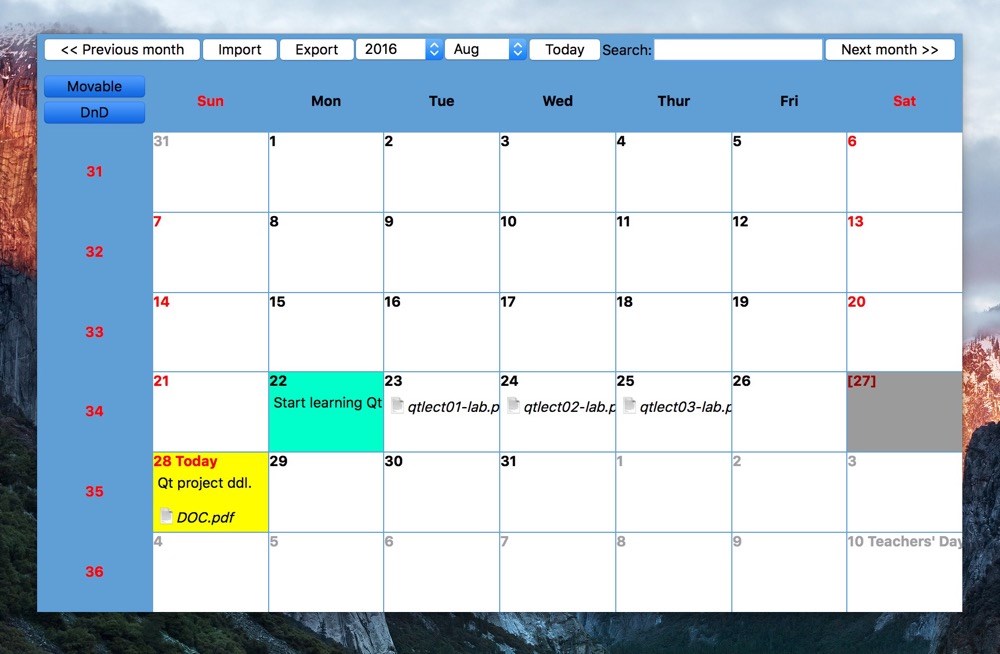
One of the app's standout features is its ability to present your schedule in multiple views—be it daily, weekly, or monthly—directly on your desktop. Imagine opening your window to a clean, clear layout of your commitments, all updated in real time. You can customize colors, layouts, and display styles, making it not just functional but also visually pleasing. Whether you prefer a minimalistic glance or detailed planning, this flexibility puts you in complete control.
2. Effortless Event Management and Notifications
Adding and editing events is as smooth as sliding into a familiar routine. The app facilitates quick entry—just a few clicks—and supports reminders to keep you on track without the distracting pings of other tools. Its notification system is unobtrusive yet reliable, ensuring you don't miss important meetings or deadlines. This feature especially shines for users who appreciate a clean, distraction-free interface that does the job without overwhelming.
3. Seamless Integration and User Experience
The interface design strikes a fine balance between simplicity and sophistication, reminiscent of a well-organized workspace. Navigation feels natural, with intuitive controls that reduce the learning curve to mere minutes. The app runs smoothly on Windows, with minimal lag or glitches, providing a cohesive experience. Whether you're a tech novice or a seasoned user, getting started is straightforward, making this tool accessible to a wide audience.
What Sets It Apart: Unique Advantages in a Crowded Field
Compared to other utility tools, Desktop Calendar excels with its unobtrusive desktop overlay—your schedule is always visible without stealing focus or cluttering your workspace. Its high level of customization allows users to tailor the appearance to their personal or professional style, unlike many apps that lock you into rigid templates. Moreover, its lightweight footprint means it performs well on various hardware configurations—perfect for those who prioritize efficiency without sacrificing aesthetics.
Another standout is its ease of integration within Windows, mimicking the native look and feel, which makes the transition from traditional paper calendars or other digital tools seamless. This focus on simplicity and user familiarity sets it apart in a market flooded with feature-heavy but sometimes overwhelming calendar apps.
Should You Give It a Try?
I'd recommend Desktop Calendar for Windows as a solid choice if you're seeking an unobtrusive yet customizable scheduling assistant. It's particularly suited for those who want quick access to their agenda without opening multiple tabs or juggling complex features. With its minimalist design and thoughtful functionality, it's like having a digital planner that respects your workspace and your time.
While it may not replace full-fledged project management tools, for daily planning and organization, it performs admirably. If you value simplicity, customization, and reliability, this application deserves a place on your desktop. Think of it as your dependable digital companion—always there when you need a quick glance or an easy update.
Pros
- User-friendly interface
- Customizable calendar views
- Seamless integration with Microsoft services
- Reminders and notifications
- Accessible on multiple devices
Cons
- Limited customization options
- Occasional sync delays
- Lacks advanced task management features
- Minimal support for third-party integrations
- Offline mode limitations











