

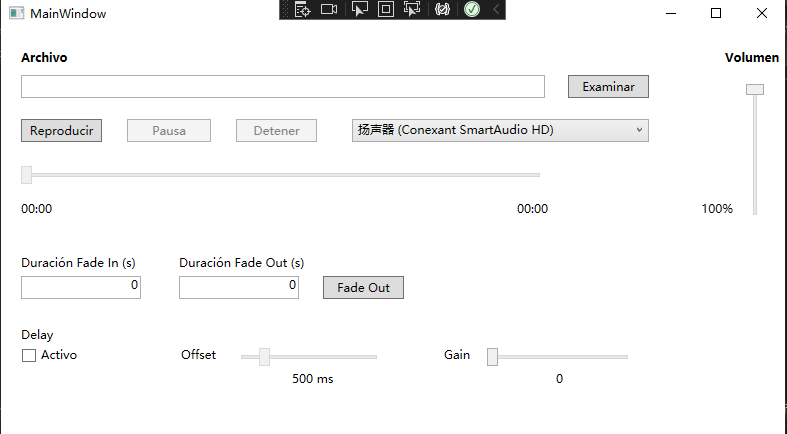
- Name Audio Manager for Sonos+
- Category Utilities & tools
- Available on PC, Mobile, Surface Hub, HoloLens
- OS Windows 10 version 14393.0 or higher
- languages English (United States)
Introducing Audio Manager for Sonos+: A Seamless Experience for Windows Users
Navigating the world of multi-room audio can sometimes feel complex, but Audio Manager for Sonos+ aims to simplify the process for Windows enthusiasts. Developed by WindyWarmStudio, this application promises to harmonize your Sonos speakers with intuitive controls and power-packed features, elevating your home audio experience to a new level.
Who's Behind the Curtain? The Developer and Core Mission
WindyWarmStudio, a dedicated team specializing in multimedia utilities, has crafted Audio Manager for Sonos+ to bridge the gap between users and their Sonos devices. Their goal is clear: provide a comprehensive yet easy-to-use tool that enhances control, customization, and management of Sonos speakers from a Windows environment. The app targets home audiophiles, tech enthusiasts, and anyone looking to streamline their multi-room audio setup without jumping through hoops.
Key Features That Make It Stand Out
- Unified Control Dashboard: Manage all your Sonos speakers collectively or individually from one sleek interface, saving time and reducing confusion.
- Advanced Room Grouping: Quickly create and modify speaker groups tailored to different activities or moods, akin to assembling custom playlists but for audio zones.
- Enhanced Settings Customization: Fine-tune audio profiles, volume levels, and EQ settings for each speaker or group, giving you the flexibility to craft your perfect sound environment.
- Real-time Monitoring & Troubleshooting: Easily diagnose connectivity or playback issues with real-time logs and notifications, acting like a health monitor for your Sonos network.
A Closer Look: Exploring Core Functionalities and User Experience
Streamlined Interface - Making Control a Breeze
The app features a clean, intuitive layout reminiscent of a well-organized entertainment command center. The main dashboard showcases all connected Sonos devices with visual icons and status indicators, allowing users to get a snapshot of their setup at a glance. Transitioning between control panels is smooth—imagine flipping through channels on a classic radio, but with higher precision and customization options. The design balances aesthetic appeal with practical accessibility, reducing the learning curve for new users.
Powerful Group Management - Cooking Up the Perfect Audio Feast
Creating and managing speaker groups is akin to assembling a personalized orchestra; you can select your preferred instruments (speakers), assign them to specific groups, and name these groups for easy recall. The app's drag-and-drop functionality simplifies this process, making it as simple as arranging furniture in a room. Moreover, you can dynamically adjust groups during playback, ideal for parties or movie nights—similar to a versatile DJ adjusting the playlist on the fly.
Rich Customization & Troubleshooting - Your Personal Sound Engineer
Beyond basic controls, Audio Manager for Sonos+ allows precise customization of audio profiles. Whether you prefer a bass-heavy experience or a balanced soundscape, the app's EQ controls make it easy to set your preferences. Additionally, its real-time diagnostics provide insights into network health and device status, giving users a sense of confidence comparable to having a personal technician at hand. These features set it apart from many utility apps that only offer basic controls, turning your Windows device into a powerful sound management hub.
Driving the Distinction: What Sets It Apart
Compared to other utilities and tools in the same space, Audio Manager for Sonos+ shines in its depth of control and user-centric design. While many apps offer remote management, few combine comprehensive customization with real-time diagnostics in such a straightforward interface. Its focus on creating an effortless experience—like having a friendly sound engineer guiding your setup—makes it particularly appealing for users who seek both power and simplicity.
Final Verdict: Is It Worth the Download?
For Windows users invested in Sonos ecosystems, this app offers an admirable blend of functionality, ease of use, and customization. It's especially suited for those who enjoy tinkering with their audio settings or need a more consolidated way to manage multiple speakers. While it may have a slight learning curve for absolute beginners, its well-thought-out interface ensures that most users can get comfortable quickly.
Overall, I'd recommend Audio Manager for Sonos+ as a valuable addition for homes or small offices seeking to elevate their audio control. It's like having a dedicated music conductor in your PC that fine-tunes your sound experience with precision and care. If managing multiple Sonos speakers efficiently is a priority for you, this app definitely deserves a spot on your toolkit.
Pros
- Seamless integration with Sonos speakers
- User-friendly interface
- Advanced audio customization options
- Multi-room synchronization
- Regular updates and feature improvements
Cons
- Occasional connection instability
- Limited compatibility with non-Sonos devices
- Complex setup process for new users
- Battery consumption on mobile devices
- Need for improved language support











