

- Name APK Installer.
- Category Utilities & tools
- Developer Kowloon
- Available on PC
- OS Windows 10 version 17763.0 or higher
- languages Chinese (Simplified), Chinese (Traditional), English (United States), Persian, Portuguese (Brazil), Russian, Spanish (Spain), Turkish
Seamless APK Management on Windows: An In-Depth Look at APK Installer. for Windows
In the evolving landscape of Windows utilities, APK Installer. for Windows emerges as a compelling tool designed to bridge the gap between Android and Windows environments. Its intuitive approach aims to simplify the process of installing and managing APK files directly on your desktop, making it a must-have for enthusiasts and developers alike.
About the Developer and Core Features
Developed and published by Kowloon, a team dedicated to enhancing cross-platform compatibility tools, APK Installer. for Windows packs a punch with its streamlined approach. Its main features include:
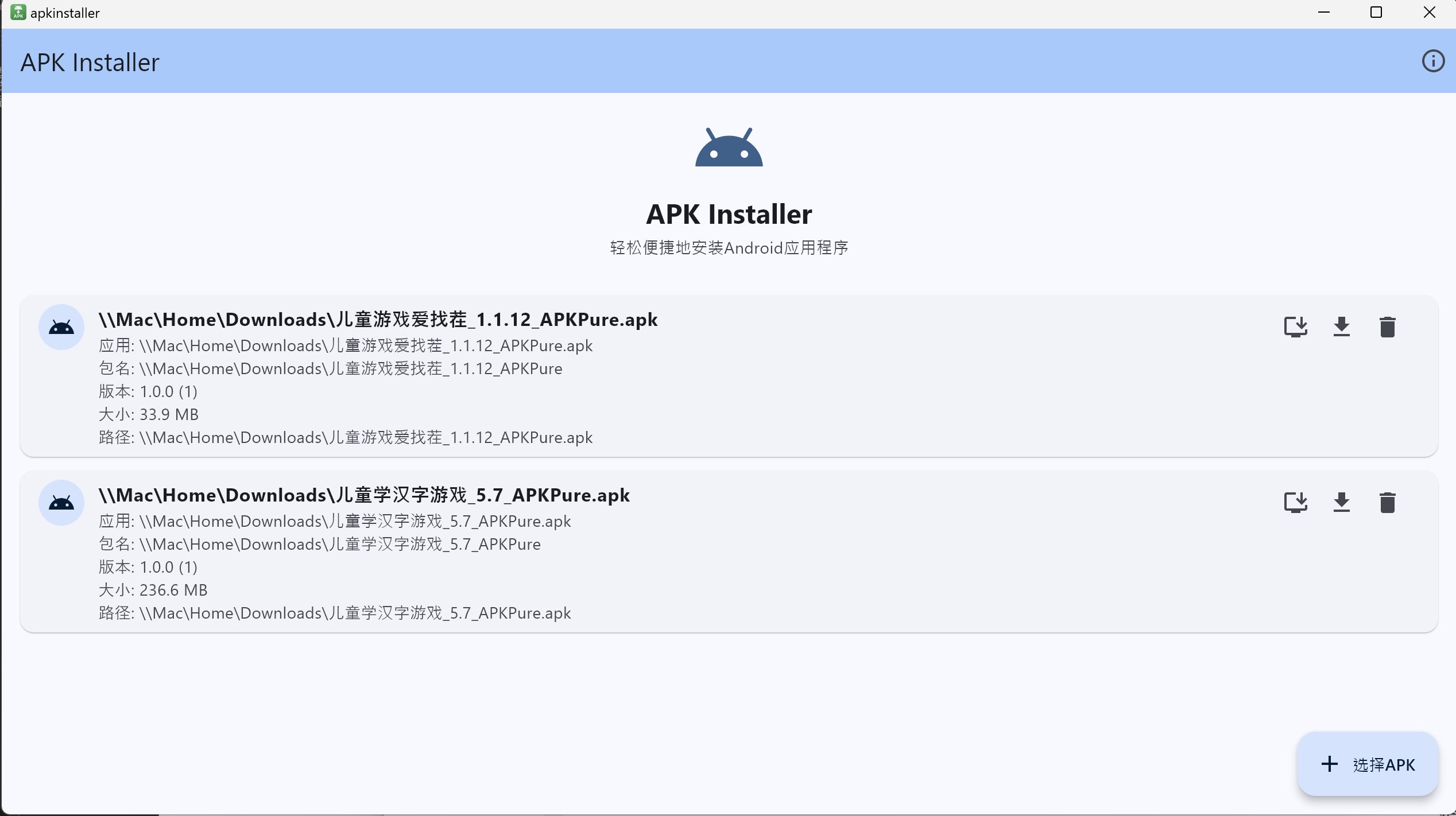
- Direct APK Installation: Effortlessly sideload APK files without requiring complex Android emulators or rooting. It's like having a key to unlock Android apps directly on your desktop.
- Batch APK Management: Supports multiple APKs simultaneously, saving time and boosting productivity—ideal for developers testing multiple applications or power users managing many apps.
- User-Friendly Interface: Clean, minimalistic design that hides technical complexity, allowing users of all levels to navigate with ease.
- Compatibility and Portability: Compatible across various Windows versions, offering portability for users on the move.
Targeted primarily at Windows users interested in quick APK testing, developers conducting app demos, or hobbyists exploring Android apps outside their smartphones, this app positions itself as an accessible alternative to more cumbersome tools.
Assessment of Core Functionalities and User Experience
Installing APKs Made Easy: From Click to App
Imagine dragging a folder into your workspace and instantly having your favorite app launched—it's akin to opening a treasure chest and discovering new gems. APK Installer. for Windows streamlines the process into a few simple clicks. When you select an APK, the app quickly verifies its integrity before installing, much like checking ingredients before cooking. The installation process is smooth, with real-time progress updates that keep the user informed without the typical confusion or delay that plagues other tools.
Managing Multiple APKs Like a Conductor
Managing several APK files? No problem. The batch functionality is reminiscent of a seasoned conductor leading multiple orchestras in harmony. You can queue, install, or uninstall multiple apps in one go, drastically reducing repetitive tasks. This feature is particularly valuable for developers testing multiple builds or enthusiasts managing a library of Android apps—it's efficiency elevated to an art form.
User Interface and Overall Experience
The interface of APK Installer. for Windows bears resemblance to a sleek control panel—simple, uncluttered, and inviting. Navigation is intuitive, with clear buttons and minimal learning curve. The app responds swiftly to commands, a testament to optimized coding. These design choices foster a user experience that feels almost like chatting with a knowledgeable friend who understands your needs and gently guides you through the process.
What Sets It Apart From Similar Utilities?
While many tools exist for Android app management on Windows, APK Installer. for Windows distinguishes itself primarily through its focus on simplicity and speed. Unlike bulky emulators that consume massive resources or complex command-line-based installers, this app keeps things straightforward. Its unique strength lies in enabling direct APK installation without the fuss—eliminating the need for emulator setup, Google account configurations, or rooting procedures. This direct approach significantly shortens the journey from APK download to app use, much like turning a key directly in a lock rather than passing through countless gates.
Final Verdict: Is It Worth Your Time?
For users seeking a lightweight, efficient, and user-friendly tool for APK management on Windows, APK Installer. for Windows is a solid choice. It excels in its primary function—installing APKs swiftly and managing multiple files effortlessly—making it ideal for developers, testers, or casual users interested in Android apps. However, it lacks some advanced features found in emulator-based solutions, so if you need to emulate entire Android environments, this might not replace your primary tools.
Overall, I recommend giving it a try if your goal is quick APK deployment without the extra overhead. It's especially suited for users who value simplicity over complexity and need a reliable companion for routine APK handling. Just like having a Swiss Army knife in your digital toolkit, APK Installer. for Windows offers a focused, effective solution—reliability in a lightweight package.
Pros
- User-Friendly Interface
- Wide APK Compatibility
- Fast Installation Process
- Batch APK Installation Feature
- Regular Updates and Support
Cons
- Limited Device Compatibility
- Basic User Guidance
- Lack of Advanced Features
- Minor UI Bugs
- Limited Language Support











