

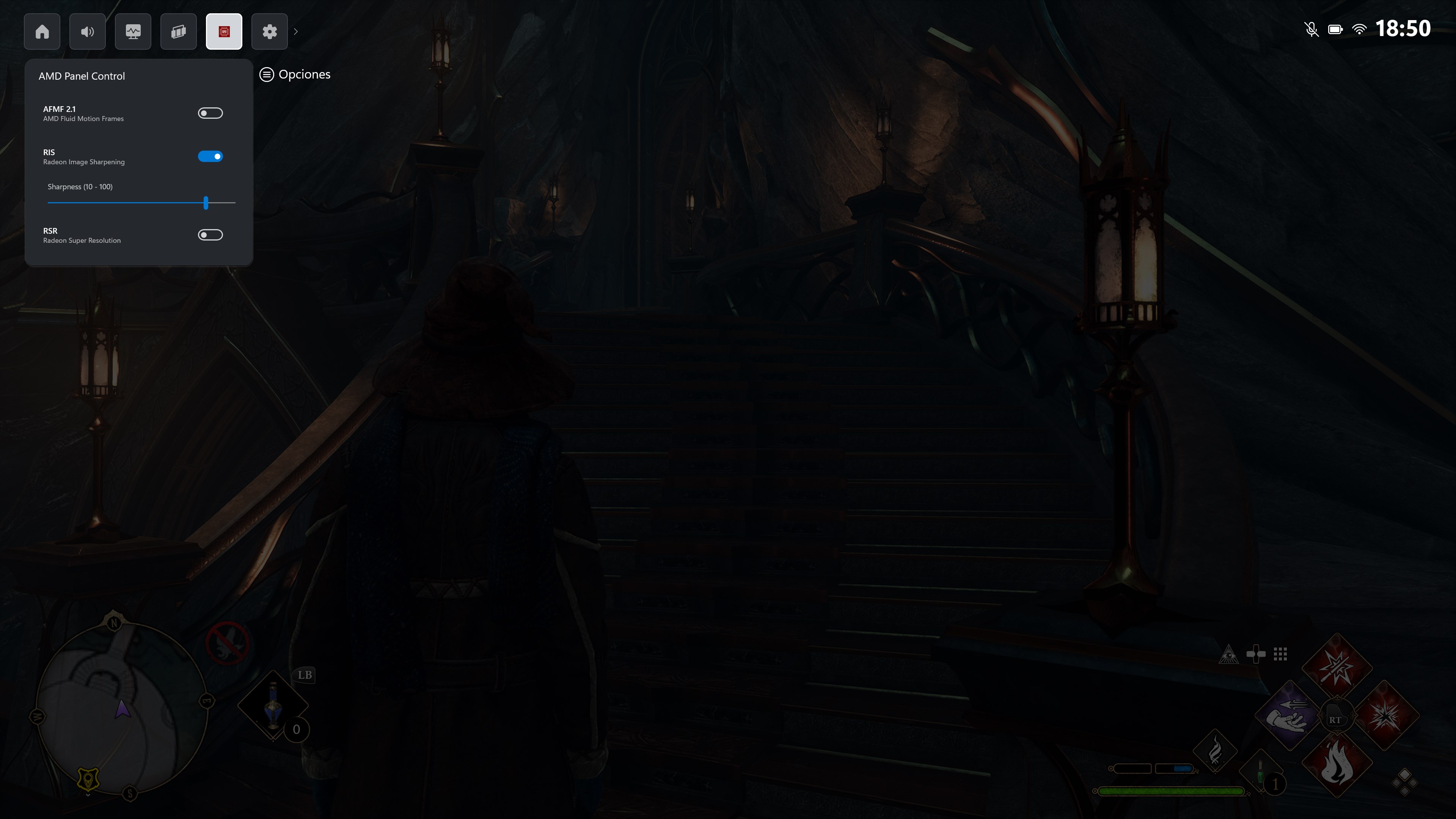
- Name AMD Control Panel
- Category Utilities & tools
- Developer Adrián Guerra Marrero
- Available on Xbox console, PC, Mobile, Surface Hub, HoloLens
- OS Windows 11 version 26100.0 or higher
- DirectX Version 11
- Memory 1 GB
- languages English (United States)
Introducing AMD Control Panel for Windows
Designed as a comprehensive utility for AMD graphics card users, this application aims to optimize and customize gaming and computing performance with ease and precision.
Who's Behind the Curtain?
Developed by Adrián Guerra Marrero and published by AGMStudio, the AMD Control Panel for Windows stands as a dedicated tool tailored for AMD GPU users seeking enhanced control over their graphics settings.
Main Features That Matter
- Advanced GPU Tuning: Fine-tune clock speeds, voltage, and fan profiles to strike the perfect balance between performance and thermals.
- Game Optimization Profiles: Easily switch between custom profiles designed to optimize visual quality and frame rates for different titles.
- Performance Monitoring & Metrics: Real-time insights into GPU load, temperature, and power consumption help users troubleshoot and optimize on the fly.
- Driver & Software Updates: Seamless check for the latest AMD drivers, ensuring compatibility and stability.
A Closer Look: Making the Most of the App
A Lively Interface Crafted for Simplicity and Efficiency
From the moment you launch the AMD Control Panel, you're greeted with a clean and intuitive dashboard that resembles a well-organized command center. The interface employs vibrant color schemes and logically grouped sections, making navigation feel natural—think of it as a cockpit where everything you need is within arm's reach. Adjusting settings is just a few mouse clicks, with sliders and toggle switches that are responsive and precise. Whether you're a seasoned overclocker or a casual gamer, the layout minimizes the learning curve and invites exploration without overwhelming the user.
Performance, Smooth and Uncomplicated
One of the standout aspects of this app is its remarkable operational fluidity. Tweaking a setting feels instantaneously reflected—no lag, no stutter. The app remains lightweight and non-intrusive, ensuring your gaming and work sessions aren't interrupted by background clutter. The real-time monitoring displays are dynamic yet unobtrusive, like having a dashboard of your GPU's vital signs displayed in a sleek, non-distracting manner. This makes it easier to experiment and observe how changes impact performance, fostering a sense of mastery over your hardware without the need for technical jargon or complex procedures.
Distinctive Advantages Over Similar Utilities
While many GPU management tools exist, AMD Control Panel for Windows distinguishes itself through its integrated approach. Unlike generic third-party utilities that often focus solely on overclocking or monitoring, this app combines both with dedicated game profiles tailored for AMD hardware. Its core strength lies in user-friendly customization without sacrificing depth of control—so both novices and enthusiasts can benefit. Additionally, seamless driver updates and performance monitoring are integrated into the same interface, reducing the need for multiple tools. This unified approach streamlines the user experience, helping you maintain, tune, and optimize effortlessly, much like having a personal mechanic for your GPU.
Final Verdict: Worth Your Attention?
If you're an AMD GPU owner eager to unlock your graphics card's full potential without sifting through cluttered options or complicated settings, this app earns a solid recommendation. Its most compelling feature is the combination of ease of use with powerful customization—think of it as a smart control tower guiding your GPU performance. Ideal for gamers seeking to tweak their experience or power users wanting detailed insights, this tool offers enough depth to satisfy advanced users while remaining accessible to beginners.
For those who prioritize simplicity without sacrificing control, AMD Control Panel for Windows is a trustworthy companion. Just remember, like any tuning tool, vigilant observation is key. Use it responsibly to ensure your system remains stable, and enjoy the newfound control over your GPU performance. Whether you're aiming for smoother gameplay or quieter operation, this app has the tools to help you achieve your goals.
Pros
- Intuitive User Interface
- Real-Time Performance Monitoring
- Enhanced Compatibility with AMD Graphics
- Immediate Fan Speed Control
- Frequent Updates
Cons
- Limited Advanced Features
- Occasional Stability Issues
- Inconsistent Performance Across Devices
- Limited Custom Profile Management
- Some Settings Require Reboot











