- Name Microsoft News
- Category News & weather
- Available on PC, Mobile, Surface Hub, HoloLens
- OS Windows 10 version 18362.0 or higher
- languages Afrikaans, Albanian, Amharic, Arabic, Armenian, Assamese, Azerbaijani, Azerbaijani (Latin), Bangla (Bangladesh), Bangla (India), Basque, Belarusian, Bosnian (Latin), Bulgarian, Catalan, Central Kurdish, Cherokee, Chinese (Simplified), Chinese (Traditional Chinese), Chinese (Traditional), Chinese (Traditional) (Hong Kong), Chinese (Traditional) (Taiwan), Chinese (Traditional, Hong Kong SAR), Croatian, Czech, Danish, Dari, Dari (Arabic), Dutch, Dutch (Belgium), English (Australia), English (Canada), English (India), English (United Kingdom), English (United States), Estonian, Filipino, Filipino (Latin), Finnish, French, French (Belgium), French (Canada), Galician, Galician , Georgian, German, German (Austria), German (Switzerland), Greek, Gujarati, Hausa, Hausa (Latin), Hebrew, Hindi, Hungarian, Icelandic, Igbo, Igbo (Latin), Indonesian, Irish, isiXhosa, isiZulu, Italian, Japanese, K'iche' (Guatemala), K'iche' (Latin), Kannada, Kazakh, Khmer, Kinyarwanda, Kiswahili, Konkani, Korean, Korean , Kyrgyz, Kyrgyz (Cyrillic), Lao, Latvian, Lithuanian, lo, Luxembourgish, Macedonian, Malay, Malayalam, Maltese, Maori, Maori (Latin), Marathi, Mongolian (Cyrillic), Mongolian (Mongolia), Nepali, Norwegian (Bokmål), Norwegian (Nynorsk), Odia, Persian, Persian/Farsi, Polish, Polish , Portuguese (Brazil), Portuguese (Portugal), Punjabi, Punjabi (Arabic), Punjabi (India), Quechua, Romanian, Russian, Scottish Gaelic, Scottish Gaelic (Latin), Serbian, Serbian (Cyrillic, Bosnia and Herzegovina), Serbian (Cyrillic, Serbia), Serbian (Latin), Serbian (Latin, Serbia), Sesotho sa Leboa, Setswana, Sindhi, Sindhi (Arabic), Sinhala, Slovak, Slovenian, Slovenian (Slovenia), Spanish, Spanish (Americas), Spanish (Argentina), Spanish (Mexico), Spanish (Spain), Swedish, Tajik, Tajik (Cyrillic), Tamil, Tatar, Tatar (Cyrillic), Telugu, Thai, Tigrinya, Turkish, Turkmen, Turkmen (Latin), Ukrainian, Urdu, Uyghur, Uyghur (Arabic), Uzbek, Uzbek (Latin), Valencian, Vietnamese, Welsh, Wolof, Yoruba, Yoruba (Latin)
Microsoft News for Windows: Your Personalized Gateway to the World's Stories
Microsoft News for Windows is a comprehensive news aggregator designed to deliver a tailored, smooth, and engaging news experience directly on your desktop. It aims to keep users informed with a curated selection of the latest headlines across various categories, all presented in an intuitive interface.
Who's Behind the News?
Developed by Microsoft Corporation, the app leverages the tech giant's extensive resources and expertise in delivering reliable news content. The team has crafted an application that seamlessly integrates with the Windows ecosystem, ensuring optimal performance and user convenience.
Core Features That Stand Out
- Personalized News Feed: The app intelligently curates news based on your reading habits and interests, ensuring you see stories that matter most to you rather than a generic lineup.
- Multimedia-rich Content: Incorporating high-quality images, videos, and interactive elements, the app transforms news consumption into an immersive experience.
- Sync Across Devices: With Microsoft's cloud infrastructure, your preferred news categories and saved articles are synchronized seamlessly across devices, allowing for consistent updates regardless of where you are.
- Customizable Notifications: Stay informed with timely alerts, which you can tailor to specific topics or breaking news categories, keeping you updated without overwhelming your workflow.
An Engaging and User-Friendly News Experience
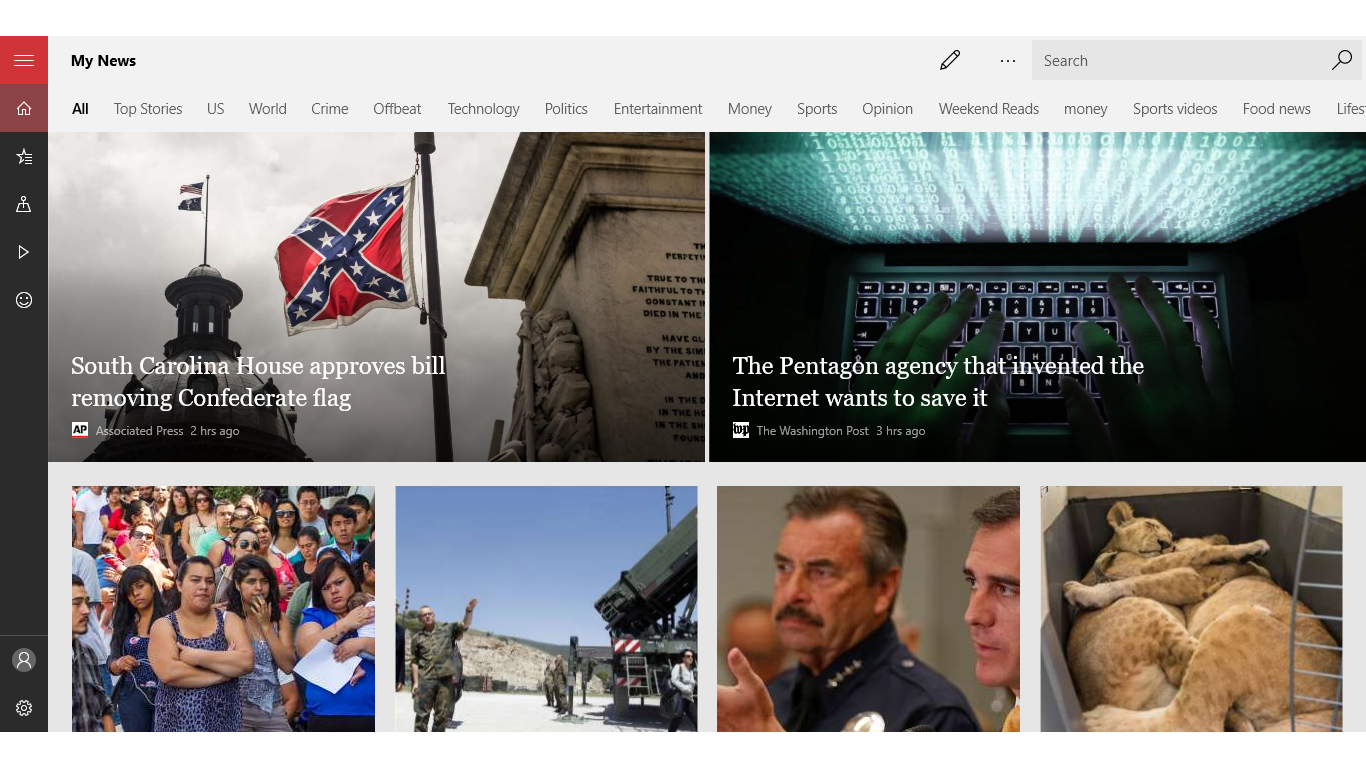
Imagine waking up and having your morning coffee while browsing through a neatly organized news dashboard—this app delivers just that sense of calm amidst the chaos of information overload. The interface is modern yet familiar, akin to flipping through a digital magazine but with all the convenience of a smart portal. The layout is clean, with clear categories and an emphasis on readability, making it easy for even casual news readers to navigate without feeling lost in a sea of headlines.
Core Functionalities in Detail
Personalized Content Algorithm: Microsoft's powerful AI engine analyzes your reading preferences over time, adjusting your feed to highlight stories that matter most to you. It's like having a personal news curator who understands your interests without the need for endless customization.
Rich Media and Interactive Content: Unlike traditional text-based news apps, Microsoft News integrates vibrant images, short video clips, and interactive infographics. This multimedia approach not only enhances comprehension but also keeps readers engaged and wanting more—much like flipping through a lively digital magazine.
Seamless Cross-Device Synchronization: When you read an article on your Windows PC, it's saved and marked as read across your other devices linked to your Microsoft account. This consistency ensures a fluid experience, whether on a Surface tablet during your commute or on a desktop at work.
Design, Usability, and Learning Curve
The app's interface strikes a fine balance between aesthetic appeal and functional simplicity. It resembles a well-organized newsstand—intuitive, clean, and easy to browse. Navigation is smooth, with fluid transitions that evoke the feel of flipping through a digital magazine rather than clicking through a cluttered interface. There is minimal learning curve; most users can start exploring content immediately with just a few taps or clicks. Additionally, the app offers customizable layouts and themes, allowing users to personalize their reading environment further.
What Sets It Apart from Other News Apps?
Unlike many rival news aggregators, Microsoft News for Windows places a strong emphasis on AI-driven personalization combined with a sleek, native Windows experience. Its ability to adapt the news feed dynamically based on individual preferences ensures that the content remains relevant and engaging. Furthermore, its integration with other Microsoft services (like Outlook and Edge) enhances overall ecosystem coherence, offering a more holistic digital experience.
Recommendations and Usage Tips
This app is particularly recommended for Windows users who appreciate a tailored, multimedia-rich news experience without the clutter. If you prefer reading your news in a clean interface with personalized updates, this application is a solid choice. For best results, spend some time customizing your interests and notification settings to avoid missing out on critical updates.
Overall, Microsoft News for Windows earns a confident recommendation for its thoughtful design, personalized content delivery, and seamless cross-platform synchronization. Whether you're a casual reader or a news junkie, this app can become your reliable companion for staying informed in a fast-changing world.
Pros
- User-friendly interface
- Personalized news feed
- Wide range of sources
- Offline reading support
- Regular updates
Cons
- Occasional content lag
- Limited customization options
- Ads presence within the app
- Occasional app crashes
- Limited multimedia features