

Overview of WhenToWork Employee Scheduling
The WhenToWork Employee Scheduling app is a powerful tool designed to simplify the complex task of managing employee shifts and schedules. Whether you're overseeing a small team or a large workforce, this application offers a comprehensive solution that streamlines scheduling, communication, and time management. Its user-friendly interface and robust features make it an essential app for managers and employees looking to enhance productivity and reduce scheduling chaos.
Official WhenToWork.com App Features
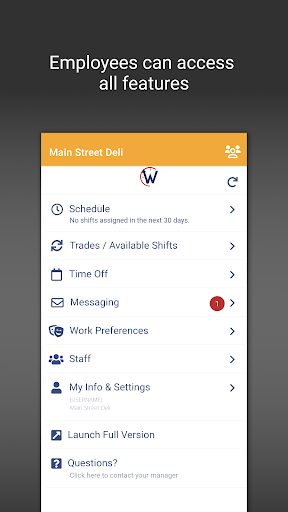
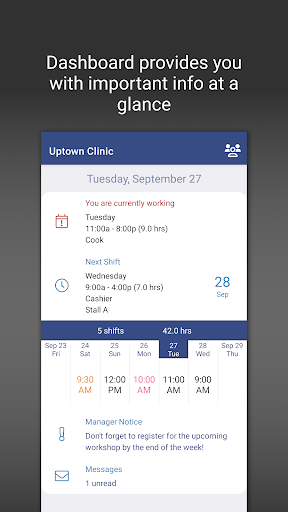
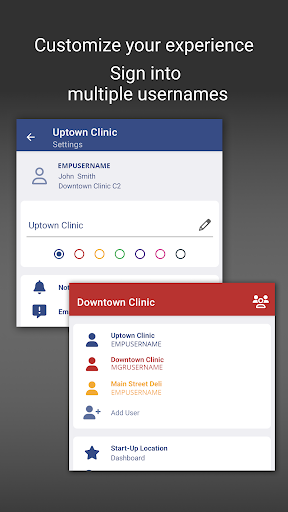
The WhenToWork.com OFFICIAL App provides a seamless experience for users on Android devices, enabling them to view schedules, participate in the Tradeboard, submit Time Off requests, and communicate via messages. Its modern dashboard offers a quick overview of schedules and allows users to effortlessly toggle between multiple usernames, making scheduling management more flexible. For more extensive features, the app offers a quick launch option that redirects users to the full browser version, providing access to the complete set of functionalities. This integration ensures that managing employee shifts is always at your fingertips, anytime and anywhere.
Key Features of WhenToWork Employee Scheduling
User-Friendly Interface and Ease of Use
One of the main advantages of the WhenToWork Employee Scheduling app is its intuitive design. Setting up and adjusting schedules is as straightforward as dragging and dropping shifts, which makes it accessible even to those who aren't highly tech-savvy. This simplicity helps reduce the learning curve and allows managers and staff to get started quickly.
Handling Complex Scheduling Needs
The app excels at managing complex scheduling scenarios. It accommodates diverse workforce sizes and allows employees to input their availability directly into the system. This feature minimizes back-and-forth communication, saving time and reducing errors. Additionally, it adapts to various work environments, providing flexibility whether you have a small team or a large organization.
Real-Time Notifications and Two-Way Communication
Employees receive instant alerts about their shifts, schedule changes, or upcoming work commitments, eliminating confusion about shift timings. The built-in messaging feature supports two-way communication for shift swap requests, time off submissions, and other inquiries. This digital interaction acts as a virtual HR assistant, promoting clear and timely communication between managers and staff.
Why Choose WhenToWork Employee Scheduling?
If you’re searching for an effective way to streamline employee scheduling and improve overall workplace efficiency, this app is a game changer. It not only saves valuable time for managers by automating routine tasks but also enhances employee satisfaction through transparent and instant communication. The app seamlessly integrates with various payroll systems, reducing manual data entry errors and ensuring payroll accuracy. Plus, its analytics capabilities provide insights into work patterns, helping managers make data-driven decisions that optimize staffing levels and productivity.
Final Thoughts
For anyone responsible for managing employee schedules, WhenToWork Employee Scheduling offers an intuitive, efficient, and reliable solution. It makes scheduling easier for both managers and staff, leading to a more harmonious and productive work environment. Whether you're a scheduling novice or a seasoned professional, this app is designed to simplify your workload and boost operational efficiency — making your management tasks less stressful and more effective.
Pros
- User-friendly interface
- Flexible scheduling options
- Automated reminders
- Mobile access available
- Customizable notifications
Cons
- Limited offline functionality
- Requires internet for updates
- Initial setup can be complex
- Limited free features
- Occasional syncing issues











