


Discover the Benefits of Visual Voicemail with MetroPCS
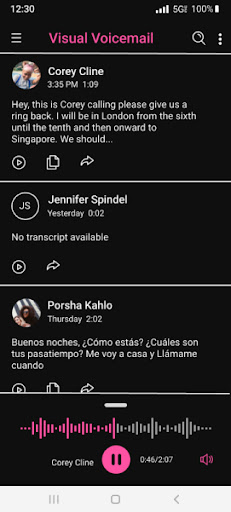
MetroPCS Voicemail has evolved significantly, offering users a smarter way to manage their voicemails through the Visual Voicemail app. This innovative feature transforms the traditional voicemail experience, providing a more convenient, organized, and efficient solution for handling your messages. With Visual Voicemail, you can listen to messages in any order, respond instantly, update contacts, and effortlessly manage your inbox—all without the hassle of dialing into your voicemail. The best part? Visual Voicemail activates automatically for free upon the first launch, requiring no changes to your existing MetroPCS voicemail number or forwarding settings.
Enhanced User Experience and Convenience
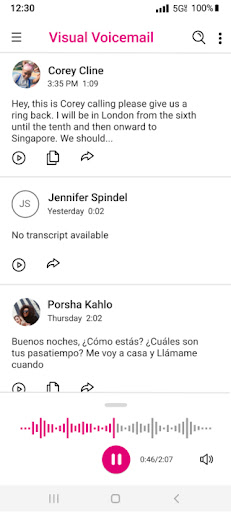
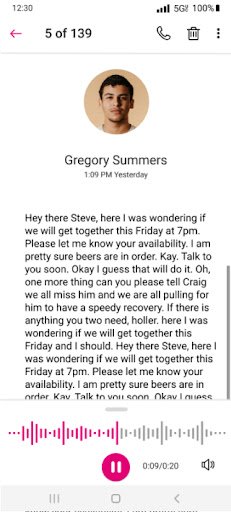
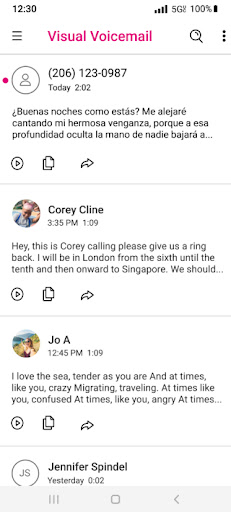
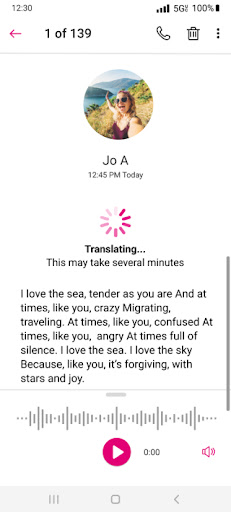
One of the standout advantages of MetroPCS Visual Voicemail is its user-friendly interface that simplifies voicemail management. Instead of navigating through a voicemail menu, the app presents a clear, organized list of your messages, complete with caller identification, timestamps, and transcriptions. This visual approach saves you time and allows you to prioritize messages efficiently. Additionally, users can respond to voicemails with a simple one-click reply or update their contacts directly from the app. The ability to review messages at your own pace, in any order you choose, makes communication more flexible and less intrusive.
Advanced Features for a Seamless Communication Experience
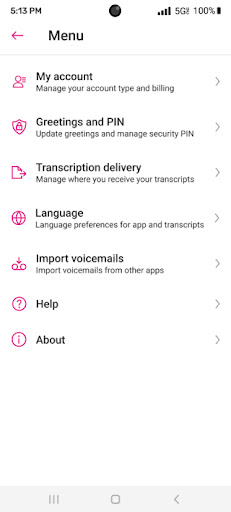
Beyond basic voicemail management, Visual Voicemail offers several advanced features. For instance, you can upgrade to Voicemail to Text for a small monthly fee, which transcribes your voicemails into text and delivers them directly to your inbox or via SMS. This feature is especially useful for multitasking or when you’re unable to listen to messages aloud. The app may also utilize infrequent, free SMS messages to sync with the voicemail server, ensuring your messages are always up-to-date without causing additional charges. Moreover, the included Unread Messages widget allows quick access to new voicemails directly from your Android home screen, making it even easier to stay on top of your communication. On most Android devices, you can add this widget by long pressing any free space on your home screen, selecting 'Add Widgets', and then choosing the Visual Voicemail widget from the list.
Why Choose Visual Voicemail for Your MetroPCS Service?
If you’ve ever missed an important voicemail or found the traditional method of dialing into your mailbox cumbersome, Visual Voicemail is a game-changer. It offers a streamlined, more accessible way to handle messages, making it ideal for busy professionals, multitaskers, or anyone seeking to improve their communication efficiency. The app's intuitive layout and powerful features help you stay organized, respond promptly, and keep your contact information updated with minimal effort. Plus, its compatibility across devices ensures that your voicemails are always within reach, whether you're on your smartphone or tablet.
Final Thoughts
After using Visual Voicemail on MetroPCS for several weeks, it’s clear that this app significantly enhances the voicemail experience. Its convenience, ease of use, and rich set of features turn what used to be a tedious task into a quick, manageable activity. While the transcription accuracy might occasionally vary depending on the caller's voice clarity, overall, the benefit of being able to read voicemails discretely or respond quickly outweighs this minor flaw. If you’re looking to upgrade your messaging system and ditch the old voicemail hassle, installing MetroPCS Visual Voicemail is a smart choice. It's a modern, efficient way to stay connected and in control of your messages, and once you try it, you’ll wonder how you ever managed without it!
Pros
- Easy access to voicemail messages
- No need to dial the voicemail number
- Allows saving and archiving voicemails
- User-friendly visual interface
- Quickly identify important messages
Cons
- Requires an internet connection
- Limited compatibility with older phones
- Occasional bugs and glitches
- Not supported by all carriers
- Privacy concerns regarding message storage










