
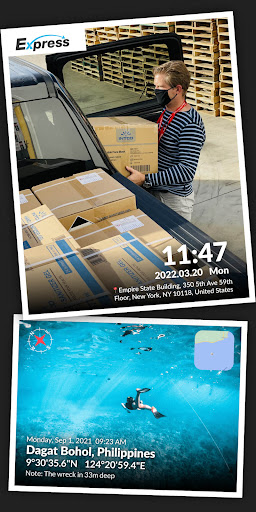
Introduction to the Timestamp Camera, Auto GPS Cam App
Are you passionate about photography and eager to preserve the exact details of your favorite moments? The Timestamp Camera, Auto GPS Cam is a versatile mobile application designed to elevate your photo and video capturing experience. Whether you’re a travel enthusiast, a social media content creator, or simply someone who loves to document life’s memories, this app offers an all-in-one solution for adding precise location, time, and date watermarks seamlessly. With an intuitive interface and numerous customization options, the Timestamp Camera app makes it easy to tag your images with detailed geodata, GPS coordinates, and personalized annotations—all in real-time. Let’s explore the standout features that make this app a must-have for mobile photographers.
Key Features of the Timestamp Camera, Auto GPS Cam
All-in-One Watermarking Capabilities
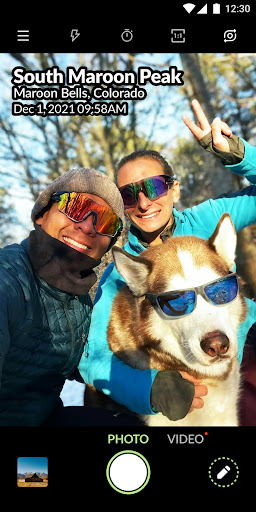
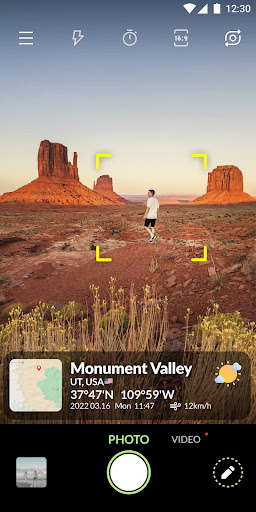
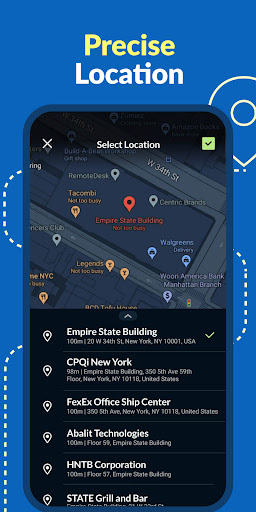
One of the primary attractions of this camera app is its auto timestamp and GPS tagging. When capturing photos or videos, you can automatically embed real-time data such as location, time & date, and even detailed map views. Users have the flexibility to manually select location details—including country, state, city, district, street, or specific buildings. The app supports nearly 100 different timestamp formats, letting you display information exactly as you wish. For example, you can choose formats like Mar 3, 2022 18:41:01, or include precise coordinates such as 37.422°N 122.084°W.
Customizable Real-Time Watermark Elements
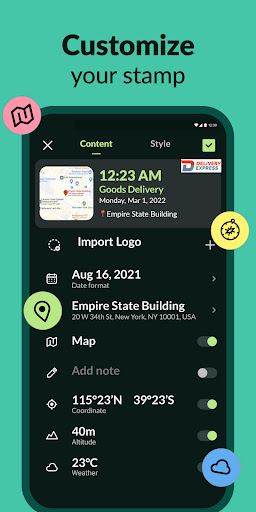
The app empowers you to customize every aspect of your timestamp overlays—adding a unique touch to your photos and videos. Features include:
- Display location: Show real-time address information during shooting
- Show time & date: Add temporal context to your captures
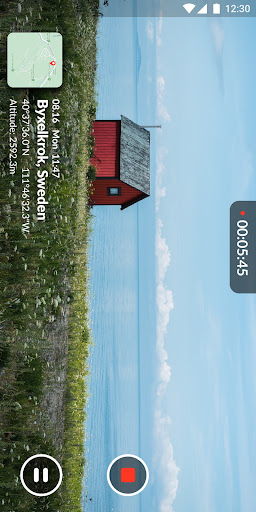
- Present map: Overlay a map to visualize the exact spot
- Show latitude & longitude: Embed precise GPS coordinates
- Add altitude: Indicate surface elevation at your location
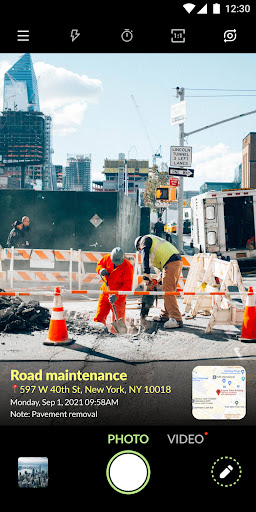
- Insert custom text and emoji: Leave notes like "Meeting point" or fun emojis on your media
DIY Timestamp Styles and Layouts
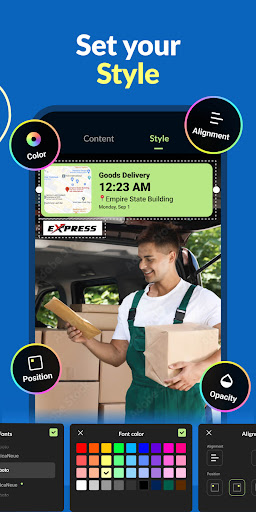
With extensive customization options, you can DIY your timestamp style:
- Set font colors from a rich palette
- Adjust timestamp background opacity from 0% to 100%
- Align content to left, center, or right
- Position timestamps at top left, top right, center, bottom left, or bottom right
Advanced Camera Settings
The app also offers a suite of advanced camera controls, such as:
- Autofocus for sharp images
- Zoom in and out to frame shots perfectly
- Capture photos while recording videos
- Auto-rotate functionality for flexible orientations
- Adjust shooting quality: low, standard, high
- Assistive grid for better composition
- Mirror camera for selfies or creative effects
- Aspect ratio options: 1:1, 4:3, or 16:9
- Remote control timer with countdown display (2s, 5s, 10s)
- Built-in flash for low-light conditions
Versatile Use Cases and Practical Applications
This app is designed for various scenarios:
- After package or food delivery, snap a photo with location and timestamp for verification
- During outdoor exploration, record GPS data to trace your path
- While traveling, capture exciting moments with accurate date stamps
- For foodies, document restaurant locations alongside images
- Real estate professionals can showcase property tours with embedded addresses
Why You Will Love the Timestamp Camera, Auto GPS Cam
Imagine reminiscing about a stunning sunset or a unique café snapshot and recalling exactly where and when you took it. This photo watermarking app offers a seamless way to add location and time details automatically, helping you create a digital diary of your adventures. Its user-friendly interface and intuitive controls make it easy for anyone to navigate, whether you’re a seasoned photographer or a novice.One of the notable benefits is the offline functionality. You don’t need an active internet connection to embed GPS data, so wandering through remote areas won’t hinder your ability to tag your media. The app's responsiveness ensures quick capturing without draining your device’s battery excessively, making it perfect for long days outdoors.This app is ideal for travel bloggers, nature lovers, or anyone who wants their photos to tell a story with context. Automatically attaching date, location, and custom notes to your images enriches your storytelling and makes organizing your photo collection effortless. Sharing photos with embedded geodata can provide friends or clients with more insights about your adventures or property tours.In the ever-growing world of digital photography, the Timestamp Camera — Auto GPS Cam is a valuable addition to your app library. It transforms simple photo-taking into a meaningful and organized activity, helping you remember details that could otherwise be forgotten. Try it today and see how much easier and more fun documenting your world can become.
Pros
- User-friendly interface with easy navigation
- Supports multiple video and photo formats
- Highly customizable timestamp options
- Efficient GPS location tagging
- Real-time date and time updates
Cons
- Some features require in-app purchases
- Consumes significant battery power
- Occasional GPS signal issues
- Limited cloud storage options
- Ads can be intrusive at times











