







Overview of Thunderbird: Free Your Inbox
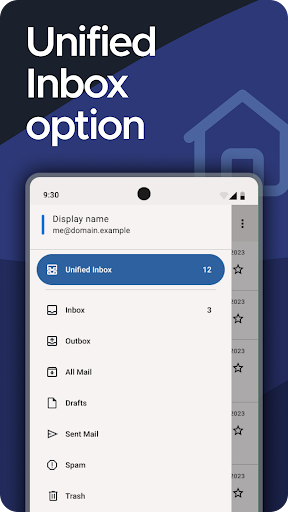
Imagine an email app that not only simplifies managing multiple accounts but also puts your privacy front and center. Thunderbird is exactly that—a powerful, open-source email client designed to empower users with a seamless and secure messaging experience. Built on a foundation of privacy-focused technology, Thunderbird enables you to effortlessly handle various email accounts within a single interface, complete with an optional Unified Inbox for enhanced productivity.
Supported by a dedicated team of developers and a global community of volunteers, Thunderbird is committed to transparency and user privacy. Since it’s funded solely through user contributions, there are no intrusive ads or data mining—your personal information is never treated as a product. This makes Thunderbird a truly ad-free, trustworthy choice for users seeking a secure email environment.
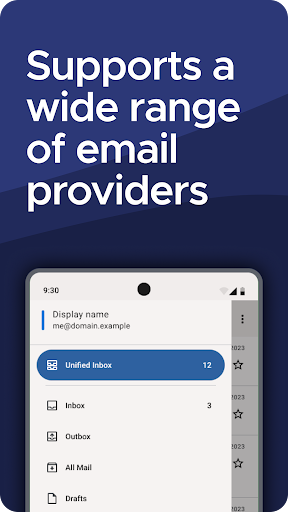
Designed with user convenience in mind, Thunderbird supports a variety of features such as instant synchronization with your mail servers, customizable interface themes, and advanced search capabilities—both local and server-side—to easily find your important messages. Its compatibility with standard email protocols like IMAP and POP3 means it works flawlessly with popular providers like Gmail, Outlook, Yahoo Mail, and iCloud, among others. Whether you prefer instant email updates or on-demand checks, Thunderbird adapts to your workflow.
Security is a cornerstone of Thunderbird. You can enhance your privacy by using OpenPGP email encryption with tools like OpenKeychain, ensuring that your messages stay private. The app’s robust security features, including protection against phishing and malware, make it a reliable choice for both personal and professional communication.
Ultimately, Thunderbird is more than just an email client—it's a community-driven project that embodies open-source principles. Its transparent development process includes regular updates, open discussions, and opportunities for users to contribute, whether through translations, support, or code improvements. With over 20 language options and support from MZLA Technologies Corporation, a Mozilla Foundation subsidiary, Thunderbird continues to lead as a trusted, privacy-respecting email solution for users worldwide.
Why Choose Thunderbird: Features & Benefits
Versatility and Ease of Use
One of the standout qualities of Thunderbird is its versatility. Whether you're managing multiple email accounts for work, personal use, or other purposes, Thunderbird handles each seamlessly. The intuitive interface and Unified Inbox option mean you can see all your messages in one place, reducing the hassle of switching between apps or webmail services. Its straightforward setup process ensures you’re up and running quickly, with minimal fuss.
Customization and Extensions
Thunderbird excels in customization. You can change layouts, apply themes—including dark mode—and add extensions to tailor your email experience. Whether you want to improve productivity, enhance security, or personalize the look, Thunderbird offers plenty of options. Its comprehensive add-on library enables users to modify and extend functionality according to their needs, making it as simple or as advanced as desired.
Robust Security and Privacy Features
Security isn’t an afterthought—it’s built into Thunderbird. The app offers encryption options like PGP/MIME to secure your communications, supporting privacy-conscious users who want to safeguard their sensitive data. Features like phishing protection and automatic spam filtering reinforce its commitment to providing a secure messaging environment, enabling you to browse your inbox with confidence.
Organized and Efficient Inbox Management
Thunderbird makes managing your inbox simple and effective. With advanced filtering rules, tags, and sorting options, you can keep your emails organized effortlessly. Set up automatic filters to sort incoming messages into designated folders, ensuring you never miss critical updates. Plus, the app’s powerful search tools allow you to find emails quickly—whether cached locally or on the server—saving you valuable time.
Community and Open Source Development
Supported by a vibrant community, Thunderbird’s development is transparent and collaborative. Users can participate in translations, support forums, and code contributions, shaping the future of this open-source project. Its ongoing updates and community-driven approach ensure that Thunderbird remains relevant, secure, and feature-rich for years to come.
Final Thoughts
If you're looking for a free, privacy-centric email client that combines powerful features with user-friendly customization, Thunderbird is the ideal choice. Its open-source nature, strong community backing, and dedication to user privacy make it stand out in the crowded landscape of email applications. Whether you're a casual user, a professional, or running a small business, Thunderbird provides the tools to streamline your email management and ensure your communications remain secure. Download Thunderbird today and experience the difference of an email client built with your privacy and productivity in mind—it's time to free your inbox.
Pros
- Open-source and freely available.
- Highly customizable user interface.
- Supports multiple email accounts.
- Includes integrated calendar and task management features.
- Offers strong security and privacy protections.
Cons
- Setup process may be complicated for new users.
- Limited compatibility with third-party plugins.
- Occasional synchronization problems.
- Does not offer advanced collaboration tools.
- Mobile application version is less feature-rich.











