

TeamSpeak 3 – Voice Chat: Overview
TeamSpeak is an advanced voice chat and communication app that enables groups to connect over the internet or private networks across Android, PC, MacOS, iOS, and Linux. It remains a popular choice for online gamers, friends, families, and small businesses worldwide, letting you chat with teammates, discuss strategies in real time, or coordinate online events. You can run TeamSpeak on your own private server for secure conversations or join one of many public servers and channels. The Android version is optimized to enhance your mobile experience and keep you connected on the go. To communicate with others, you must be connected to a TeamSpeak 3 server—direct device-to-device connections aren’t supported. For public servers, download the desktop client and select Connections > Server List. Private server access is managed via credentials provided by the server administrator.
Getting Started & Access
You can view a list of public servers by downloading the TeamSpeak desktop client and choosing Connections > Server List. Private-server access requires credentials from the server administrator. TeamSpeak supports cross-platform collaboration, making it easy to stay in touch with your guild, clan, or colleagues.
Key Features
- Synchronized bookmarks
- Multi-server connectivity
- Push-To-Talk (PTT) and voice activation
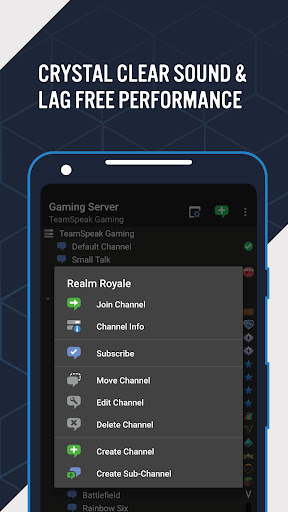
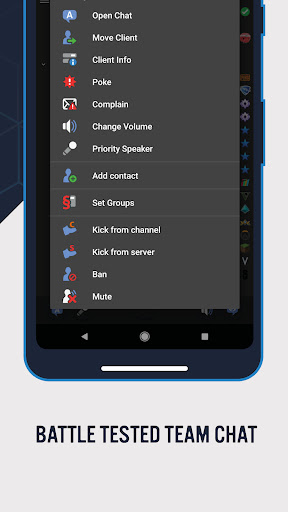
- Supports most common admin functions
- Send and receive text messages
- Identity and contacts management
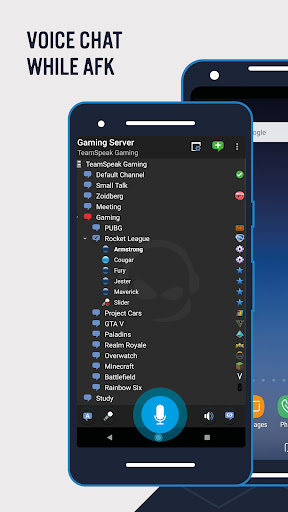
- Detailed channel and player information
- Player status notifications
- Ongoing, free app updates
Support & Updates
Our team of developers is continually working to improve the solution and add new features for an even better experience. If you encounter a bug or crash, provide details about your hardware and environment to help reproduce the issue; rewards may be offered for helpful reports. Rate the app based on its overall features and functionality, not just a single issue.
Summary
Download TeamSpeak today and stay connected with your guild, clan, friends, or colleagues, wherever you are. The combination of reliability, flexibility, and cross‑platform support makes TeamSpeak a trusted choice for real-time voice communication.
TeamSpeak 3 Review: Nostalgia Meets Modern Voice Chat
Hey folks! Today I’m diving into TeamSpeak 3, the app that’s been making waves in the voice chat universe. Whether you’re a hardcore gamer or simply someone who loves a good group chat, this app promises smooth and clear communication. Let’s see if it lives up to the hype.
First Impressions & Features
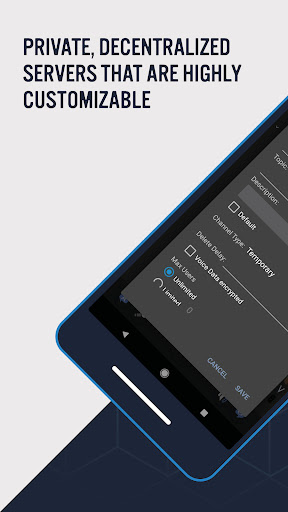
From the moment you launch TeamSpeak 3, there’s a sense of nostalgia. The interface is clean and straightforward, reminiscent of the classic PC version many of us grew up with. Setting up a server is a breeze, and you can start chatting with friends in minutes. The standout thing is the extensive customization options—adjusting audio quality, layout, and other preferences can significantly improve your experience. It’s not just about looks; these tweaks genuinely enhance usability.
Performance & User Experience
In practice, the app runs smoothly with crystal-clear voice transmission and minimal lag, even on imperfect connections. That makes TeamSpeak 3 a fantastic pick for gamers who rely on real-time communication. It also handles large groups well, whether you’re coordinating a raid in your favorite MMORPG or hosting a virtual family reunion. Multiple channels can run concurrently without confusion, helping keep conversations organized.
Security & Privacy
Security is a strong point: TeamSpeak 3 uses robust encryption to keep conversations private. An added privacy benefit is that you don’t need to register with an email to use the service, which is a refreshing contrast to many apps that demand more personal data.
Verdict
In short, TeamSpeak 3 is a solid choice for anyone in need of reliable voice chat. Its customization options, solid performance, and privacy focus help it stand out in a crowded market. Whether you’re gaming, working, or just hanging out with friends, this app has you covered. If you’re seeking a powerful and versatile voice chat solution, give TeamSpeak 3 a try—you’re likely to be impressed by its flexibility and reliability.
In-Depth Blog-Style Feature Description
TeamSpeak 3 is the robust, cross‑platform voice chat app trusted by gamers, teams, and communities around the world. Available on Android, Windows, macOS, iOS, and Linux, TeamSpeak 3 voice chat delivers low-latency, crystal-clear audio that keeps conversations seamless during intense gaming sessions or important online events. The app’s cross‑platform nature means you can coordinate with teammates whether you’re on a PC, a laptop, or a mobile device, making it ideal for remote teams and on-the-go players who need reliable communication without sacrificing performance. With Push-To-Talk (PTT) and voice activation, you can tailor how you communicate, while detailed channel and player information, along with status notifications, helps moderators and participants stay in sync. Public servers offer a quick start for groups new to TeamSpeak, while private servers provide full control over who can join and what permissions they have—useful for gaming clans, study groups, or small businesses alike. The TeamSpeak 3 app emphasizes security and privacy. It uses strong encryption to protect conversations, giving you confidence when discussing strategies, game plans, or sensitive information. Importantly, you don’t need to register with an email to use TeamSpeak, which reduces the amount of personal data you share when you simply want to connect with friends or colleagues. For mobile users, TeamSpeak 3 for Android optimizes the experience for smaller screens and touch interfaces while preserving the core features that make the desktop version powerful. Server management is approachable: setting up your own server offers complete control, while joining public servers is straightforward with just a server list and an appropriate connection. Ongoing updates keep the platform fresh with new features, improved stability, and bug fixes, reinforcing TeamSpeak as a future-proof choice for long-running communities and events. In practice, TeamSpeak 3 excels when coordinating large groups, whether you’re raiding in an MMORPG, running a virtual conference, or hosting a live-streamed Q&A with friends. The ability to maintain multiple channels, assign roles, and monitor user activity helps maintain order in bustling voice chats. For gamers, teams, and casual users alike, the combination of reliable performance, flexible customization, and strong privacy protections makes TeamSpeak 3 a standout option in the competitive landscape of voice chat apps. If you’re in the market for a capable, scalable, and privacy-friendly solution, TeamSpeak 3 delivers a compelling blend of nostalgia and modern functionality that keeps your conversations clear, organized, and secure.
Pros
- High-quality audio clarity.
- Low latency communication.
- Cross-platform support.
- Customizable channels.
- Robust security features.
Cons
- Complex setup for beginners.
- Limited free features.
- Occasional connection drops.
- Outdated interface design.
- In-app purchases required.











