
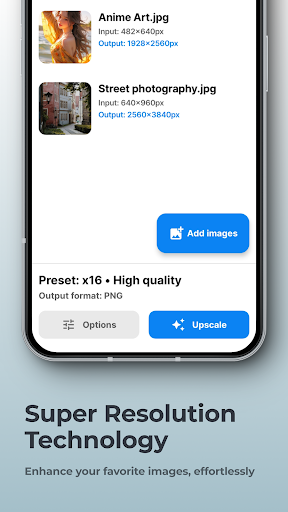

SuperImage Pro - AI Enhancer
Have you ever looked at an old photograph and wished you could magically eliminate the graininess, restore lost details, and make your images pop with vibrant colors? SuperImage Pro - AI Enhancer is a powerful photo editing app designed to do just that. Leveraging cutting-edge artificial intelligence technology, this app transforms blurry, pixelated, and low-resolution images into crisp, clear, and visually appealing pictures, all while ensuring your privacy is protected.
Key Features of SuperImage Pro - AI Enhancer
• Unlimited Image Enhancements – Forget about credits, subscriptions, or limitations. With SuperImage Pro, you can enhance and upscale your images as much as you want. Whether it’s a favorite photograph or a batch of images, the sky truly is the limit!
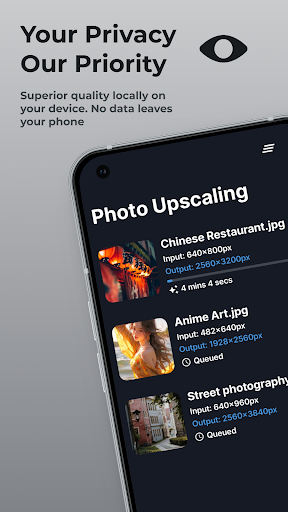
• On-Device Processing – Want to keep your photos private? SuperImage Pro processes images locally on your smartphone, utilizing modern hardware and advanced AI algorithms. No internet connection required, so your images stay secure and private.
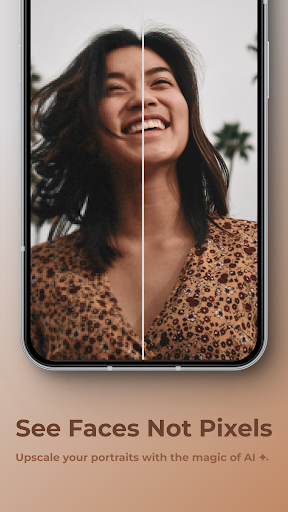
• Enhance Portraits – Improve your portraits by sharpening facial features, adding clarity, and enhancing background details. This feature is perfect for revitalizing low-resolution photos of friends and loved ones, making everyone look their best.
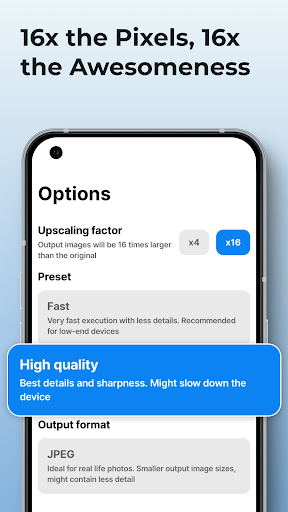
• Upscale Images – Whether you’re working with wallpapers, anime characters, or personal photos, SuperImage Pro can upscale images up to 16 times their original resolution. Say goodbye to blurry pictures!
• Custom Model Loading – For advanced users, importing custom AI models in PyTorch, ONNX, and MNN formats is straightforward. Tailor the AI enhancement to your specific needs with just a few clicks.
• Privacy and Security – Your photos are processed locally on your device, never uploaded to the cloud, ensuring maximum privacy and security during every image enhancement.
Performance and Ease of Use
One of the most impressive aspects of SuperImage Pro is its speed. It handles high-resolution images efficiently, delivering results in a snap — perfect if you're enhancing multiple images or working within tight timelines. The intuitive user interface makes navigation simple and accessible to everyone, from seasoned photographers to casual users. There's no clutter or complicated settings; just tap, and watch your images transform.
Moreover, the app is ad-free, providing a smooth and distraction-free editing experience. Whether you're looking to restore vintage photos, perfect your digital portfolio, or simply brighten up everyday pictures, SuperImage Pro offers a seamless experience for all your photo enhancement needs.
Personal Insights and Final Thoughts
After exploring SuperImage Pro - AI Enhancer, I can confidently say it's a must-have tool for anyone passionate about photography, digital archiving, or just enhancing personal memories. Its AI-driven enhancements breathe new life into old and low-quality images, making them look vibrant and sharp. The ability to process images locally ensures your privacy remains intact, a crucial feature in today’s cloud-driven world.
While the free version offers excellent capabilities, unlocking the full potential with paid features is a worthwhile investment if photo editing is a regular activity. Whether you're restoring vintage photographs, improving smartphone snapshots, or preparing images for professional use, this app packs a punch.
In summary, SuperImage Pro - AI Enhancer is like having a personal photo studio in your pocket. Its combination of powerful AI technology, user-friendly design, and privacy safeguards makes it a stand-out choice for image enhancement. Give it a try and see how your photos can be transformed into stunning works of art!
Pros
- Enhances image quality significantly.
- User-friendly interface and easy navigation.
- Fast processing powered by AI technology.
- Supports a wide variety of image formats.
- Regular updates introducing new features.
Cons
- Premium features require a subscription.
- Occasional glitches when handling large files.
- Free version offers limited functionalities.
- Requires a stable internet connection.
- Consumes significant device storage.











