
Sound Amplifier: Enhance Your Listening Experience with Ease
Ever found yourself in a noisy environment where you just can't catch the conversation? That’s where Sound Amplifier comes to the rescue, transforming the way you perceive sound on your Android device. Designed to assist individuals who are hard of hearing or anyone wanting to improve their auditory experience, this powerful app makes subtle sounds crystal clear, whether you're in a bustling cafe, a lecture hall, or watching TV at home.
What is Sound Amplifier?
Sound Amplifier is an innovative application that utilizes your smartphone and a pair of headphones to amplify, filter, and customize surrounding sounds. By leveraging the device’s microphone, the app enhances speech clarity, reduces background noise, and allows you to control different sound frequencies. Whether you're trying to better follow a conversation, enjoy media content, or simply tune out distracting noise, Sound Amplifier acts as your personal audio assistant.
Key Features and Benefits
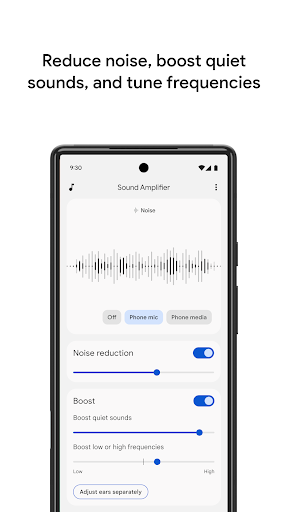
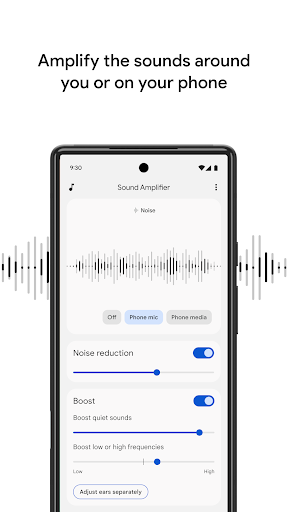
Advanced Noise Reduction
One of the standout features of Sound Amplifier is its capability to reduce unwanted noise, enabling users to recognize speech more effortlessly in challenging environments. This is especially beneficial for hearing-impaired individuals who seek greater independence in daily interactions.
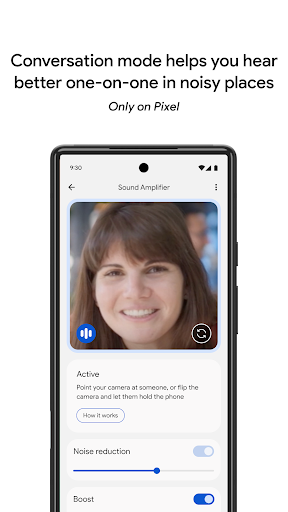
Focus on Conversations with Conversation Mode
Available for Pixel 3 and newer models, conversation mode allows users to concentrate on a specific speaker's voice, even amid chaos. Simply activate this mode, and the app will help you better discern individual voices, making social interactions more manageable without external assistance.
Customizable Listening Experience
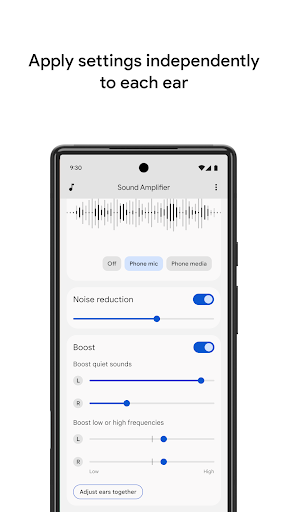
Personalization is at the heart of Sound Amplifier. Users can tweak settings to boost low/high frequencies, quiet sounds, or reduce noise according to their preference. The app offers options to set these preferences separately for each ear, providing a tailored auditory experience.
Easy Activation and Control
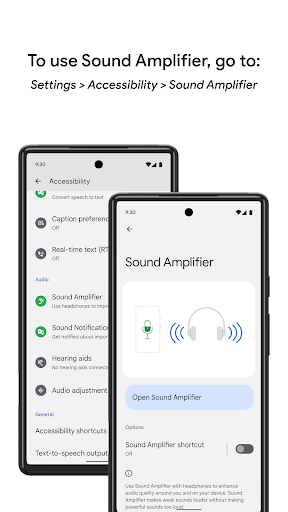
Switching Sound Amplifier on and off is straightforward—use the accessibility button, gestures, or Quick Settings. This simplicity ensures that the user can quickly enable or disable the amplification feature when needed, without hassle.
System Requirements and Compatibility
Sound Amplifier works seamlessly on Android 8.1 and above. To maximize its benefits, pair your device with compatible headphones, ideally Bluetooth ones for better mobility and convenience. Keep in mind that conversation mode is currently supported on Pixel 3 and newer models.
Permissions and Accessibility
The app requires access to the microphone to process and amplify sounds. It also functions as an accessibility service, observing user actions and retrieving window content to enhance usability. Importantly, no data is collected or stored during this process.
Real-World Applications and Usage Scenarios
Whether you're a person with hearing impairments or someone who simply wants to improve their auditory environment, Sound Amplifier opens up new possibilities. Imagine attending a crowded concert and being able to focus solely on the music or having a clear conversation during a busy family gathering. It's also perfect for media enthusiasts who want to enjoy movies or TV shows without increasing the volume excessively, thereby protecting their hearing.
Conclusion: Why Choose Sound Amplifier?
In our sound-rich world, controlling auditory input can be transformative. Sound Amplifier offers an intuitive, customizable, and effective solution to amplify and clarify sounds around you. Whether you're navigating daily interactions, enjoying media, or supporting hearing difficulties, this app proves to be an indispensable companion. With its user-friendly interface, robust features, and seamless integration with your Android device, Sound Amplifier truly elevates your listening experience.
Pros
- Enhances audio clarity effectively
- User-friendly interface
- Customizable sound settings
- Works with most headphones
- Improves sound for hearing impaired
Cons
- Requires Android 6.0 or newer
- Limited to Android devices
- May drain battery faster
- Can occasionally lag
- Not effective in very noisy environments











