
PDF Pro - View PDF: Overview
If you're on the hunt for a reliable and user-friendly PDF reader, your quest concludes with "PDF Pro - View PDF". This all-around application is designed to meet your PDF-handling requirements, enabling you to smoothly view, manage, and share every PDF file you have, regardless of your location.
The interface of "PDF Pro - View PDF" is sleek and user-friendly. Here are the main features that make "PDF Pro - View PDF" stand out:
Key Features
Instant PDF Access: With just one click, you can start reading your PDF files, eliminating any waiting time.
Complete File Accessibility: The app gives you access to all the PDF files stored on your device. No more searching through multiple directories; everything is neatly organized in one place.
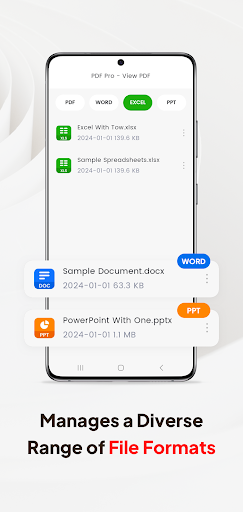
Multiple Document Compatibility: In addition to PDFs, it also supports various other document types such as Doc, PPT, and Excel. This means you can handle different file formats within a single application.
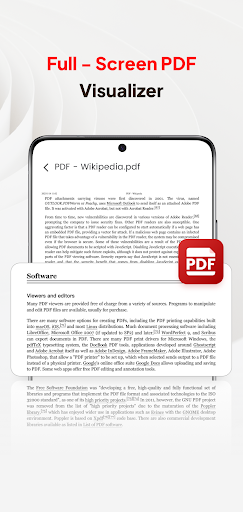
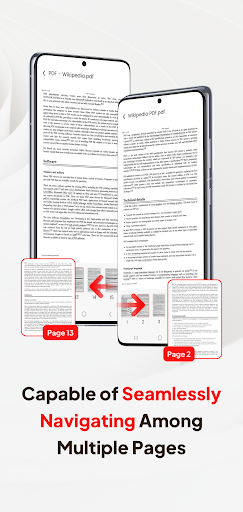
Smooth Page Navigation: For an enhanced reading experience, the app offers quick page navigation, allowing you to flip through pages rapidly.
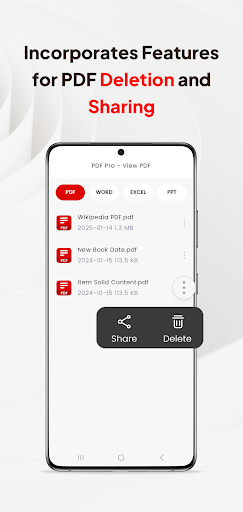
However, the advantages don't end here. "PDF Pro - View PDF" also facilitates seamless sharing of your PDF files with other people. Whether it's for work or personal use, sharing has never been easier.
So, why wait? Download "PDF Pro - View PDF" now and experience the convenience of having all your PDF files easily accessible, wherever you are.
All file management privileges The app comes equipped with a wide range of file management tools. You can scan new documents, organize your PDF collection, share files directly with others, or delete the ones you no longer need, all within the app. Moreover, opening and viewing PDF files is a seamless process, ensuring that you can handle your PDF tasks efficiently.
PDF Pro-View PDF: User Experience and Capabilities
First Impressions and User Interface
Right off the bat, PDF Pro-View PDF greets you with a clean and intuitive interface. The design is minimalistic, which I really appreciate because, let's be honest, no one wants to spend ages trying to figure out where everything is. Every button and feature is neatly laid out, making it super easy for even the least tech-savvy among us to navigate.
Features That Stand Out
The app is packed with all the necessary features you’d expect from a top-tier PDF viewer. You can read, annotate, and even sign documents directly from your phone. The annotation tools are surprisingly robust, offering a variety of options like highlighting, underlining, and adding comments. I found this particularly useful for those long reports where I need to mark up important sections.
Another feature that caught my attention is the app’s ability to convert PDFs into other formats. Whether you need a Word document or an Excel sheet, PDF Pro-View PDF has got you covered. The conversion process is quick and seamless, saving you the headache of using third-party software.
Performance and Usability
Performance-wise, the app runs smoothly without any noticeable lag. Even when opening large files, the load time is impressively short. This is a godsend for anyone who, like me, despises waiting around for things to load. The app also supports cloud storage integration, so you can easily access your documents from services like Google Drive and Dropbox.
Security and Privacy
In today’s digital age, security is a top priority, and PDF Pro-View PDF doesn’t disappoint. The app offers password protection for sensitive files, ensuring your documents remain private. I also appreciate the fact that it doesn’t bombard you with ads or unnecessary permissions, which is a huge plus in my book.
Overall, I found PDF Pro-View PDF to be an excellent tool for managing documents on the go. It’s reliable, easy to use, and packed with features that cater to both casual users and professionals alike. If you’re in the market for a solid PDF viewer, this app is definitely worth checking out.
PDF Pro-View PDF: A Feature-Rocused Blog-Style Description
For anyone who works with documents on a daily basis, PDF Pro-View PDF is a standout choice as a versatile PDF reader and PDF viewer. This mobile-friendly app brings together essential tools for reading, annotating, signing, and converting PDFs, all in one intuitive interface. It’s particularly handy for professionals who need fast access to PDFs, robust markup options, and reliable file management on the go. You’ll appreciate how quickly you can open a document with one tap, and how the app keeps all your files neatly organized in one place—without the clutter of multiple apps.
The built-in annotation toolkit is impressively capable, offering highlighting, underlining, and comments, which makes reviewing long reports or research papers efficient and streamlined. You can also sign documents directly from your device, which is a valuable feature for contracts and agreements when you’re away from a desktop. Beyond annotation, PDF Pro-View PDF includes a handy conversion function that can export PDFs to Word or Excel formats, saving time and avoiding the need for extra software.
Performance is another strong point. The app handles large PDFs with ease and minimizes wait times, ensuring a smooth reading and editing experience. Cloud storage integration with services like Google Drive and Dropbox means your documents are accessible across devices, whether you’re at the office, at home, or on the road. Security-conscious users will appreciate password protection for sensitive files and a focused, ad-free experience that respects privacy and avoids unnecessary permissions.
In short, PDF Pro-View PDF serves as an all-in-one solution for document management on the go. It blends a clean, minimal design with powerful features—reading, annotating, converting, signing, organizing, sharing, and securing PDFs—making it a practical choice for students, freelancers, and professionals who need reliable access to their documents anytime, anywhere. If you’re seeking a solid PDF reader that doubles as a capable PDF editor and converter, this app is worth exploring as your primary PDF tool.
Pros
- User-friendly interface
- Supports multiple file formats
- Advanced editing features
- Fast document loading
- Secure file encryption
Cons
- Limited free version features
- Occasional app crashes
- Ads in free version
- Requires internet for full features
- No night mode available











