
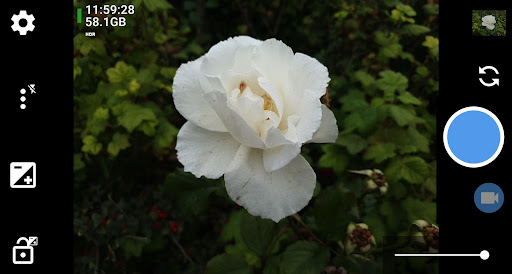
Open Camera: A Free and Open-Source Camera App for Everyone
Are you looking for a versatile camera app that provides extensive control over your smartphone photography? Open Camera is a comprehensive, free, and open-source camera application designed to transform your mobile camera experience. Whether you're a beginner or a seasoned photographer, this app packs a wide range of features that rival those found in professional DSLR cameras.
One of the standout qualities of Open Camera is its commitment to offering powerful functionality without any cost or intrusive third-party advertisements. This makes it an appealing choice for users who want a high-performance camera app without the hassle of in-app purchases or ads. Plus, being open-source, the app benefits from continuous improvements driven by a community of developers, ensuring you get regular updates and new features.
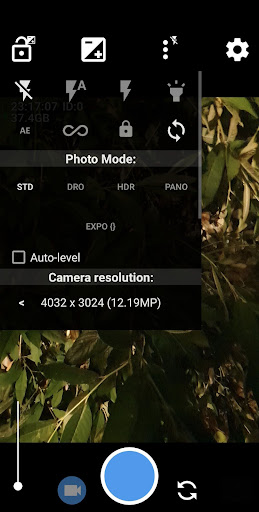
From basic photo capturing to advanced settings like manual controls, HDR, and exposure bracketing, Open Camera is like a Swiss Army knife in your photography toolkit. It supports a variety of functions that are indispensable for creative photography, such as overlay grids, crop guides, and GPS geotagging. The app also offers unique features like an auto-level to keep your photos perfectly aligned and an upside-down preview mode for use with attachable lenses.
For even more control, users can adjust ISO, white balance, exposure compensation, and use focus modes with the support of Camera2 API. The app also includes options to take photos remotely with noise detection sounds or by configuring volume keys, adding convenience whether you're alone or shooting group shots.
If you're interested in videography, Open Camera does not disappoint. It supports recording in HD videos and offers features like slow-motion recording, log profiles, and the ability to connect external microphones. For photographers seeking high dynamic range images, HDR mode with auto-alignment and ghost removal is available, along with exposure bracketing to capture scenes with complex lighting.
Additional features such as overlay grids, crop guides, histogram, zebra stripes, focus peaking, and focus bracketing empower users to fine-tune every shot. The ability to add metadata like date, time, location, and custom text directly onto images or store them as subtitles in videos further enhances your photographic documentation.
Users who care about privacy can opt to remove exif metadata from their photos, ensuring that their image data remains private. For specialized photography needs, panorama mode (including front camera) and support for other advanced camera features make Open Camera suitable for a wide range of creative projects.
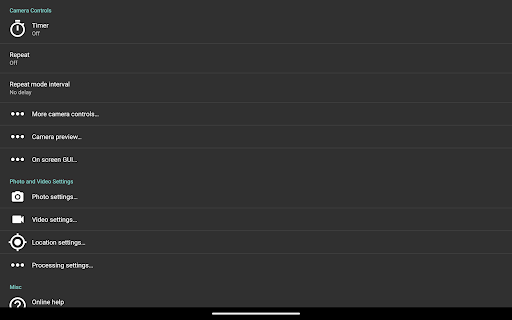
Despite its extensive capabilities, Open Camera maintains a user-friendly approach, with a simple interface that hides complex settings behind intuitive icons. The app allows customization of controls, including configurable volume keys and user interface adjustments, making it accessible for all users. The built-in remote controls, such as timer with voice countdown and auto-repeat mode, offer additional convenience for capturing perfect moments effortlessly.
In summary, Open Camera is an outstanding choice for anyone serious about mobile photography. It combines professional-grade features with ease of use and a commitment to privacy and open development. Whether you're capturing everyday moments or shooting for professional projects, this app has everything you need to elevate your photography game.
Visit the official website for more information and access to the source code. Remember, as with any camera app, it’s advisable to test its features on your device to ensure compatibility with your hardware. Download Open Camera today and unlock a new level of creativity in your mobile photography adventures!
Pros
- Free and open-source application
- Customizable user interface
- Supports external microphones
- Remote control capabilities
- Regular updates and support
Cons
- Steep learning curve for beginners due to complex settings
- Limited editing functionalities
- Occasional bugs following updates
- Lack of integrated tutorials
- Requires Android version 5.0 or higher











