







Introduction to the Meeting - Video Meeting App
Welcome to Meeting - Video Meeting, an innovative online video conferencing platform designed to streamline your virtual interactions. Whether you're hosting a business meeting, participating in a virtual event, or catching up with friends, this cloud video meeting app makes connecting effortless. With high-quality real-time video and screen sharing, it ensures seamless communication across devices and locations. As a leader in modern enterprise communications, Meeting - Video Meeting offers a reliable cloud platform for video and audio conferencing, chat, and webinars that empower teams and individuals alike to stay connected anytime, anywhere.
Features of Video Conference
The app boasts a suite of user-friendly features tailored for effective virtual collaboration:
• Join Meeting without login
• Join meetings easily using the meeting ID
• All features available for cloud meetings
• Easy-to-use virtual video conferencing
• Chat with other users during the meeting
How to Use the Meeting - Video Meeting App
Setting up and participating in virtual meetings is straightforward:
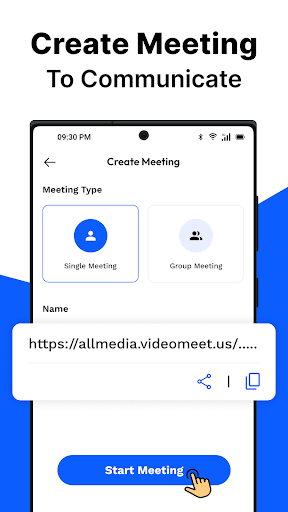
1. Create a Meeting
- Choose the meeting type (One-on-One or Group).
- Personalize your session by entering a meeting name.
- Share the meeting code with participants.
2. Join a Meeting
- Simply enter the meeting ID provided by the host.
- No login required for joining a meeting.
3. During the Meeting
- Flip the camera to switch perspectives.
- Chat with participants for interactive discussions.
- Share your screen to present or collaborate in real-time.
- Monitor and manage participants effortlessly.
4. End or Exit the Meeting
- Choose whether to leave or end the session for all participants.
Key Advantages of Meeting - Video Meeting
If you’ve ever struggled to find a dependable platform for virtual gatherings, Meeting - Video Meeting is your ideal solution. This app creates a virtual space that’s as comfortable as your favorite coffee shop but packed with powerful features. The platform emphasizes ease of use and reliable connectivity, making it accessible to users of all technical levels.
Intuitive Interface and Setup
One of the standout aspects of Meeting - Video Meeting is its clean, intuitive interface. Downloading and setting up the app is so simple that even less tech-savvy users can start hosting or attending meetings with minimal effort. It doesn’t overwhelm you with unnecessary options but provides just enough tools—such as video sharing, chat, and screen sharing—to enhance productivity and engagement. Think of it as a compact, yet powerful, Swiss Army knife for virtual meetings that fits seamlessly into your busy schedule.
Outstanding Video and Audio Quality
At the heart of any great video conferencing platform is reliable video and audio quality. Meeting - Video Meeting ensures you experience minimal disruptions, even under less-than-ideal internet conditions. The app intelligently adapts video quality based on your connection to maintain smooth communication, much like having a resilient, adaptable friend who stays connected regardless of network fluctuations. This smart optimization minimizes frustrating freezes and sync issues, providing a natural, real-time interaction that feels like in-person conversation.
Key Features That Enhance Your Virtual Meetings
A few of the most popular features include:
- Screen sharing: Present slides, documents, or demonstrate a process effortlessly with a single click.
- Multi-device support: Use the app seamlessly across smartphones, tablets, or computers, switching devices without losing your flow.
- In-meeting chat: Communicate via chat without interrupting the speaker, perfect for clarifying points or sharing quick notes.
Summing Up: Why Choose Meeting - Video Meeting
In conclusion, Meeting - Video Meeting offers a dependable and feature-rich platform suitable for a wide range of virtual interactions. Its straightforward setup, adaptive technology, and comprehensive functionalities make it an excellent choice for professionals, educators, and casual users alike. Whether you’re managing remote teams, hosting webinars, or simply staying in touch with loved ones, this app provides the tools needed for successful video conferencing. Experience the convenience and reliability that have made it a preferred solution for virtual collaboration. Try Meeting - Video Meeting today and elevate your virtual communication to the next level!
Pros
- Easy to set up and join meetings.
- High-quality video and audio.
- Cross-platform compatibility.
- Screen sharing feature available.
- Supports large groups.
Cons
- Can consume a lot of data.
- Occasional connection drop-offs.
- Limited features in free version.
- Requires stable internet connection.
- Some users report lag on older devices.











